Grafana OnCall OSS is over. The project entered maintenance mode on March 11, 2025, the grafana/oncall repository was archived on March 24, 2026, and on that same day Grafana switched off the Cloud Connection that delivered SMS, phone call and mobile push notifications to self-hosted instances. If your on-call engineer was woken up by a push notification from a self-hosted OnCall, that has not happened since March.
The official path is Grafana Cloud IRM, the managed product that merged OnCall and Incident in April 2025. It is the right answer for some teams and the wrong one for others, and this guide is for the second group. I cover exactly what stopped, what Grafana Cloud IRM costs, five Grafana OnCall alternatives (Hyperping, PagerDuty, incident.io, Rootly and GoAlert for the open-source slot) and a migration table that maps escalation chains, schedules and integrations onto each tool.
If you want the broader on-call category rather than a Grafana OnCall exit plan, our top 10 on-call scheduling tools guide covers it. This article does not repeat that list.
Key takeaways
- Self-hosted Grafana OnCall still runs, but since March 24, 2026 it gets no fixes and cannot send SMS, phone calls or mobile push through Grafana's relay. Slack, Telegram, email and webhooks keep working.
- Grafana Cloud IRM costs a $19/mo platform fee (3 active IRM users included) plus $20 per additional active IRM user, and the free tier stops at 3 active users.
- Grafana's migrator now accepts an OnCall OSS source, but it does not create users or teams, and it only targets Grafana Cloud IRM.
- For a 10-person team, Hyperping Pro costs $74/mo billed yearly with monitoring and a status page included, against $159/mo for Grafana Cloud IRM Pro and $200 to $250/mo for Rootly, PagerDuty or incident.io, none of which include uptime checks.
- GoAlert is the open-source replacement that keeps schedules, escalations and Twilio paging on your own servers, at the cost of a project whose last release was October 2024.
Why you can trust this guide
I'm Léo, founder of Hyperping, so one of the five alternatives below is mine. I do not think Hyperping is the right pick for every OnCall user, and I say where it is not: if your alerts must keep coming from Prometheus Alertmanager, Hyperping is the wrong destination, and I name the tools that accept those webhooks instead.
Every date in this article comes from Grafana's own maintenance mode announcement, the OSS setup notice and the archived repository. Prices were read on each vendor's pricing page on September 16, 2026. Where Grafana's documentation contradicts itself on migration tooling, I quote both pages rather than pick one.
What exactly stopped in Grafana OnCall OSS
Three separate things happened, and teams tend to conflate them.
| Date | What changed | Effect on a self-hosted instance |
|---|---|---|
| March 11, 2025 | OnCall OSS enters maintenance mode | Only critical bugs and CVEs with a CVSS score of 7.0 or higher get fixed. No new features. |
| April 21, 2025 | OnCall (Cloud) and Incident apps sunset in Grafana Cloud | Cloud customers moved to the unified Grafana Cloud IRM app. |
| March 24, 2026 | Repository archived, Cloud Connection disabled | Read-only code. Mobile app push, SMS and phone calls through Grafana's relay stop. |
What still works after March 24, 2026 on a self-hosted instance: Slack and Microsoft Teams ChatOps, Telegram, email, outgoing webhooks, and SMS or voice if you had wired your own Twilio, Exotel or Zvonok account instead of the Cloud Connection. Grafana's announcement also suggests push through Pushover, Gotify or ntfy via webhooks.
What no longer works: the mobile app connected to a self-hosted stack, and every notification that went through Grafana's servers. Security patches for the container images stop too, which is the part that gets an internal audit's attention.
So a team that never used the Cloud Connection and pages through Slack can keep running the archived version for a while. A team that relied on the mobile app for 3 a.m. pages has already lost its wake-up channel, and that is the group that needs to move now.
Grafana Cloud IRM: the default option and what it costs
Grafana Cloud IRM is what Grafana wants you to move to. It is OnCall and Incident merged into one app inside Grafana Cloud, with the same escalation chains, schedules, routes and ChatOps, plus incident management and the mobile app that no longer talks to OSS.
Pricing
As listed on grafana.com in September 2026:
- Free: limited to 3 active IRM users per month, community support.
- Pro: $19/mo platform fee that includes 3 active IRM users, then $20 per additional active IRM user, with automatic volume discounts and 8x5 email support.
- Enterprise: minimum commitment of $25,000 per year, premium support, BYOC and federal cloud options.
An active IRM user is anyone who appears in an on-call schedule or escalation chain during the month, or who acknowledges a page, changes an alert or creates or edits an incident. Read that definition carefully: every engineer in a rotation counts, whether or not they were paged.
| Team in rotation | Grafana Cloud IRM Pro, monthly |
|---|---|
| 3 people | $19 (platform fee only) |
| 5 people | $59 |
| 10 people | $159 |
| 25 people | $459 |
What I like
- The shortest migration. Same concepts, same Terraform provider, same Slack and Teams apps. If your alerts originate in Grafana alerting, the dashboard link and metric values still carry through into the page.
- A migrator exists for the OSS source. Grafana's irm-tooling repository accepts
MIGRATING_FROM="oncall_oss"and copies escalation chains, schedules and shifts, integrations, routes and outgoing webhooks. It runs in a plan mode first. - The mobile app comes back. Push, SMS and phone notifications are part of the managed product.
Considerations
- Grafana's documentation disagrees with itself. The dedicated OSS migration page states that "the IRM migration tools don't currently support Grafana OnCall OSS as a source platform" and points to Terraform or the OnCall API, while the migration overview and the tooling README list OnCall OSS as supported. In practice the migrator does not create users or teams, matches people by email, and cannot create direct-paging integrations. Plan for a manual pass either way.
- You lose self-hosting. Schedules, alert payloads and incident timelines move to Grafana's cloud. For teams that picked OnCall OSS because of data residency, that is the whole point of leaving.
- The per-user meter is broad. Ten engineers in a rotation is $159/mo before you pay for Grafana Cloud metrics, logs or traces.
- Still no external checks and no public status page. Like OnCall, IRM routes alerts. Detection stays in Prometheus or synthetic monitoring, and customer-facing status pages stay a separate subscription.
Choose Grafana Cloud IRM if you already pay for Grafana Cloud, your alerts are Grafana alerting rules, and you have no self-hosting requirement. Skip it if you left OnCall OSS for something other than the maintenance notice, or if you want to stop paying per engineer in the rotation.
Top 5 Grafana OnCall alternatives
I picked five tools that each replace a different thing OnCall was doing for you: Hyperping for teams that want detection and on-call in one bill, PagerDuty for enterprise alert routing, incident.io and Rootly for Slack-native incident response, and GoAlert for the open-source, self-hosted slot that OnCall OSS used to fill.
| Tool | Accepts Alertmanager or Grafana webhooks | Built-in uptime checks | Status page | Self-hosted | Price for 10 people, monthly |
|---|---|---|---|---|---|
| Grafana Cloud IRM | Yes (native) | No | No | No | $159 |
| Hyperping | No (Hyperping is the alert source) | Yes | Yes | No | $74 (Pro, yearly) |
| PagerDuty | Yes | No | Add-on (Statuspage) | No | $210 (Professional, yearly) |
| incident.io | Yes | No | Yes (limited on Team) | No | $250 (Team + on-call) |
| Rootly | Yes | No | Yes | No | $200 (On-Call Essentials) |
| GoAlert | Yes | No | No | Yes | $0 plus a server and Twilio |
1. Hyperping: on-call, monitoring and status pages on one flat plan
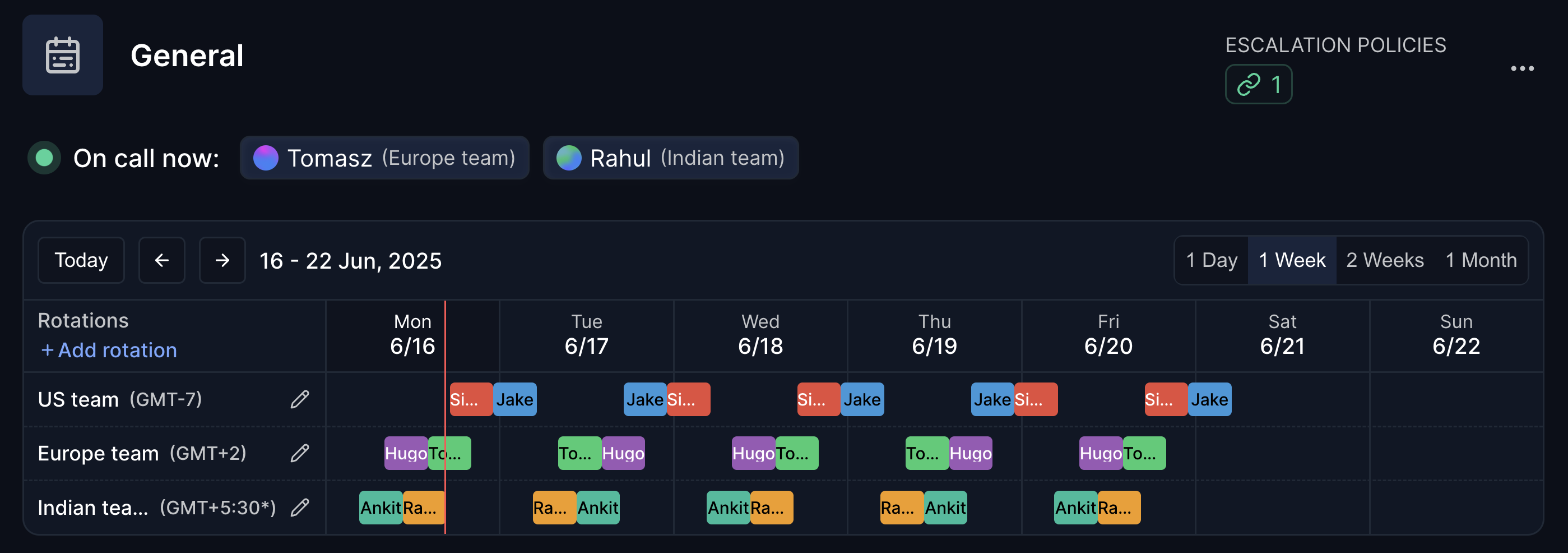
Perfect for: teams of 2 to 50 whose OnCall integrations were mostly uptime, SSL and cron alerts, and who want the check, the page and the status page in one tool.
Most OnCall OSS deployments I have seen route two kinds of alerts: Prometheus rules about internal metrics, and blackbox-style checks about whether the site is up. Hyperping replaces the second kind at the source. HTTP, cron heartbeat, DNS, port and Playwright browser checks run from 18 regions, and when one fails, the escalation policy pages the on-call engineer directly. There is no webhook between the check and the page.
Notable features
- On-call schedules with one rotation per team or timezone, handoff time, concurrent shifts, time restrictions and overrides
- Escalation policies with ordered steps and delays across Slack, Teams, email, SMS and phone call, where a step can target "whoever is on call" in a schedule
- Grouped alerts so a shared outage sends one page instead of one per monitor
- Status pages on your own domain with subscribers, and password-protected or SSO pages on Pro and Business
- Terraform provider, REST API and a Prometheus exporter so uptime and response times still land in your Grafana dashboards
- Outgoing integrations to PagerDuty and Opsgenie if part of the team stays on another pager during the transition
Pricing
Prices from Hyperping's pricing page, yearly billing with the monthly price in brackets:
- Free: 20 monitors, 5-minute checks, 1 status page, no on-call
- Essentials: $24/mo ($29 monthly), 3 seats included then $7 per seat, 1 on-call schedule, 20 SMS a month
- Pro: $74/mo ($89 monthly), 10 seats included then $9 per seat, 3 schedules, 75 SMS, browser checks
- Business: $249/mo ($299 monthly), 20 seats included then $12 per seat, 200 SMS, white label and SAML add-ons
A 10-person team fits in Pro's 10 included seats and pays $74/mo, with monitoring and the status page included.
Considerations
- No inbound alert integration. Hyperping does not receive Alertmanager or Grafana alerting webhooks. If your Prometheus rules must keep paging people, Hyperping covers the external checks and you keep a webhook-capable pager for the internal ones, or you pick a tool below.
- Notification-level Slack, not a Slack-native incident lifecycle. Acknowledge and escalate work from Slack, but there is no incident channel automation or post-mortem generator.
- Smaller integration catalog than PagerDuty: Slack, Teams, Discord, Google Chat, Telegram, email, SMS, phone, webhooks, PagerDuty, Opsgenie, Twilio and Intercom.
- No dedicated mobile app. Pages arrive by SMS, phone call, Slack or Teams on your phone.
Choose Hyperping if you want to stop running three tools (checks, pager, status page) and your paging volume comes from things being down rather than from metric thresholds. Try it free with 20 monitors.
2. PagerDuty: enterprise routing with the deepest integration catalog
Perfect for: organizations above 50 engineers that need a vendor SLA, AIOps and 750+ integrations, and can pay per user.
PagerDuty is what most OnCall OSS deployments were avoiding on cost. It is also the tool with the most complete answer to "will it integrate with X": Alertmanager, Grafana alerting, Datadog, CloudWatch and 750 others send events in, and event orchestration deduplicates and routes them before anyone is paged.
Notable features
- Schedules, escalation policies, overrides and round-robin routing
- Event orchestration and AIOps for deduplication and noise reduction (PD Reliability Platform tiers)
- Runbook automation and incident workflows
- Mobile app with push, SMS and phone that a self-hosted OnCall user will find familiar
- Terraform provider
Pricing
From PagerDuty's pricing page:
- Free: up to 5 users, 1 schedule, 1 escalation policy, 100 SMS and phone notifications a month
- Professional: $21/user/mo yearly ($25 monthly)
- PD Reliability Platform, billed upfront per year: Starter $2,800 (10 seats), Essential $12,000 (20 seats), Plus $48,000 (50 seats), Ultimate custom (500 seats), with AIOps and automation
Ten engineers on Professional cost $210/mo, and Statuspage and synthetic monitoring are separate products.
Considerations
- The per-user price is 5 to 10 times the Grafana Cloud IRM platform fee for a small team, before AIOps.
- The free tier's single schedule and single escalation policy cover one team at most.
- No built-in monitoring and no status page without Statuspage.
Choose PagerDuty if you are leaving OnCall OSS because an audit or a procurement team asked for a supported vendor, and integration breadth matters more than price. For a fuller breakdown, see our PagerDuty alternatives guide.
3. incident.io: Slack-native incident response with on-call attached
Perfect for: teams that run incidents in Slack and want the on-call rotation, the incident channel and the post-mortem in the same product.
OnCall's Slack integration was its best feature. incident.io takes that further: the page, the incident channel, the roles, the status page update and the AI-drafted post-mortem all happen from Slack or Teams, with on-call sold as a per-user add-on.
Notable features
- On-call schedules, escalation paths and overrides, managed from Slack
- Alert ingestion from Alertmanager, Grafana, Datadog and webhooks
- Incident channels, roles, timelines and AI-generated post-mortems
- Status pages, limited on the Team plan
- Mobile app with push, SMS and phone
Pricing
From incident.io's pricing page:
- Basic: free, single-team on-call and a status page
- Team: $15/user/mo yearly ($19 monthly) plus $10/user/mo for on-call
- Pro: $25/user/mo plus $20/user/mo for on-call
- On-call only: $20/user/mo
- Enterprise: custom
Ten people on Team with on-call is $250/mo; on-call only is $200/mo.
Considerations
- Two per-user meters stack: the response seat and the on-call seat.
- Without Slack or Teams, most of the value disappears.
- No uptime checks. Detection stays in Grafana or elsewhere.
Choose incident.io if your bottleneck after the page is coordination, not detection, and your team lives in Slack. Our incident.io alternatives guide covers the trade-offs in depth.
4. Rootly: AI-first response and on-call for mid-market teams
Perfect for: fast-growing teams of 30 to 300 that want workflow automation across Jira, GitHub and Zoom, and a separate on-call module priced per user.
Rootly sells incident response and on-call as separate products at the same per-user price. The on-call module has the pieces an OnCall OSS user expects (schedules, escalation policies, alert grouping and routing) plus the ones OnCall never had, such as shadow rotations, PTO handling, schedule gap detection and an on-call pay calculator.
Notable features
- Alert grouping and routing with live call routing
- Schedules with shadow rotations, PTO management and gap detection
- Slack and Teams-native incident lifecycle with AI scribe and retrospectives
- Status page included in Incident Response Essentials
- Alertmanager, Grafana, Datadog and webhook ingestion
Pricing
From Rootly's pricing page:
- On-Call Essentials: $20/user/mo
- Incident Response Essentials: $20/user/mo
- Enterprise for either: custom
- Startup program: up to 50% off under 100 employees, "pay what you can" under 25
Ten engineers on On-Call Essentials cost $200/mo, and $400/mo if you add Incident Response.
Considerations
- No free tier, and the two modules double the per-user bill if you want both.
- Configuration depth that a 5-person team will not use.
- No uptime checks.
Choose Rootly if you want deeper workflow automation than incident.io and a rotation model with shadows and PTO built in. See our Rootly alternatives guide for the head-to-head.
5. GoAlert: the open-source, self-hosted replacement
Perfect for: teams that chose OnCall OSS for self-hosting and data residency, and have someone to operate one more service.
GoAlert is maintained by Target under the Apache 2.0 license. It does the core of what OnCall OSS did: rotations and schedules, escalation policies, alerts by email, SMS and voice through your own Twilio account, Slack notifications, generic webhooks and a Prometheus Alertmanager integration. It runs as a single Go binary on PostgreSQL, which is lighter than OnCall's Django, Celery, Redis and MySQL stack.
Notable features
- On-call schedules, rotations and temporary overrides
- Escalation policies with repeat steps
- Alertmanager, Grafana, generic webhook and email integrations
- SMS and voice via Twilio, Slack channel notifications
- Calendar subscriptions and API keys
Pricing
Free. You pay for a server, PostgreSQL and Twilio usage.
Considerations
- Release cadence. The latest release, v0.34.1, dates from October 2024, after v0.34.0 in August 2024 and v0.33.0 in November 2023. The project is alive but slow, and you should read the commit log before betting your paging on it.
- No mobile app. Pages arrive by SMS, call, email or Slack.
- No incident management, no status page, no Grafana-specific context in the alert.
- Other open-source tools cover neighbouring jobs but not on-call scheduling: Keep handles alert aggregation, Uptime Kuma handles checks, Zabbix handles infrastructure monitoring with basic escalations.
Choose GoAlert if self-hosting is a hard requirement and Slack plus Twilio are enough channels. If the requirement is "open source" rather than "self-hosted", weigh whether a slow-moving project is better than a managed one you can leave.
Grafana OnCall vs PagerDuty: which one after the archive?
This is the comparison most people search for, so here it is on its own. The comparison that matters today is Grafana Cloud IRM versus PagerDuty, since OSS is no longer a candidate for new deployments.
| Grafana Cloud IRM | PagerDuty Professional | |
|---|---|---|
| Price, 10 engineers in rotation | $159/mo | $210/mo yearly |
| Price, 25 engineers | $459/mo | $525/mo yearly |
| Alert sources | Grafana alerting natively, plus webhooks | 750+ integrations |
| Noise reduction | Routes and grouping | Event orchestration, AIOps on platform tiers |
| Incident management | Included (former Incident app) | Included, runbook automation extra |
| Self-hosted option | No | No |
| Uptime checks, status page | No, no | No, Statuspage add-on |
| Vendor support | 8x5 email on Pro | 24x7 on Business and above |
Pick Grafana Cloud IRM when your alerts come from Grafana and you want the dashboard in the page. Pick PagerDuty when you have alert sources outside Grafana, need AIOps, or need a support contract an enterprise will sign. Pick neither when the thing you were paging on was "the site is down", because both still need a separate monitoring tool for that.
Migration table: where each Grafana OnCall object goes
Every OnCall OSS object has an equivalent somewhere, but not always where you expect. Export first, then map.
| Grafana OnCall OSS | Grafana Cloud IRM | Hyperping | PagerDuty | incident.io | Rootly | GoAlert |
|---|---|---|---|---|---|---|
| Integration (Alertmanager, Grafana alerting, webhook) | Integration, same URL scheme | No equivalent: replace with Hyperping monitors for external checks | Service with an integration key | Alert source | Alert source | Integration key per service |
| Route (regex on payload to pick a chain) | Route | Monitor to escalation policy assignment | Event orchestration rule | Alert route | Alert routing rule | Not available, one policy per service |
| Escalation chain | Escalation chain | Escalation policy with timed steps | Escalation policy | Escalation path | Escalation policy | Escalation policy with repeat |
| Schedule (web or iCal) | Schedule | On-call schedule with one rotation per team | Schedule with layers | Schedule | Schedule | Schedule with rotations |
| Shift override | Override | Override on the rotation | Override | Override | Override | Temporary schedule |
| User notification rules | Notification policy | Per-step channel choice in the policy | Contact methods and rules | Notification preferences | Notification rules | Contact methods |
| Slack and Teams ChatOps | Same apps | Slack and Teams notifications, acknowledge from Slack | Slack and Teams apps | Native Slack and Teams | Native Slack and Teams | Slack notifications |
| Mobile push | IRM mobile app | SMS and phone call, no dedicated app | PagerDuty app | incident.io app | Rootly app | SMS and voice only |
| Outgoing webhooks | Outgoing webhooks | Webhook integration | Webhooks v3 | Workflows | Workflows | Webhooks |
| Terraform (grafana provider) | Same provider | Hyperping Terraform provider | PagerDuty provider | incident.io provider | Rootly provider | Not available |
Export your configuration before you start
The OnCall OSS API is still up on your instance. Generate a token in the OnCall plugin settings, note the engine URL shown on the same page, and pull every object type into JSON. Keep these files whatever destination you pick.
export ONCALL_URL="https://oncall.example.com"   # the OnCall engine URL, not the Grafana URL
export ONCALL_TOKEN="your-oncall-api-token"

for resource in integrations routes escalation_chains escalation_policies schedules on_call_shifts users; do
  curl -s -H "Authorization: $ONCALL_TOKEN" \
    "$ONCALL_URL/api/v1/$resource/?perpage=100" \
    > "oncall-$resource.json"
done
If the destination is Grafana Cloud IRM, run the irm-tooling migrator in plan mode against these credentials before migrate mode, and expect to invite users and create teams by hand first. For any other destination, the JSON is your inventory: count the integrations, list the chains, and rebuild them in the new tool's Terraform provider where one exists.
Three things the table does not solve
- Alertmanager rules that page people. Only Grafana Cloud IRM, PagerDuty, incident.io, Rootly and GoAlert accept the webhook. If you move to Hyperping, decide which rules become Hyperping checks and which keep a webhook-capable pager.
- Alert history. No migrator carries it. Export what you need for post-mortems before you turn the instance off.
- Phone numbers. OSS users on the Cloud Connection never stored numbers with a third-party provider. Every responder has to re-enter a verified number in the new tool, and that is the step that gets skipped until the first missed page.
How to use Hyperping to replace Grafana OnCall
The workflow below moves a team off OnCall OSS in about two weeks, most of it parallel running.
1. Export your OnCall configuration
Run the export script above and open the schedules and escalation chains files. Write down, per chain, the steps, the delays and the schedules they reference. This is the spec for the rest of the migration.
2. Create the monitors that replace your external checks
In Hyperping, add one monitor per endpoint Grafana alerting was watching from the outside: HTTP checks with keyword or status code assertions, SSL expiry, cron heartbeats for scheduled jobs, and Playwright browser checks for login and checkout flows. Set the interval (30 seconds on Essentials and Pro) and the regions.
3. Recreate on-call schedules
Open On-Call in the sidebar and create a schedule per OnCall schedule. Add one rotation per team or timezone, choose the rotation type, the handoff time and the rotation order, and check the calendar preview matches the OnCall schedule you exported. Overrides are handled per rotation, so swapped shifts do not require rebuilding the schedule.
4. Rebuild escalation chains as escalation policies
Go to Escalation Policies and create one per chain. Step 1 with a 0-minute delay to Slack or Teams, step 2 after 5 minutes by SMS to the on-call schedule, step 3 after 10 more minutes by phone call to the schedule and the lead. Assign the policy to the monitors from step 2, and turn on grouped alerts so a shared outage pages once.
5. Connect Slack, Teams, SMS and phone
Add the Slack or Teams integration, then ask every responder to add and verify a phone number in their account settings. If part of the team stays on PagerDuty or Opsgenie during the transition, add the PagerDuty or Opsgenie integration so Hyperping incidents reach them too.
6. Run both tools in parallel for two weeks
Leave OnCall OSS routing Grafana alerts to Slack. Let Hyperping page the on-call engineer for the external checks. Compare the two: time to first notification, time to acknowledgement, and which alerts Hyperping raised that OnCall did not or the reverse. Fire a test incident through every escalation step at least once.
7. Cut over and archive
Update runbooks to point at Hyperping, disable the escalation chains in OnCall so nothing pages from it, and keep the JSON exports. If you still need Prometheus rules to page someone, keep that path on a webhook-capable tool and let Hyperping own the external checks and the status page.
Decision framework
- Already on Grafana Cloud, alerts come from Grafana alerting: Grafana Cloud IRM. Run the migrator in plan mode first.
- Self-hosting is non-negotiable: GoAlert, with Twilio for SMS and voice.
- Under 50 people, most pages are "it is down": Hyperping, and retire the separate uptime tool and status page while you are at it.
- Incidents run in Slack and the post-mortem is the pain: incident.io, or Rootly if you want deeper workflow automation.
- Procurement wants a vendor with an SLA and 750 integrations: PagerDuty.
Whatever you pick, do the export this week. The archived instance keeps running, but it is one unpatched CVE away from being the incident.
Related reading
- Top 10 on-call scheduling tools compared for the broader category
- Opsgenie is shutting down: guide to alternatives if you are also leaving Atlassian
- Escalation policies guide for designing the steps and delays
- On-call scheduling for small teams if your rotation has 2 or 3 people
FAQ
Is Grafana OnCall discontinued? ▼
The open-source version is. Grafana OnCall OSS entered maintenance mode on March 11, 2025 and the grafana/oncall repository was archived on March 24, 2026. A self-hosted instance still runs, but it receives no updates and the Cloud Connection that delivered SMS, phone and mobile push notifications was switched off on the archival date. The managed product continues as Grafana Cloud IRM.
What is the best Grafana OnCall alternative? ▼
Grafana Cloud IRM if you want the least change and already pay for Grafana Cloud. Hyperping if you want on-call, uptime monitoring and status pages in one flat-rate plan. PagerDuty for enterprise alerting with 750+ integrations. incident.io or Rootly for Slack-native incident response. GoAlert if you need to stay open source and self-hosted.
Is there an open-source alternative to Grafana OnCall? ▼
GoAlert, maintained by Target under the Apache 2.0 license, is the closest one still available: schedules, rotations, escalation policies, Alertmanager and Grafana webhooks, SMS and voice through Twilio. Its last release (v0.34.1) dates from October 2024, so budget for operating it yourself. Keep, Zabbix and self-hosted Uptime Kuma cover parts of the job but not on-call scheduling.
How much does Grafana Cloud IRM cost? ▼
As listed on grafana.com in September 2026, the free tier allows 3 active IRM users per month. The Pro tier charges a $19 per month platform fee that includes 3 active IRM users, then $20 per additional active IRM user, with volume discounts. Enterprise starts at a $25,000 yearly commitment. An active IRM user is anyone in a schedule or escalation chain, or anyone who acknowledges, pages or edits incidents during the month.
Grafana OnCall vs PagerDuty: which should I pick? ▼
Pick PagerDuty if you need a vendor with an SLA, 750+ integrations, AIOps and a mature mobile app, and you can pay $21 per user per month on Professional, then a PD Reliability Platform fee billed upfront per year, from $2,800 for 10 seats, for AIOps. Pick Grafana Cloud IRM if your alerts already come from Grafana alerting and you want dashboard context inside the page at $20 per active user. Neither includes uptime checks or a public status page.
Can I migrate my Grafana OnCall OSS schedules and escalation chains automatically? ▼
Partly. Grafana's irm-tooling migrator accepts an OnCall OSS source and copies escalation chains, schedules, integrations, routes and notification rules into Grafana Cloud IRM, but it does not create users or teams, and Grafana's own OSS migration page still points to Terraform or the API instead. For any other destination, export the objects through the OnCall API and rebuild them in the new tool, ideally as code.