Learn to maintain99.99%+ uptime

Bring every incident
back under control.

From the first alert to the final update. Bring your monitoring, on-call team, and customer communication together, so you can focus on getting things back to normal.

14-day free trial No credit card required

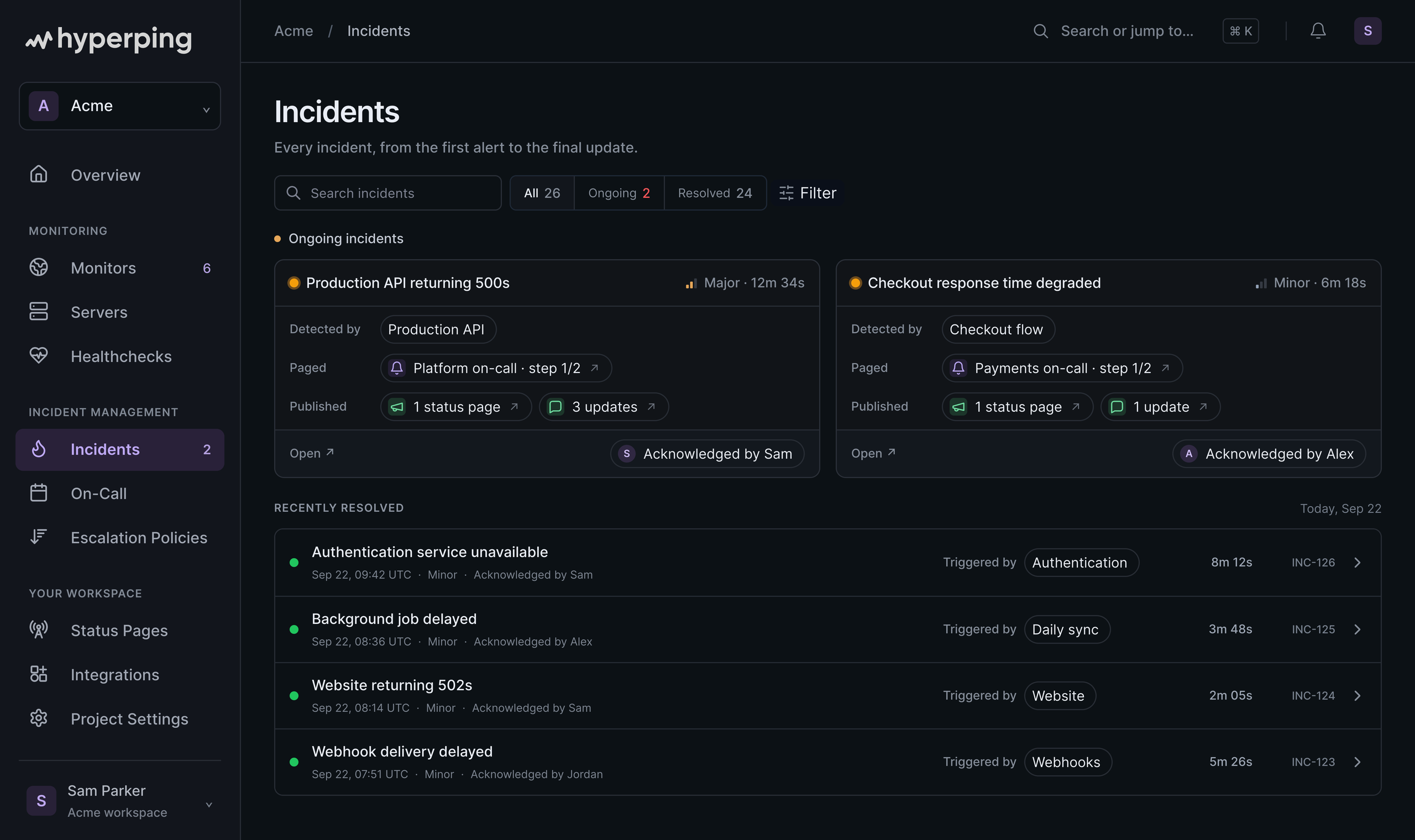
Hyperping incident dashboard with two active incidents, severity, acknowledgment, and a searchable incident history. Demo workspace.

Trusted by teams that put uptime first.

Read customer stories
Alma
Pitch
Silverfort
Beatport
EF Education First
Higgsfield
Havas
Slite
Husqvarna
University of Oxford

We’re on watch

Checks run today
28,480,000
Active monitors
19,600
Outages caught today
6,100
Alerts sent today
24,400
Heartbeats received today
160,000
Live status pages
1,700

The full picture, in one place

One incident.
All the context.

Know what happened.
And what’s happening now.

See detection, acknowledgments, escalations, and public updates in one timeline. Give every incident a severity and summary, whether it started with a failed check or a manual report.

  • Automatic and manually declared incidents
  • Severity, acknowledgment, and escalation
  • A searchable history of every incident
Explore incident history

The right person.
At the right time.

Build on-call rotations across time zones. Route alerts through escalation policies, and bring in backup when an incident needs more attention.

Explore on-call scheduling

Keep customers informed.
While you work on the fix.

Publish incidents to your status page, send updates to subscribers, and give customers a place to follow along. All connected to your response.

Explore status pages

Resolve it.
Then learn from it.

Keep your summary and post-mortem alongside the incident. Review the timeline, document the impact and root cause, and capture what your team learned while it’s still fresh.

Read the post-mortem guide

Your team’s channels.
Already connected.

Send the signal where your team will see it. Connect your chat and on-call tools, get mobile, email, SMS, and phone alerts, or build your own workflow with webhooks.

Powering businesses of all sizes.From fintech to global agencies, teams know first.

What teams say about Hyperping.

Read more
Guillermo Rauch
CEO, Vercel
@hyperping is really amazing
Fabrice Gregoire
Site Reliability Engineer, Alma
Hyperping’s reputation in our company is that it’s more reactive than Datadog. We usually get notifications from Hyperping before Datadog.
Pierre Renaudin
CTO, Slite
We picked Hyperping to bring a high quality incidents and status reporting dashboard to our users.
Moritz Dausinger
CEO & Founder, Refiner
We have the real-time alerts from Hyperping telling us if the app is down. These are sometimes arriving even before AWS notices or notifies us.
Gary Gaspar
CEO & Founder, Marker.io
We couldn’t imagine running our SaaS business without Hyperping now.
Jakob Bo Storjohann
CEO, Ideanote
Hyperping nails all aspects: from smooth setup to peace of mind and attentive customer service.

Frequently asked questions.

What is incident management in Hyperping?

Hyperping connects uptime monitoring, alerting, on-call schedules, incident timelines, and status pages. When a check fails, your team can investigate the incident, acknowledge it, escalate to the right people, and keep customers informed from the same platform.

Can I create an incident manually?

Yes. You can declare an incident even when a monitor has not detected an outage. Give it a title, severity, and summary, then track its progress alongside incidents created by your monitoring. AI agents connected to the Hyperping MCP server can also declare, acknowledge, and escalate incidents.

How do on-call schedules and escalations work together?

An on-call schedule determines who is on duty. An escalation policy determines who gets alerted, through which channels, and what happens if nobody acknowledges. You can combine schedules, teammates, and integrations in a multi-step policy, with delays between steps.

Can I notify my team in Slack or Microsoft Teams?

Yes. Send alerts to Slack, Microsoft Teams, Discord, Telegram, and other integrations. You can also reach responders by email, SMS, and phone calls, and connect your own tools with webhooks.

How do I keep customers updated during an incident?

Publish an incident to your Hyperping status page and add updates as your investigation progresses. Subscribers can receive notifications, and customers have a single place to check the latest status and incident history.

Can I review what happened after an incident?

Yes. The incident timeline brings together detection, acknowledgments, escalations, and status updates. Keep a summary and post-mortem with the incident so your team can document the impact, root cause, and lessons learned.

Stay ahead of downtime.