The best PagerDuty alternatives are Hyperping (flat-rate monitoring + on-call + status pages), Better Stack (unified monitoring + logs + incidents), incident.io (Slack-native incident management), Rootly (automation-focused incident response), and Squadcast (budget-friendly on-call). I analyzed 29 tools total and narrowed it to these five based on G2 reviews, community forum feedback, and hands-on evaluation.
PagerDuty is the incumbent in on-call management. But its per-user pricing ($21+/user/mo), enterprise-heavy feature set, and recent product frustrations are pushing teams to look elsewhere.
In this guide, you'll learn:
- Why teams leave PagerDuty (based on real community forum complaints, not speculation)
- Five alternatives that solve specific problems PagerDuty doesn't
- Honest pricing comparisons with actual numbers
- Which tool fits your team size, workflow, and budget
If you want monitoring that catches issues in 30 seconds, on-call scheduling with smart escalation policies, and status pages that build customer trust, all at a flat monthly rate with included seats and paid additional seats, try Hyperping free for 14 days.
Key takeaways
- Hyperping is the best option if you want monitoring, on-call, and status pages in one tool with predictable pricing. Starts at $24/mo flat-rate, included seats and paid additional seats.
- Better Stack is the strongest choice for teams that want monitoring, logs, and incident management unified. Paid plans start at $29/mo with modular add-ons.
- incident.io is ideal for Slack-centric teams that want to manage the full incident lifecycle without leaving Slack. Team plan starts at ~$15/user/mo plus a per-on-call-user add-on.
- Rootly fits fast-growing mid-market and enterprise teams that want AI-native, Slack-first incident response with deep automation. Incident Response Essentials starts around $20/user/mo.
- Squadcast (now part of SolarWinds) is the most affordable per-user option for DevOps teams, with a free plan for up to 5 users and Pro at $12/user/mo.
Why you should trust this guide
I'm Leo, founder of Hyperping. Yes, I have a stake in one of these tools. I'll be upfront about that throughout this guide. But I've watched teams choose competitors when those tools genuinely fit better, and my goal is to help you find the right tool, not just pitch mine.
For this guide, I reviewed hundreds of G2 reviews, went through 444 topics on PagerDuty's community forum to find real user frustrations, tested platforms where I could, and relied on verified user feedback where I couldn't.
Top picks at a glance
| Best for | Product |
|---|---|
| Monitoring + on-call + status pages at a flat rate | Hyperping |
| Monitoring + logs + incidents unified | Better Stack |
| Slack-native incident management | incident.io |
| Automation-focused incident response | Rootly |
| Budget-conscious DevOps teams | Squadcast |
Why teams consider PagerDuty alternatives
PagerDuty built the category. It set the standard for on-call management and incident response. But the product has accumulated friction points that are pushing teams toward alternatives. Many of the teams evaluating it right now are coming from Opsgenie, which Atlassian shuts down in April 2027, and the Opsgenie vs PagerDuty comparison covers that specific move.
Per-user pricing that doesn't scale well
PagerDuty's Professional plan starts at $21/user/month, and Business jumps to $41/user/month. For a 20-person engineering team on the Business plan, that's $9,840/year before add-ons for AIOps or Automation.
I came across a forum post from a user who spent seven years trying to get leadership approval for PagerDuty. The per-user cost was the primary blocker. When your bill grows linearly with headcount, every new hire becomes a pricing conversation.
This model also creates a perverse incentive: teams limit who gets a PagerDuty license instead of giving access to everyone who might need it. That defeats the purpose of an incident management tool.
Product friction and mobile regressions
PagerDuty's community forum reveals specific product frustrations that compound over time. The mobile app's swipe-to-resolve feature, which users relied on for quick acknowledgment, now requires an extra confirmation tap. For on-call engineers getting paged at 3 a.m., every extra step matters.
Incident workflow delays have a minimum of 5 minutes, but users have been requesting delays as short as a few seconds. When your automated runbook needs to wait 5 minutes before the next step, that's time your customers are experiencing an outage.
API and webhook limitations
Teams building automation around PagerDuty run into specific API gaps. The "description" field was removed from webhooks, leaving only "title" available. Resolution notes are not accessible via webhook automation. Getting Service Custom Field Values requires N+1 API calls.
For teams investing in incident automation, these limitations create workarounds that add maintenance burden and slow down response times.
Privacy concerns with default settings
PagerDuty's Slack integration enables "Chat message ingestion" and "Private channel ingestion" by default. Teams that didn't review these settings during setup may be unknowingly sending private Slack messages into PagerDuty. This is the kind of default that erodes trust with security-conscious organizations.
Quick comparison: PagerDuty alternatives
| Tool | Starting Price | Best For | Main Limitation |
|---|---|---|---|
| Hyperping | From $24/mo (flat-rate) | SMBs wanting monitoring + on-call + status pages | Not a full observability platform |
| Better Stack | From $29/mo | Teams wanting monitoring + logs + incidents | Per-seat pricing on higher tiers |
| incident.io | From ~$15/user/mo | Slack-native incident management | Requires Slack-centric culture |
| Rootly | From ~$20/user/mo | Automation-heavy incident response | Less accessible for very small teams |
| Squadcast | From $12/user/mo (Pro) | Budget-conscious DevOps teams | Fewer enterprise features than PagerDuty |
Hyperping: Best for monitoring + on-call + status pages at a flat rate
Who Hyperping is built for
Teams that want uptime monitoring, on-call scheduling, escalation policies, and status pages in one tool without juggling multiple subscriptions or worrying about per-user costs.
Full disclosure: I built Hyperping, so take my perspective with that context. I'll be straightforward about where it fits and where it doesn't.
Notable features
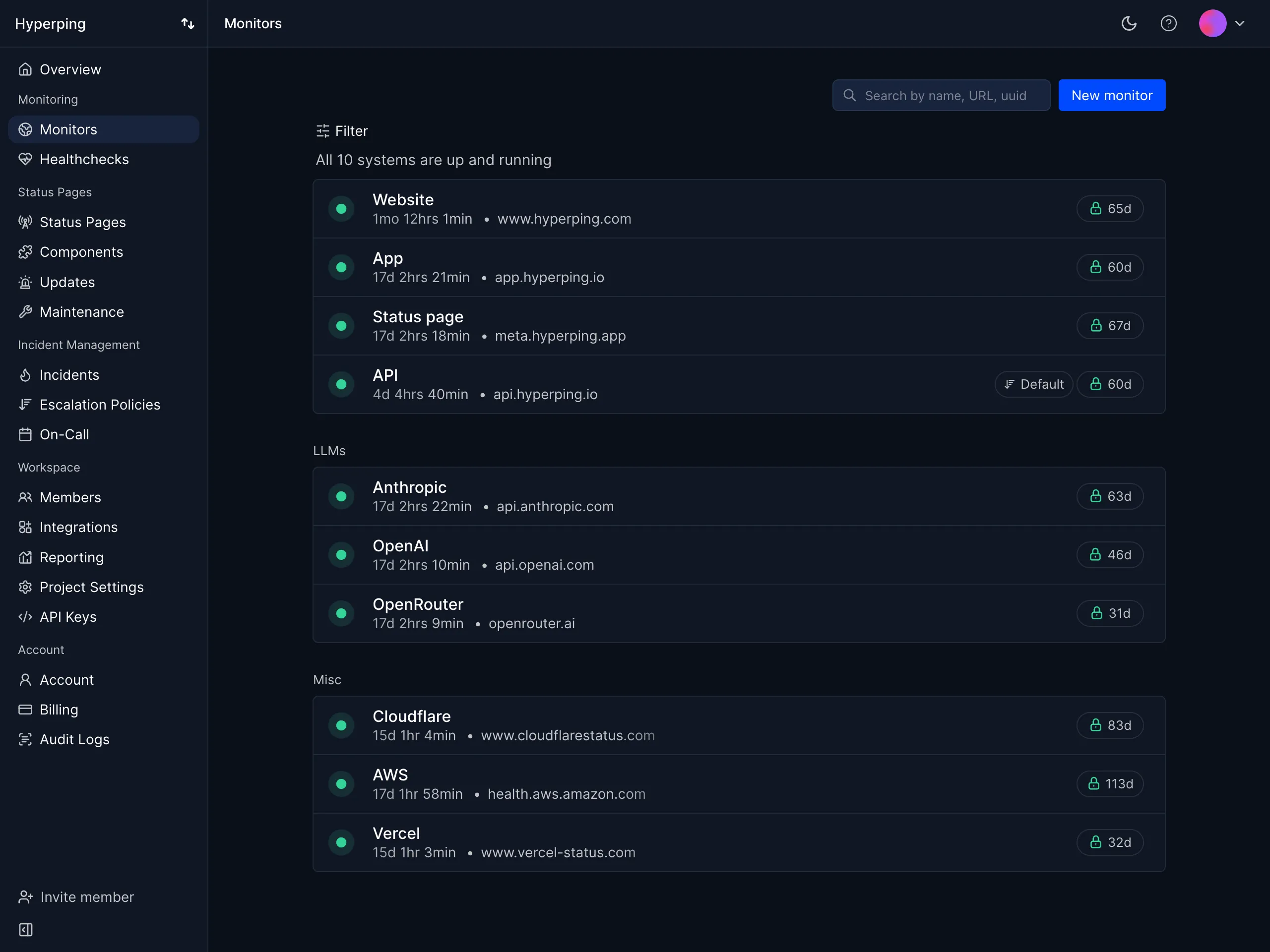
- 30-second check intervals across global monitoring locations
- On-call scheduling with timezone-aware rotations and automatic handoffs
- Multi-step escalation policies that route alerts to the right person at the right time
- Branded status pages with custom domains, multi-language support, and subscriber notifications
- Multi-channel alerting: email, SMS, voice calls, Slack, Discord, Telegram, Microsoft Teams, and webhooks
- Synthetic monitoring with Playwright for end-to-end testing of critical user flows
- Agent-based server monitoring with a one-line install that reports CPU, memory, filesystem, disk I/O, and network metrics from each host
- EU-based infrastructure with GDPR compliance built in from the start
Why choose Hyperping over PagerDuty?
Predictable pricing. PagerDuty charges per user. Hyperping charges a flat monthly rate. For a team of 15, PagerDuty Business costs $615/month ($41 x 15). Hyperping Business costs $249/month and includes 1000 monitors, 10 status pages, and 20 seats. That's $4,392/year in savings.
Monitoring included, not bolted on. PagerDuty is an incident management tool that relies on external monitoring to detect issues. Hyperping detects the issue itself, whether it is a failing HTTP check from one of its regions or a server agent that goes stale and then offline, and routes the alert to the right on-call engineer in one platform. Host metrics like CPU, memory, and disk usage sit on the same timeline, so whoever picks up the page can see what the machine was doing.
No configuration overhead. PagerDuty requires setting up Services, Policies, Schedules, and Users as separate concepts. Hyperping's setup takes minutes, not hours.
What users say
"We made our Hyperping status page publicly available and it became a crucial part of our sales pitches. We are proud of our uptime and we love that we can share it with prospects and customers in such an easy way."
"We have the real-time alerts from Hyperping telling us if the app is down. These are sometimes arriving even before AWS notices or notifies us."
How much does Hyperping cost?
- Essentials: $24/month for 50 monitors, 1 status page, 3 seats
- Pro: $74/month billed annually for 250 monitors, 3 public or private status pages, 10 seats. Includes email access codes, multilingual pages, and native account SAML SSO.
- Business: $249/month billed annually for 1000 monitors, 10 status pages, 20 seats, priority support
All paid plans include on-call scheduling and escalation policies. Seats are included; additional seats are billed separately.
Where Hyperping falls short
Hyperping is not a full observability platform. If you need integrated log management, distributed tracing, or deep APM, you'll need additional tools like Datadog or Better Stack alongside it.
The platform is also younger than PagerDuty, which means fewer third-party integrations. If you rely on a deep ServiceNow or Jira Service Management connection, PagerDuty's 700+ integrations are hard to match.
For very large organizations with complex follow-the-sun scheduling, 20-rule escalation policies, or ITSM compliance requirements, PagerDuty's scheduling engine is more mature.
Is Hyperping right for you?
Choose Hyperping if you're a startup, SMB, or growing SaaS team that wants monitoring, on-call, and status pages in one tool with pricing you can predict. It's a strong fit for teams frustrated by per-user billing, European companies that value GDPR compliance, and anyone who wants a tool that works out of the box without weeks of configuration.
Switching from PagerDuty? Follow the migrate from PagerDuty to Hyperping guide.
Better Stack: Best for monitoring + logs + incidents unified
Who Better Stack is built for
Teams that want a single platform covering uptime monitoring, log management, and incident response. Better Stack works well when you need to go beyond "is it up?" and understand what your logs say about why it went down.
Notable features
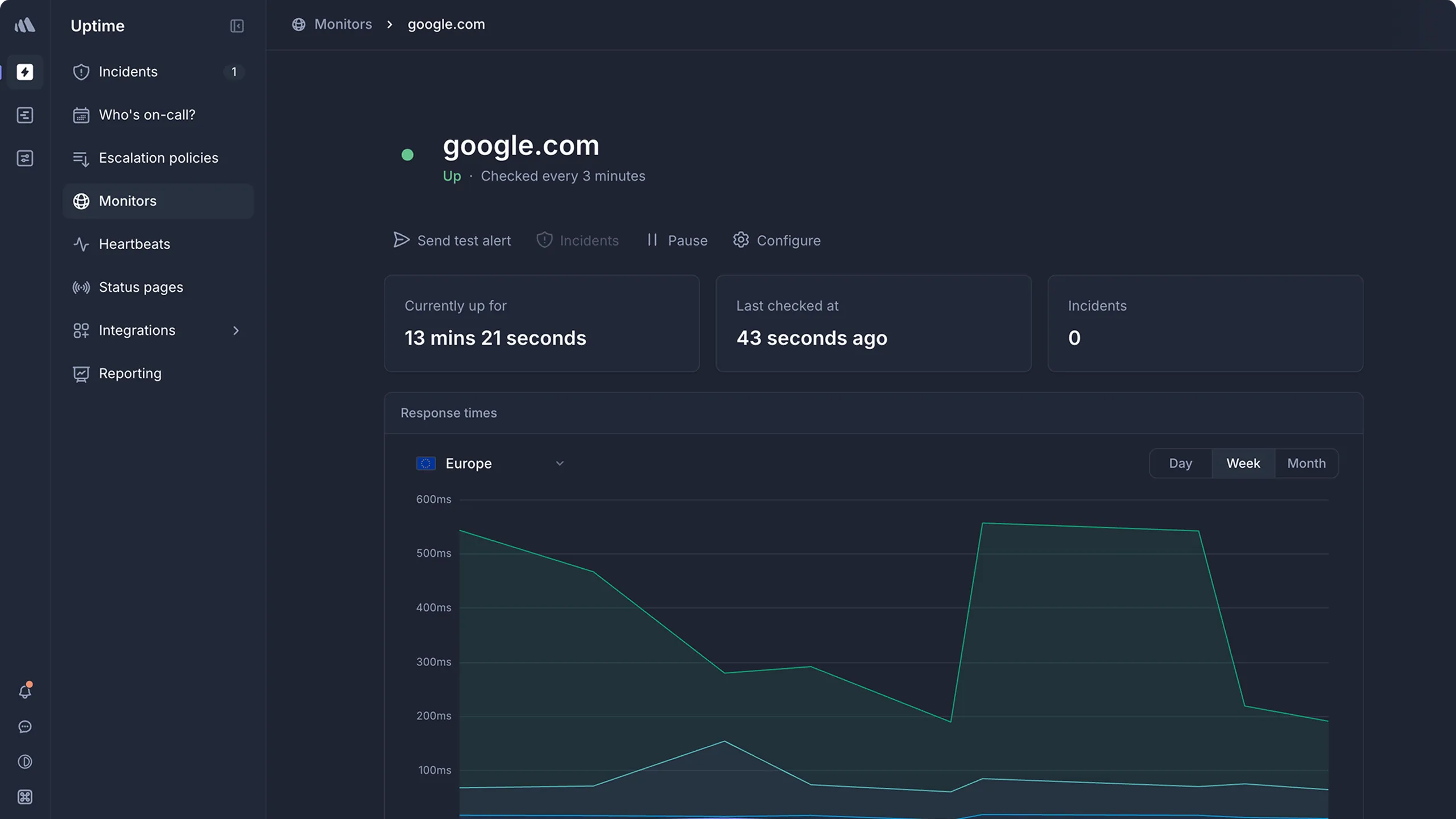
- Uptime monitoring with checks from multiple global locations
- Log management with structured search and alerting
- Incident management with on-call scheduling and escalation
- Status pages with custom branding
- Integrations with Slack, Teams, PagerDuty, and developer tools
- Terraform and API support for infrastructure-as-code workflows
Why choose Better Stack over PagerDuty?
Monitoring and logs included. PagerDuty is purely incident management. Better Stack gives you the monitoring that detects issues and the log analysis that helps you diagnose them, alongside on-call and incidents.
Better starting experience. Better Stack has a generous free tier that lets you try the platform without committing. PagerDuty's free tier is limited to 5 users with minimal features.
More approachable for smaller teams. Better Stack's interface is cleaner and faster to configure than PagerDuty's enterprise-oriented setup process.
What G2 users say
"BetterStack Uptime is an excellent tool for monitoring the availability of sites and services in real-time. Its interface is modern, easy to use, and pleasant on a daily basis. I appreciate the ability to quickly set up monitors, receive multi-channel alerts (Slack, SMS, email, call), and share professional status pages with clients."
"The only downside: the cost can quickly rise if you have many monitors or need advanced integrations. Additionally, some customization features (for example, on status pages) remain limited in the entry-level plans."
How much does Better Stack cost?
- Free tier with basic monitoring and limited features
- Paid plans from $29/month with per-seat pricing on higher tiers
- Log management pricing is usage-based depending on ingestion volume
Where Better Stack falls short
The jump from the free tier to paid plans is steep and catches some teams off guard. Per-responder licensing ($29/month), plus add-ons for additional monitors ($21/month for 50 more) and status pages ($12/month each), makes the total cost harder to predict than flat-rate alternatives.
Better Stack also lacks native infrastructure metrics and distributed tracing. If you need those capabilities as you scale, you'll need to add other tools.
Is Better Stack right for you?
Choose Better Stack if you want monitoring, logs, and incidents in one tool and your team is comfortable with usage-based pricing. It's a strong fit for fast-moving startups that want a polished interface and don't need deep APM or tracing. Compare the total cost carefully against flat-rate alternatives as your team grows.
incident.io: Best for Slack-native incident management
Who incident.io is built for
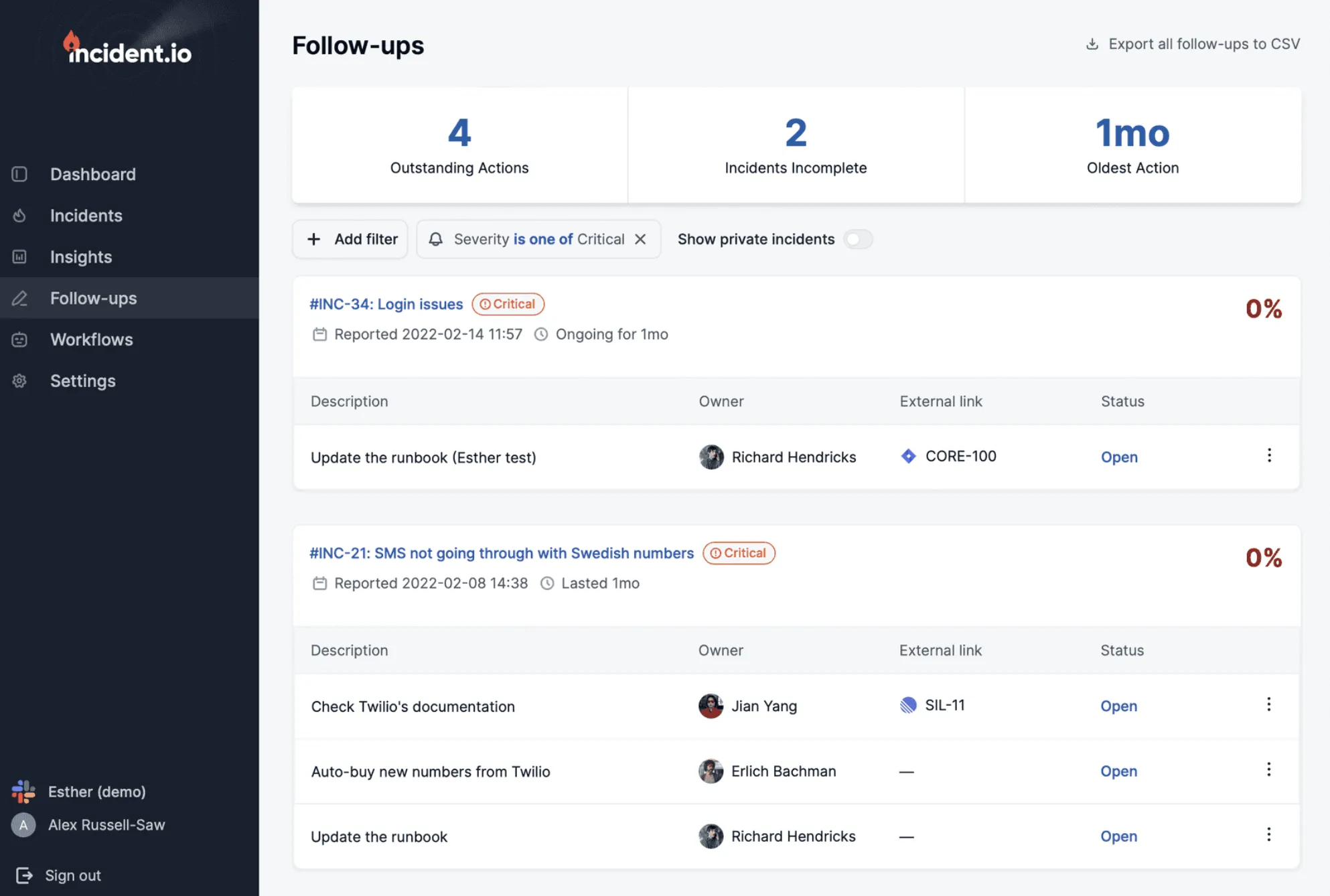
Engineering teams that live in Slack and want the entire incident lifecycle, from declaration to post-mortem, to happen inside their primary communication tool. incident.io goes beyond Slack notifications. It runs the actual incident management process within Slack.
Notable features
- Full Slack-native workflow: declare incidents with slash commands, manage response in dedicated channels, coordinate responders without context-switching
- AI-powered investigation: an AI agent that analyzes code changes, past incidents, and system state to identify probable root causes
- On-call scheduling with live call routing and burnout analytics
- Automated workflows that handle channel creation, role assignment, notifications, and integrations based on severity
- Post-incident analysis with AI-generated post-mortems from captured timelines
- Status pages with automated updates
Why choose incident.io over PagerDuty?
Incidents stay where your team already works. PagerDuty requires engineers to switch to a separate interface during an incident. incident.io keeps everything in Slack, which reduces coordination overhead. Their data suggests this saves 10-15 minutes per incident.
AI investigation, not just AI grouping. PagerDuty's AIOps groups alerts together. incident.io's AI SRE actively investigates incidents, analyzing GitHub commits and identifying the probable change that caused the problem.
Better post-mortem workflow. incident.io auto-generates post-mortem drafts from the incident timeline captured in Slack. PagerDuty's post-mortem capabilities require more manual effort.
What G2 users say
"Incident.io is a game-changer for incident response. Its seamless ChatOps integration makes managing incidents fast, collaborative, and intuitive—right from Slack."
"The intuitive design, overall ease of use and stellar customer relationship experience has made me an avid fan of this product… the way [AI suggestions] are surfaced to the user is absolutely seamless."
"The initial setup is complex. Important tools like status pages are limited on most plans. Simple actions like creating a ticket require extra steps."
How much does incident.io cost?
- Team: starts around $15/user/month plus a per-on-call-user add-on (~$10/user/month); includes core incident management and one status page
- Pro: starts around $25/user/month with a higher per-on-call-user fee (~$20/user/month), adding advanced insights and AI-assisted features
- Enterprise: custom pricing
A free trial is available. For a 30-person team with 20 on-call users, annual costs typically range from approximately $10,000 to $20,000 depending on the tier.
Where incident.io falls short
Slack dependency. If your team uses Microsoft Teams as its primary tool, or if you don't have a strong Slack culture, incident.io loses much of its value. The Teams integration exists but has fewer features.
No built-in monitoring. Like PagerDuty, incident.io focuses on what happens after an alert fires. You still need a separate monitoring tool to detect issues.
Cost at scale. Per-user pricing means the bill grows with headcount, the same fundamental issue teams have with PagerDuty, though at a lower per-user rate.
Is incident.io right for you?
Choose incident.io if your engineering team genuinely lives in Slack and you want incident management that fits naturally into existing workflows. It's particularly strong for organizations dealing with 10+ incidents per month that need consistent processes, and teams that want AI-powered investigation without extra configuration. Make sure your team is truly Slack-centric before committing.
Rootly: Best for AI-native, Slack-first incident response
Who Rootly is built for
Fast-growing mid-market and enterprise engineering teams that live in Slack or Microsoft Teams and want AI-native incident response with deep automation. Rootly is used by companies like Cisco, NVIDIA, Figma, Squarespace, and Canva, and is typically adopted by modern SaaS, fintech, and B2B platform teams that want to modernize incident response without a long implementation project.
Notable features
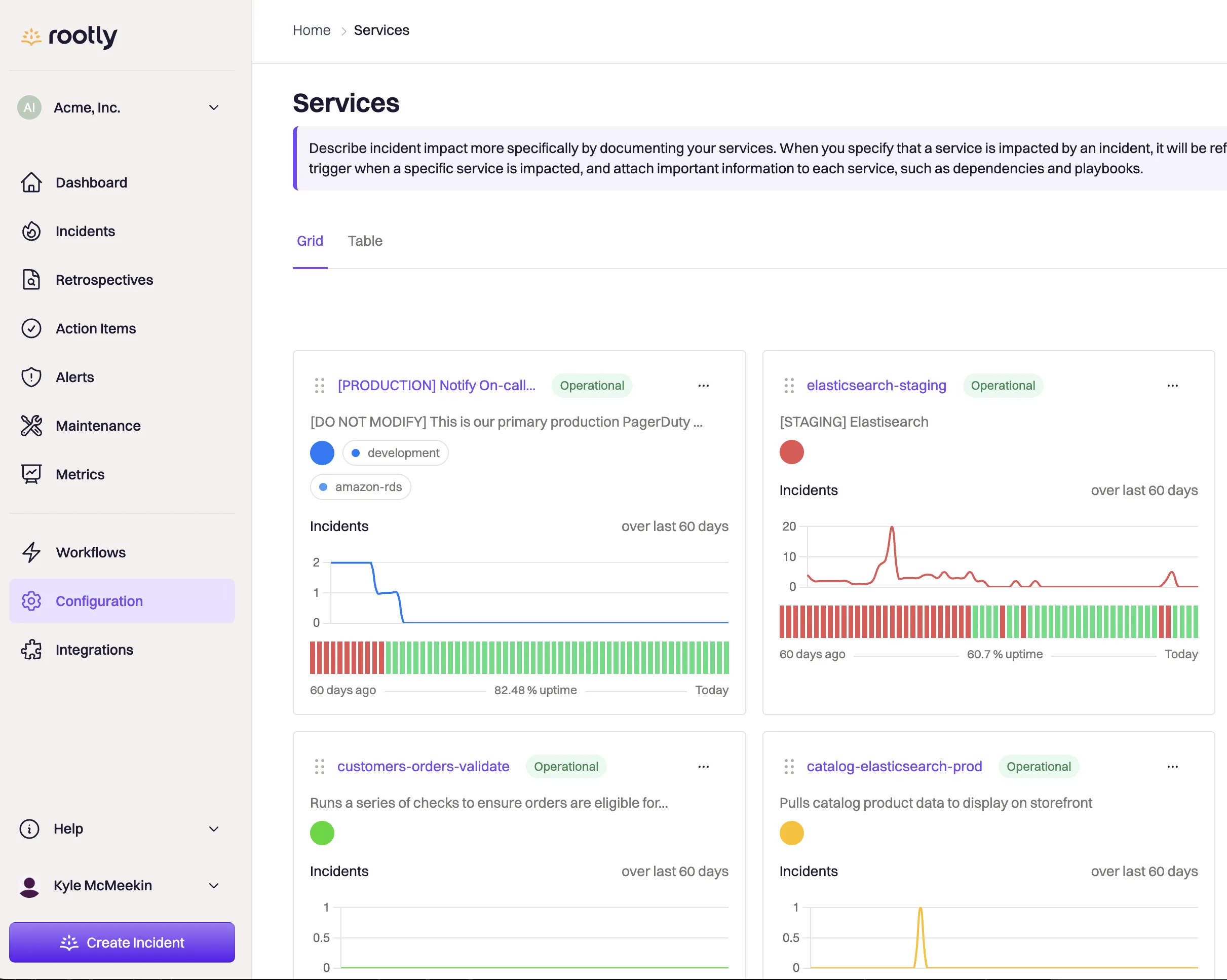
- Slack- and Teams-native workflows: declare, manage, and resolve incidents directly in chat, with automated channel creation, huddles, and transcription
- AI-powered incident automation: AI summaries, suggested responders, remediation hints, and historical incident analysis
- Full on-call management: schedules, escalation policies, overrides, alert routing, and iOS/Android apps
- Workflow engine for low-code automations across your tools (Jira, GitHub, Zoom, Slack, and more)
- Automated retrospectives and timelines with MTTR/MTTA metrics and follow-up task tracking
- Public and private status pages for internal and external communication
- Enterprise security: SSO, SCIM, RBAC, audit logs, SOC 2, GDPR, and CCPA compliance
Why choose Rootly over PagerDuty?
AI-native, not AI-bolted-on. PagerDuty added AIOps over time, but Rootly was built around AI from day one. AI is integrated into summaries, retrospectives, and suggested actions throughout the incident lifecycle.
Slack-first design. PagerDuty treats chat as a notification channel. Rootly embeds every step of incident response directly into Slack or Teams, which reduces context-switching and speeds up adoption.
Bundled incident + on-call + AI at mid-market prices. Rootly is typically 30-50% cheaper than PagerDuty at comparable scope, with less SKU fragmentation when you combine incident response, on-call, and AI modules.
What G2 users say
"Rootly has helped us standardize our incident management practices within Slack, which is our primary means of communication. It reduces context switching and lets operations engineers stay focused on the actual issue, rather than bouncing between multiple tabs trying to find the right one."
"I like that everything is stored in one place and integrates easily with all our existing tools. The workflow feature enables the automation of many tasks, eliminating manual steps... The setup was very easy, and I was able to get up and running in about 2 hours."
One reviewer who switched from PagerDuty explained: "We switched due to crushing technical debt and complexity around our Pagerduty instance, along with lack of any productive relationship with their team."
"Rootly does not have as many out of the box integrations as some of its competitors. You are able to work around this using webhooks, but the native integrations are more powerful and feature rich."
How much does Rootly cost?
- Incident Response Essentials: around $20/user/month
- On-Call Essentials: around $20/user/month
- AI SRE and Enterprise: custom pricing via sales, with bundle discounts when combining modules
- A 14-day free trial is available, and startup discounts of up to ~50% are offered for small and early-stage companies
Typical annual spend ranges from roughly $15,000 to $60,000 depending on team size and tier.
Where Rootly falls short
Slack/Teams dependency. Organizations that don't use Slack or Teams as their primary communication tool will see reduced value.
No built-in monitoring. Like PagerDuty and incident.io, Rootly depends on external tools for detection.
Per-user cost adds up at scale. Per-user pricing in the $20+ range can get expensive for very large teams, especially if you stack incident response, on-call, and AI modules.
Less transparent tier limits. Exact feature caps per plan (workflows, runbooks, status pages) require a sales conversation to clarify.
Is Rootly right for you?
Choose Rootly if you're a fast-growing mid-market or enterprise team that already lives in Slack or Teams and wants AI-native incident response with strong automation. It's a strong fit for SaaS, fintech, and B2B platforms running 20+ incidents per month. It's less suited to very small teams or organizations that don't standardize on Slack/Teams.
Squadcast: Best for budget-conscious DevOps teams
Who Squadcast is built for
DevOps and SRE teams that need on-call scheduling, alert routing, and incident management with SRE best practices (SLOs, error budgets) built in, without PagerDuty's price tag. Squadcast was acquired by SolarWinds and is now marketed as "SolarWinds IT Incident Response (Squadcast)", though it's still positioned as a standalone reliability workflow platform.
Notable features
- On-call scheduling with rotations, overrides, and time-based routing
- Escalation policies with multi-step routing and alert deduplication/noise reduction
- Incident management with timelines, runbooks, and war-room collaboration
- SRE workflows: SLO/SLA tracking, error budgets, and reliability automation
- 175+ integrations with Datadog, Prometheus, Grafana, Jira, Slack, MS Teams, and more
- Status pages for incident communication
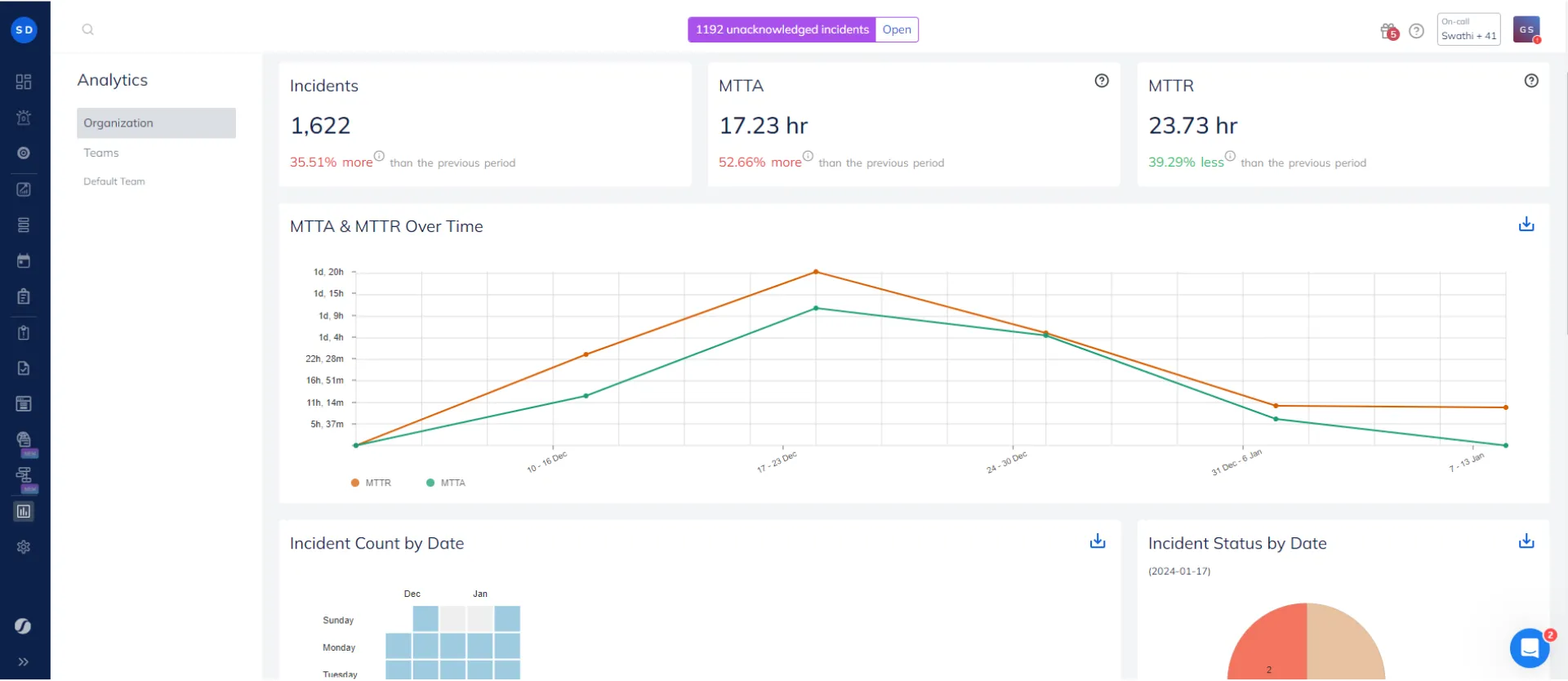
- Analytics and reporting on MTTR, incident volume, and alert trends
Why choose Squadcast over PagerDuty?
Dramatically lower cost. Squadcast's free tier supports up to 5 users. The Pro plan at $12/user/month is a little over half of PagerDuty's $21/user/month Professional tier. For a 20-person team, that's $2,880/year vs. $5,040/year.
SRE practices built in. Squadcast positions itself as a reliability workflow platform, with SLOs, error budgets, and reliability automation in the product rather than bolted on.
Faster setup. Users consistently report getting Squadcast configured in hours, not days.
What G2 users say
One reviewer who switched from PagerDuty shared: "After over three years of using PagerDuty, we decided to switch to Squadcast, mainly due to challenges with PagerDuty's pricing and customer support. The migration process was seamless; the Squadcast team helped us achieve parity with our previous PagerDuty setup, including migrating all schedules, escalation policies, and configurations."
"On-call scheduling/rotations, alert routing intelligence, incident response workflows, integrations with monitoring tools."
"Very clean UI and menu. Dashboard to give quick view of current status/active incident... escalation policy helps further that if call is missed by one person then it goes to other and so on."
How much does Squadcast cost?
- Free: up to 5 users, email/push notifications, 100 free SMS/voice notifications account-wide, 3-month data retention
- Pro: $12/user/month (annual billing) with unlimited users, SMS/voice notifications, and noise reduction
- Premium: $19/user/month (annual billing) adding runbooks, workflows, and SLO tracking
- Enterprise: custom pricing with AI-generated summaries, ServiceNow bidirectional sync, SSO, and advanced security
Where Squadcast falls short
Fewer enterprise features. If you need PagerDuty-level scheduling complexity (follow-the-sun with shadows and 20-rule escalation policies), Squadcast's engine is simpler.
Post-acquisition uncertainty. Following the SolarWinds acquisition, the product is rebranded under the SolarWinds umbrella. Some teams express caution about long-term roadmap clarity after acquisitions like this.
Less brand recognition in procurement. For organizations where tool selection requires leadership buy-in, PagerDuty's name can still be an easier sell.
Is Squadcast right for you?
Choose Squadcast if you're a small to mid-size team that needs reliable on-call management without overpaying. It's the strongest fit for teams where PagerDuty's per-user cost is the primary pain point, organizations that use the core 80% of on-call features and don't need the enterprise 20%, and teams with straightforward scheduling needs (weekly rotations, basic escalation policies). If your requirements are simple and your budget is tight, Squadcast delivers the best value per dollar.
How to choose the right PagerDuty alternative
Rather than a generic "it depends," here are specific decision criteria:
Choose Hyperping if you want monitoring, on-call, and status pages in one tool with flat-rate pricing. Best for teams under 20 people who are tired of paying per user and want to consolidate tools.
Choose Better Stack if you need monitoring, logs, and incidents unified and your team values a polished interface. Best for startups and growing teams that want observability depth beyond basic uptime checks.
Choose incident.io if your team lives in Slack and manages 10+ incidents per month. Best for organizations that want structured incident response without forcing engineers out of their primary workflow.
Choose Rootly if you're a fast-growing mid-market or enterprise team that already lives in Slack or Teams and wants AI-native incident response with strong automation. Best for SaaS, fintech, and B2B platforms running 20+ incidents per month.
Choose Squadcast if budget is the primary constraint and you need solid on-call management. Best for teams under 20 that use the core features and don't need enterprise complexity.
How to test these tools
All five top picks offer free tiers or trials:
- Hyperping: Free tier available; 14-day trial on the Essentials plan. Switching from PagerDuty? See the migration guide.
- Better Stack: Free tier with basic features
- incident.io: Free trial available on paid plans
- Rootly: ~14-day free trial; startup discounts of up to 50% for early-stage companies
- Squadcast: Free plan for up to 5 users
Run any new tool alongside your existing setup for at least one week. Compare alert routing speed, false positive rates, setup time, and how naturally the tool integrates with your team's daily workflow. Most teams I've spoken with tried 2-3 tools before settling on their final choice.
Related reading
- Migrate from PagerDuty to Hyperping — step-by-step migration guide
- Best on-call scheduling tools - compare the top on-call platforms
- Escalation policy framework - build escalation policies that cut MTTR
- Best incident management tools - broader incident management roundup
- Linux server monitoring guide - CPU, memory, disk, and network metrics from your own hosts
- Server monitoring cost calculator - compare per-host pricing across Datadog, New Relic, Netdata, and Hyperping
- Hyperping on-call - on-call scheduling with Hyperping
- Hyperping incident management - incident management features
- Hyperping status pages - branded status pages
FAQ
What are the best PagerDuty alternatives in 2026? ▼
The top five PagerDuty alternatives are Hyperping (flat-rate monitoring with on-call and status pages), Better Stack (unified monitoring, logs, and incidents), incident.io (Slack-native incident management), Rootly (automation-focused incident response), and Squadcast (budget-friendly on-call for DevOps teams).
Why do teams switch from PagerDuty? ▼
The most common reasons are per-user pricing that scales painfully with team size (starting at $21/user/mo), complexity that smaller teams do not need, mobile app regressions, and limited webhook/API flexibility that slows down automation workflows.
What is the cheapest PagerDuty alternative with on-call scheduling? ▼
Squadcast offers a free tier for up to 5 users and a Pro plan at $9/user/mo. Hyperping starts at $24/mo flat-rate with included seats and paid additional seats and includes on-call scheduling, escalation policies, and status pages on all paid plans.
Can I get monitoring, on-call, and status pages in one tool instead of PagerDuty? ▼
Yes. Hyperping combines uptime monitoring (30-second checks), on-call scheduling with escalation policies, and fully branded status pages in a single platform. Plans start at $24/mo with seats included; additional seats are billed separately.
Is PagerDuty worth the cost for small teams? ▼
For most small teams, PagerDuty is more tool than you need. The per-user pricing, complex configuration, and enterprise-focused features add overhead without proportional value. Alternatives like Hyperping or Squadcast offer the core on-call and escalation features at a fraction of the cost.
What is the best PagerDuty alternative for Slack-based teams? ▼
incident.io is the strongest option for Slack-centric teams. It runs the full incident lifecycle inside Slack, from declaration to post-mortem, with AI-powered investigation and automated workflows. Pricing starts at around $16/user/mo.
Can I migrate from PagerDuty easily? ▼
Yes. Hyperping's migration guide covers exporting PagerDuty services, schedules, and escalation policies, rebuilding your on-call pipeline in Hyperping, and running both tools in parallel before cutover. The team also offers free white-glove migration on paid plans. See /docs/migrate/from-pagerduty.