The best FireHydrant alternatives for on-call scheduling in 2026 are Hyperping for monitoring, on-call and status pages on one flat plan, incident.io for Slack-native response with on-call attached, Rootly for deeper workflow automation and a richer rotation model, PagerDuty for enterprise alert routing, Grafana Cloud IRM for teams whose alerts already come from Grafana, and GoAlert for the open-source, self-hosted slot.
I compared these six against FireHydrant's current plans, read the r/sre threads where engineers weigh FireHydrant against incident.io and Rootly, and priced every tool for a 20-person team. FireHydrant is a serious product with the deepest runbook engine in the category. Most teams looking for a replacement are not leaving because it fails. They are leaving because the on-call layer (Signals) is bundled with a lifecycle platform they do not use, because AI and analytics sit behind the Enterprise plan, or because the incident lives in a web app while their team lives in Slack.
In this guide you will learn:
- Why teams actually evaluate alternatives to FireHydrant (the reasons are specific, and rarely "it is bad")
- The six picks I would recommend, with current pricing and the trade-offs each one carries
- Head-to-head answers for incident.io vs FireHydrant and FireHydrant vs Rootly
- A step-by-step path to move on-call scheduling to Hyperping without a gap in coverage
If you want monitoring that catches issues in 30 seconds, on-call schedules with escalation policies, and a status page your customers actually read, all on a flat monthly plan with seats included and extra seats billed per user, try Hyperping free.
Key takeaways
- FireHydrant now sells three plans: Free (up to 10 responders), Pro at $25/responder/mo billed annually with Signals on-call included but SMS and voice sold separately, and Enterprise on custom pricing, which is where AI, private status pages, alert grouping and analytics live.
- Hyperping replaces the check, the pager and the status page in one plan. A 20-person team pays $179/mo monthly or about $149/mo billed yearly on Pro, against $500/mo for the same team on FireHydrant Pro.
- incident.io is the closest Slack-native alternative and ships AI post-mortems on Pro, but stacks two meters: $15/user/mo for Team plus $10/user/mo per on-call user.
- Rootly sells On-Call Essentials on its own at $20/user/mo, with shadow rotations, PTO handling and gap detection that FireHydrant Signals does not have.
- PagerDuty remains the enterprise default at $21/user/mo on Professional, then a PD Reliability Platform fee billed upfront per year from $2,800 for 10 seats, with 750+ integrations and AIOps in the platform tiers.
- Grafana Cloud IRM costs a $19/mo platform fee plus $20 per active IRM user, and only makes sense if Grafana alerting is already your alert source.
- GoAlert is free and self-hosted, covers schedules and escalations with Twilio paging, and has not shipped a release since October 2024.
Why you can trust this guide
I'm Léo, founder of Hyperping. One of the six tools below is mine, and I say where it is the wrong pick: if your pages must keep coming from Prometheus Alertmanager or Datadog through a webhook, Hyperping is not your FireHydrant replacement, and I name the four tools that accept those webhooks instead.
Prices were read on each vendor's public pricing page on September 16, 2026. FireHydrant replaced its earlier Starter and Advanced tiers with a Free, Pro and Enterprise line-up, so any guide that still quotes $20 and $44 per user is out of date. For user sentiment I leaned on the threads practicing SREs keep linking to:
- Rootly vs FireHydrant: any experience? (r/sre)
- Incident management tools comparison (r/sre)
- The 95-person SaaS that evaluated PagerDuty, FireHydrant, Rootly and incident.io (r/SaaS)
- Best PagerDuty alternatives (r/devops)
Where a claim comes from a vendor's own comparison page, I flag it as such. Where I could not test a tool directly, I relied on G2 and PeerSpot reviews and say so.
Top picks at a glance
| Best for | Product |
|---|---|
| Monitoring, on-call and status pages on one flat plan | Hyperping |
| Slack-native incident response with on-call attached | incident.io |
| Deep workflow automation and a richer rotation model | Rootly |
| Enterprise alert routing with the largest integration catalog | PagerDuty |
| On-call for teams whose alerts come from Grafana | Grafana Cloud IRM |
| Open-source, self-hosted on-call scheduling | GoAlert |
Why teams look for FireHydrant alternatives
FireHydrant's reviews are good. On G2 the recurring praise is for support responsiveness, the Slack and Teams chatbot, and runbooks that give a 30-service organization a repeatable path through every incident. The reasons to look elsewhere are about packaging and fit.
- The on-call layer is bundled with a lifecycle platform. Signals, FireHydrant's on-call and alerting product, is included in Pro at $25 per responder. If what you need is a rotation, an escalation policy and a phone call at 3 a.m., you are paying for runbooks, a service catalog and retrospective templates you may never open. Rootly and incident.io both sell on-call on its own at $20/user/mo.
- SMS and voice are sold separately on Pro. The plan lists push, Slack, Teams and email as the included notification channels, with "SMS and voice available for separate purchase". For a team that treats the phone call as the wake-up channel of last resort, that is a second line item to negotiate.
- AI and analytics are Enterprise-only. AI summaries, transcripts, triage and retrospectives, incident analytics, alert grouping, private incidents and private status pages all sit on the custom-priced tier. incident.io ships AI post-mortems on Pro and Rootly's AI scribe is on its Essentials plans.
- The incident lives in a web app. FireHydrant's Slack bot triggers actions, but the timeline, the roles and the retrospective sit in the FireHydrant UI. Teams whose responders never leave Slack report better adoption on incident.io or Rootly. incident.io's own comparison page says as much, so treat that claim as marketing, but the pattern also shows up in the r/sre thread where engineers describe FireHydrant as the tool for SREs who run the process and Rootly as the tool the whole team will actually use.
- Constraints on automation and integrations. G2 reviewers mention being limited by what can trigger an automation, a Slack bot that is "spammy and lacks configuration options", and analytics that make it hard to answer basic questions about incident load. Pro also caps you at 5 integrations and 10 custom fields.
- Features breaking as new ones ship. Several G2 reviews note that pre-existing functionality occasionally stops working after a release. Small at the desk, large at 3 a.m.
- Mindshare. On PeerSpot's December 2025 numbers, Rootly holds 8.5% of category mindshare against FireHydrant's 1.6%. That matters in procurement, in hiring engineers who already know the tool, and in how many integration partners build for it first.
One theme repeats across every thread: no single tool owns every layer of an incident. Detection, paging, coordination and customer communication are four jobs. FireHydrant does the middle two well. The alternatives below either do the paging layer cheaper, do the coordination layer inside chat, or fold detection and communication into the same bill.
Why these 6 tools made the cut
I considered 25+ tools including Better Stack, Squadcast, Blameless, Opsgenie, xMatters, Zenduty, iLert, Splunk On-Call, ServiceNow, Jira Service Management, Freshservice, OneUptime, Keep, Spike.sh, PagerTree and All Quiet. Many fell short for a specific reason:
- Sunsetting. Opsgenie shuts down in April 2027. Anyone evaluating today should evaluate the replacement, not the tool being replaced. Our Opsgenie shutdown guide covers that case.
- Too narrow. Spike.sh, PagerTree and All Quiet page people and stop there. They lack the escalation depth and the status page that come up in every r/sre thread about replacing FireHydrant.
- Service desk first. Jira Service Management, ServiceNow and Freshservice optimize for tickets. The 2 a.m. coordination problem FireHydrant solves is not their design center.
- Opaque pricing. Blameless, BigPanda and BMC Helix still require a sales call to get a number. FireHydrant publishes its Pro price, and a replacement should too.
- Post-acquisition uncertainty. Squadcast is a credible budget pick at $12/user/mo, but the SolarWinds acquisition makes the roadmap hard to read, and it is covered in our Rootly alternatives guide already.
- Monitoring first. Better Stack bundles monitoring, logs and incidents in a polished UI, but its per-responder and per-page add-ons make the bill drift, and it is a weaker match for the on-call intent this guide targets.
The six tools below each answer a distinct reason someone types "FireHydrant alternatives for on-call scheduling" into a search box.
Feature comparison
| Feature | Hyperping | incident.io | Rootly | PagerDuty | Grafana Cloud IRM | GoAlert |
|---|---|---|---|---|---|---|
| Pricing model | Flat plan + seats | Per user + on-call | Per user, per module | Per user + add-ons | Platform fee + per user | Free, self-host |
| On-call sold separately | No, included | Yes ($10 to $20/user) | Yes ($20/user) | Included | Included | n/a |
| Built-in uptime monitoring | Yes | No | No | No | No | No |
| Accepts Alertmanager or Datadog webhooks | No | Yes | Yes | Yes | Yes | Yes |
| Slack or Teams incident lifecycle | Notifications | Full | Full | Notifications | ChatOps | Notifications |
| AI post-mortems | No | Yes (Pro) | Yes | Add-on | Yes (Cloud) | No |
| Runbooks | No | Workflows | Workflows | Automation add-on | No | No |
| Status page built-in | Yes | Yes (limited on Team) | Yes | Add-on (Statuspage) | No | No |
| Phone call alerting | Yes | Yes | Yes | Yes | Yes | Yes (Twilio) |
| Free tier | Yes | Basic plan | No | Up to 5 users | 3 active users | Free |
| Hosting | EU (GDPR) | US/EU | US | US/EU | US/EU | Yours |
1. Hyperping: best if your pages come from uptime checks
Perfect for
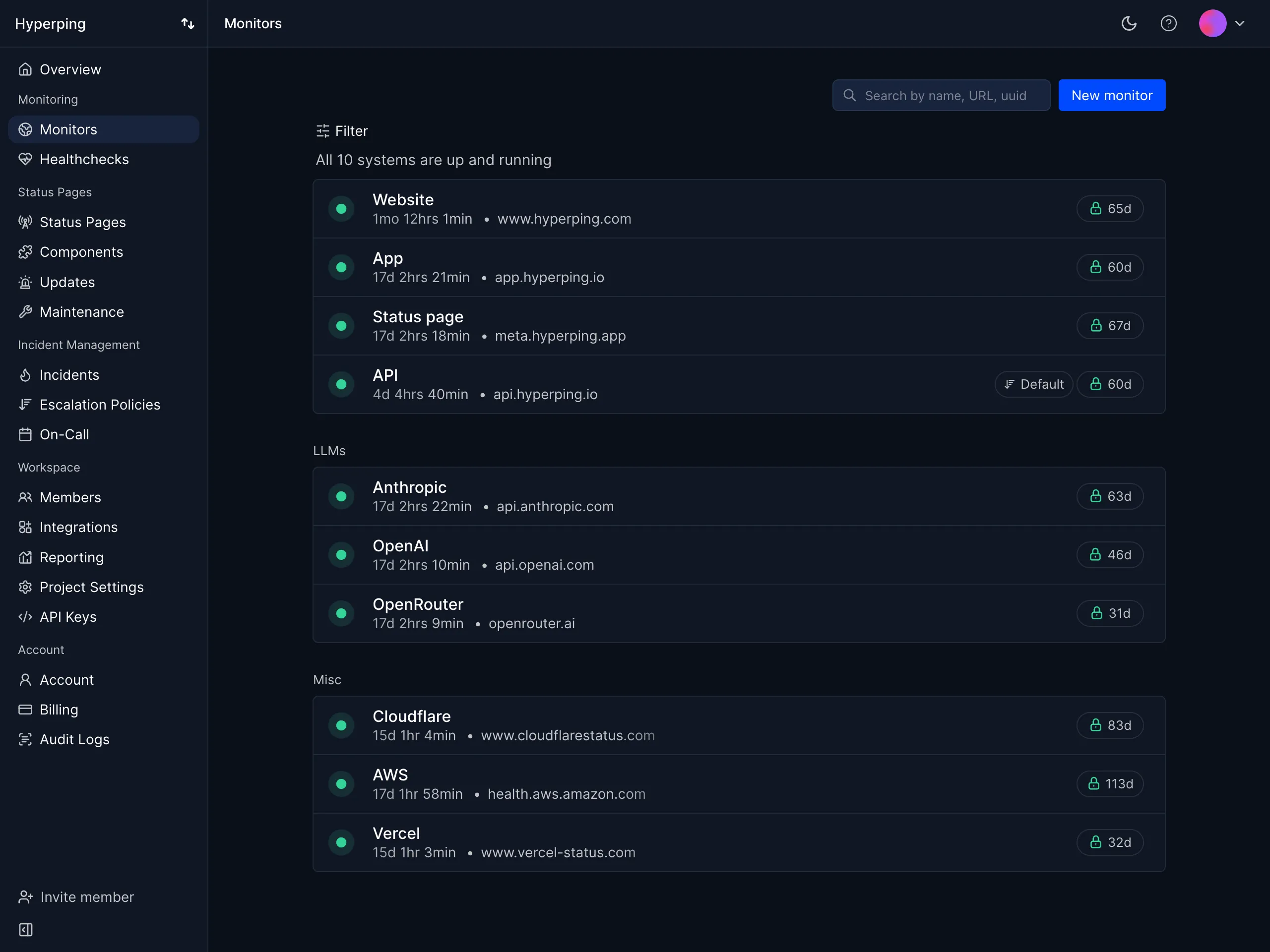
Teams of 2 to 50 whose FireHydrant Signals integrations were mostly uptime, SSL and cron alerts, and who want the check, the page and the customer-facing status page in one product. The natural pick when you look at your FireHydrant incident list and most entries read "site down" or "certificate expired".
Notable features
- Checks from 18 regions for HTTP, DNS, port, cron heartbeat and Playwright browser flows, every 30 seconds on Essentials and Pro, every 20 seconds on Business, plus a daily SSL certificate check on every HTTPS monitor.
- On-call schedules with one rotation per team or timezone, handoff times, time restrictions and overrides.
- Escalation policies with ordered steps and delays across Slack, Teams, email, SMS and phone, where a step can target whoever is on call in a schedule.
- Confirmation from a second region before anyone is paged, which removes most false positives at the source rather than with grouping rules.
- Status pages included: 1 on Essentials, 3 on Pro, 10 on Business, with custom domains, subscribers and password or email-code protection from Pro.
- Server monitoring agent for CPU, memory, disk and network on Linux and macOS.
- Outbound integrations to Slack, Teams, Discord, Telegram, PagerDuty, Opsgenie and webhooks.
- EU hosting with all data stored in European data centers.
Why choose Hyperping over FireHydrant
The page and the check are the same product. FireHydrant Signals receives alerts from something else. Hyperping is the something else, and it pages directly from the failing check. That removes one vendor, one webhook and one place a page can get lost.
One bill, and it does not grow with every hire. A 20-person team on Hyperping Pro pays $179/mo billed monthly or about $149/mo billed yearly, which covers the 10 included seats plus 10 extra seats at $9/mo each. FireHydrant Pro for the same 20 people is $500/mo billed annually, before SMS and voice, and it still does not check whether your site is up.
SMS and phone are in the plan. Essentials includes 20 SMS a month, Pro 75, Business 200, and voice calls are available from Essentials. On FireHydrant Pro those two channels are a separate purchase.
A status page your customers will find. FireHydrant Pro includes public status pages, but the incident still has to be declared in FireHydrant to reach it. On Hyperping the monitor, the incident and the page share one data source, so the page updates the moment the check fails.
Where Hyperping falls short
Hyperping does not accept inbound alerts from Alertmanager, Datadog or Grafana. If your Prometheus rules must keep paging humans, Hyperping covers the external checks and you keep a webhook-capable pager for the internal ones, or you pick one of the four tools below that accept those webhooks.
It is also not a lifecycle platform. There are no per-service runbooks, no service catalog, no AI retrospectives and no Slack incident channels with roles. Hyperping's incidents are manual or monitor-driven, with a timeline and a status page update, and that is the extent of it. For a team running 20+ coordinated incidents a month, that is a gap, and incident.io or Rootly fill it.
What users say
"Hyperping's reputation in our company is that it's more reactive than Datadog. We usually get notifications from Hyperping before Datadog. It's useful as a fallback, a lighter backup monitoring solution."
"We made our Hyperping status page publicly available and it became a crucial part of our sales pitches. We are proud of our uptime and we love that we can share it with prospects."
Pricing
From the Hyperping pricing page, yearly billing:
- Free: $0, 1 seat, 20 monitors every 5 minutes, 18 regions, 1 hosted status page, no on-call
- Essentials: $24/mo ($29 monthly), 3 seats then $7/seat, 50 monitors every 30 seconds, 1 on-call schedule, escalation policies, 20 SMS, 1 status page
- Pro: $74/mo ($89 monthly), 10 seats then $9/seat, 250 monitors, 3 schedules, 75 SMS, 3 status pages, private pages
- Business: $249/mo ($299 monthly), 20 seats then $12/seat, 1,000 monitors every 20 seconds, 200 SMS, 10 status pages, white label
On-call schedules and escalation policies are included from Essentials. A 20-person team on Pro is about $149/mo billed yearly.
Choose Hyperping if
Most of what FireHydrant was paging you about is detectable from the outside, your team is under 50 people, and you would rather stop paying for three tools (monitor, pager, status page) than for one lifecycle platform. Skip it if Alertmanager webhooks are non-negotiable or if the coordination layer is your actual bottleneck.
2. incident.io: best for Slack-native response with on-call attached
Perfect for
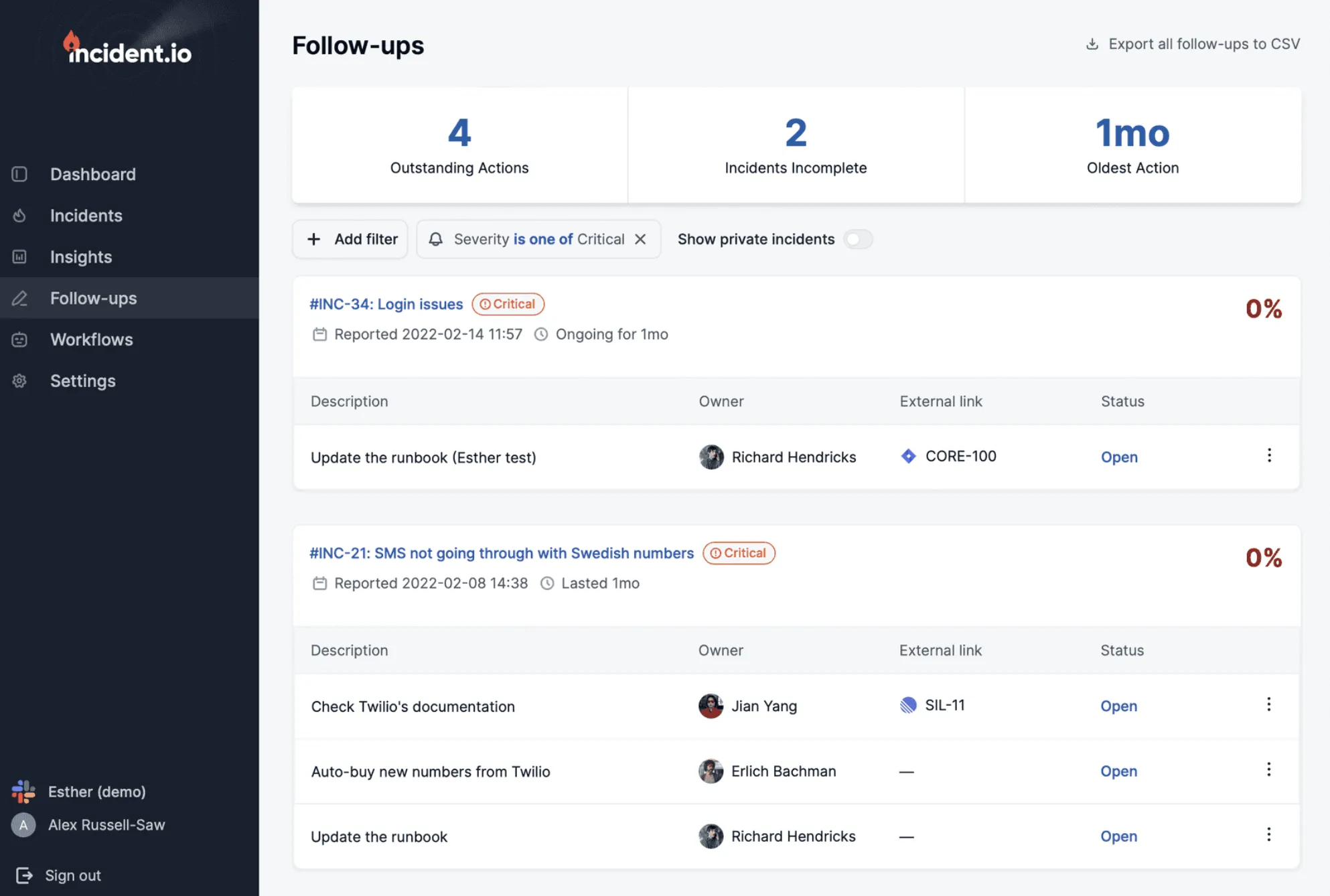
Teams that run incidents in Slack or Microsoft Teams and want the page, the incident channel, the status page update and the post-mortem to happen without opening a separate web app. The tool the 95-person SaaS on r/SaaS chose after evaluating PagerDuty, FireHydrant, Rootly and incident.io side by side.
Notable features
- On-call schedules, escalation paths and overrides managed from Slack, sold as a per-user add-on or as a standalone On-call plan.
- Alert ingestion from Alertmanager, Grafana, Datadog and generic webhooks, with alert routing into escalation paths.
- Incident channels with roles and timelines created automatically on declaration.
- AI post-mortems drafted from the captured timeline, on the Pro plan.
- Visual workflow builder for severity routing, stakeholder updates and follow-ups.
- Status pages, one on Team, more on Pro.
- Mobile app with push, SMS and phone.
Why choose incident.io over FireHydrant
The whole incident stays in chat. This is the difference incident.io built the company on, and it is the one that shows up in adoption numbers. The r/SaaS write-up reports post-mortem completion going from "maybe 50%" to 92% after moving to incident.io, because the draft was waiting in the channel when the incident closed. FireHydrant's Slack bot triggers actions but the write-up happens in the FireHydrant UI.
AI on Pro, not on a custom quote. AI post-mortems, AI investigation and suggested responders ship on incident.io Pro at a published price. On FireHydrant, AI summaries, transcripts, triage and retrospectives are Enterprise features.
Opinionated defaults. Severities, roles and the declare flow work out of the box. FireHydrant's own positioning is "not opinionated", which is a strength for a mature SRE team with documented runbooks and a cost for a team that has not written any yet.
Built for the whole company. incident.io's comparison page (vendor claim, but it matches the reviews) pitches the product to support, compliance and leadership as well as engineers. FireHydrant is aimed at the SRE who owns the process.
Where incident.io falls short
Two meters stack. The Team plan is $15/user/mo, and every on-call user adds $10/user/mo. A 20-person team with everyone in the rotation is $500/mo, the same as FireHydrant Pro. Pro with on-call reaches $45/user/mo.
Slack dependency. Microsoft Teams support exists but trails Slack. If your responders coordinate in email or a ticketing tool, most of the differentiation disappears.
Less runbook depth than FireHydrant. incident.io has workflows, not per-service runbooks. A team that ported 40 documented playbooks into FireHydrant will find incident.io's builder more constrained.
Setup takes a real week. G2 reviewers note the workflow and catalog configuration is involved.
Pricing
From incident.io's pricing page:
- Basic: free, single-team on-call and one status page
- Team: $15/user/mo yearly ($19 monthly) plus $10/user/mo per on-call user
- Pro: $25/user/mo plus $20/user/mo per on-call user, adds AI features and advanced insights
- On-call only: $20/user/mo
- Enterprise: custom
A 20-person team on Team with everyone on call is $500/mo; on-call only is $400/mo.
Choose incident.io if
Your team genuinely lives in Slack, you run 10+ incidents a month, and the post-mortem backlog is the pain you want to fix. Skip it if you are on Teams as a primary surface, if runbook depth is why you picked FireHydrant, or if your bottleneck is detection. Our incident.io alternatives guide goes deeper on the trade-offs.
3. Rootly: best for workflow automation and a richer rotation model
Perfect for
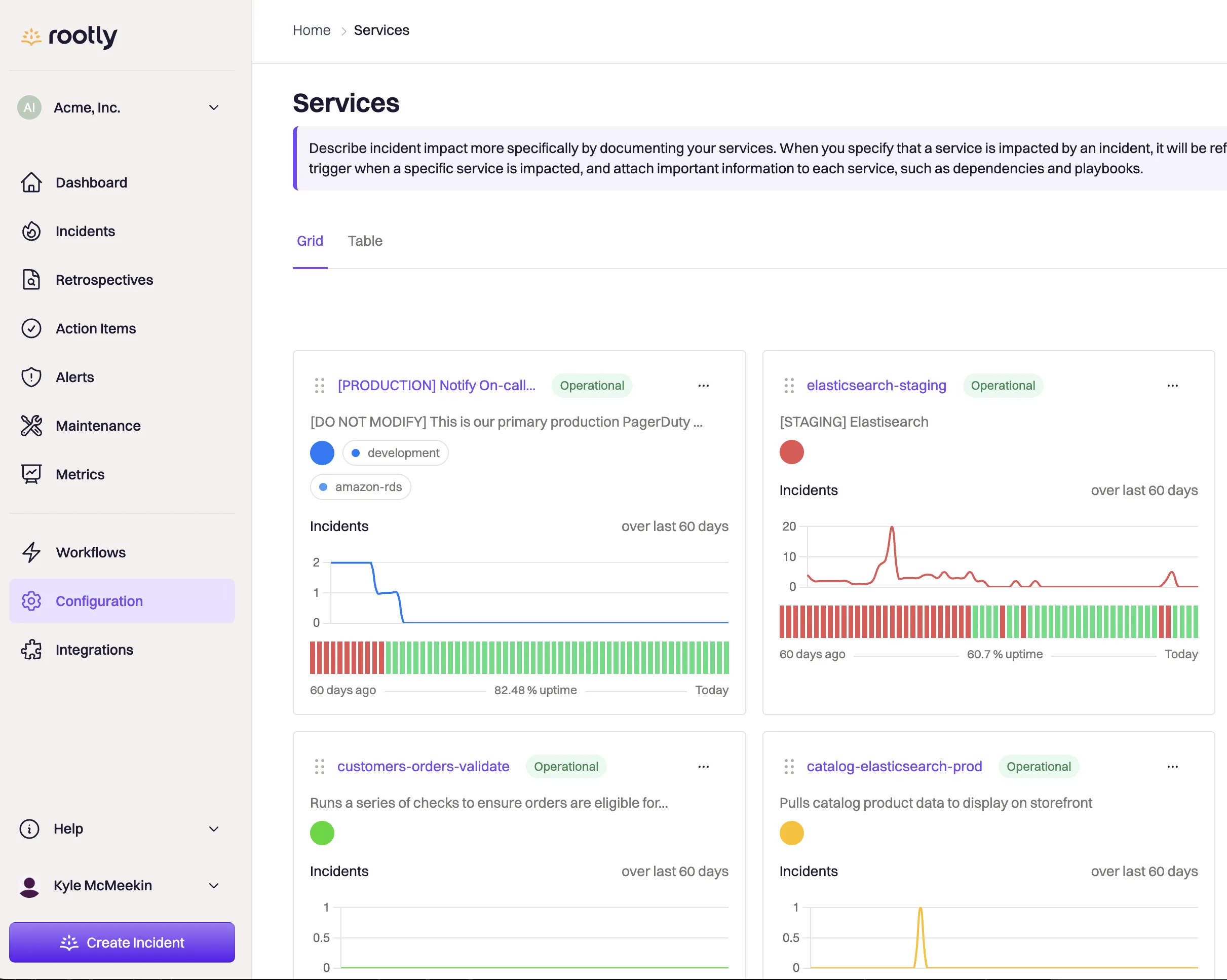
Mid-market teams of 30 to 300 that want Slack-native response with a workflow engine reaching across Jira, GitHub, Zoom and the rest of the toolchain, and an on-call module they can buy on its own. The other name in the r/sre FireHydrant thread.
Notable features
- On-Call Essentials as a standalone module with schedules, escalation policies, alert grouping and routing, and live call routing.
- Rotation features FireHydrant lacks: shadow rotations for onboarding, PTO handling, schedule gap detection and an on-call pay calculator.
- Slack and Teams incident lifecycle with automatic timeline capture from every message and command.
- AI scribe and AI retrospectives included in the Essentials plans.
- Workflow engine with conditional logic across Jira, GitHub, Zoom, Datadog and 60+ integrations.
- Status page included in Incident Response Essentials.
- Alert ingestion from Alertmanager, Grafana, Datadog and webhooks.
Why choose Rootly over FireHydrant
Buy only the on-call layer. Rootly On-Call Essentials is $20/user/mo with no obligation to take Incident Response. FireHydrant Pro bundles Signals with the lifecycle platform at $25 per responder. If on-call is the job, Rootly is 20% cheaper and you are not paying for runbooks.
A rotation model built by people who have been on call. Shadow rotations, PTO-aware scheduling and gap detection are the features that keep a schedule honest over a year. FireHydrant Signals has schedules and escalation policies, and stops there.
Automatic timelines without a scribe. Rootly reconstructs the timeline from Slack messages and commands. On FireHydrant, the timeline is populated by actions taken through the bot or the UI, and the rest is typed in later.
AI in the base plans. Rootly's AI features ship on Essentials. FireHydrant reserves them for Enterprise.
Where Rootly falls short
Two modules double the bill. On-Call and Incident Response at $20/user/mo each puts a 20-person team at $800/mo for both, well above FireHydrant Pro's $500/mo for a comparable scope.
Configuration depth. One r/devops commenter who chose incident.io over Rootly described "tons of features but required way too much configuration to work for our commerce environment". A 5-person team will not use most of the workflow engine.
No free tier. There is a startup program (up to 50% off under 100 employees), but no free plan to evaluate against FireHydrant's Free tier.
Runbooks are workflows. If what you liked about FireHydrant is a codified, per-service runbook that executes step by step, Rootly's workflow builder gets there differently and takes longer to set up.
Pricing
From Rootly's pricing page:
- On-Call Essentials: $20/user/mo
- Incident Response Essentials: $20/user/mo
- Enterprise for either: custom
- Startup program: up to 50% off under 100 employees, "pay what you can" under 25
A 20-person team is $400/mo on On-Call Essentials, $800/mo with Incident Response.
Choose Rootly if
You want Slack-native response with more workflow reach than incident.io, or you only want the on-call module and want it from a vendor with a lifecycle platform to grow into. Skip it if you are under 20 people or if the two-module bill is the reason you are leaving FireHydrant. Our Rootly alternatives guide covers the reverse question.
4. PagerDuty: best for enterprise alert routing
Perfect for
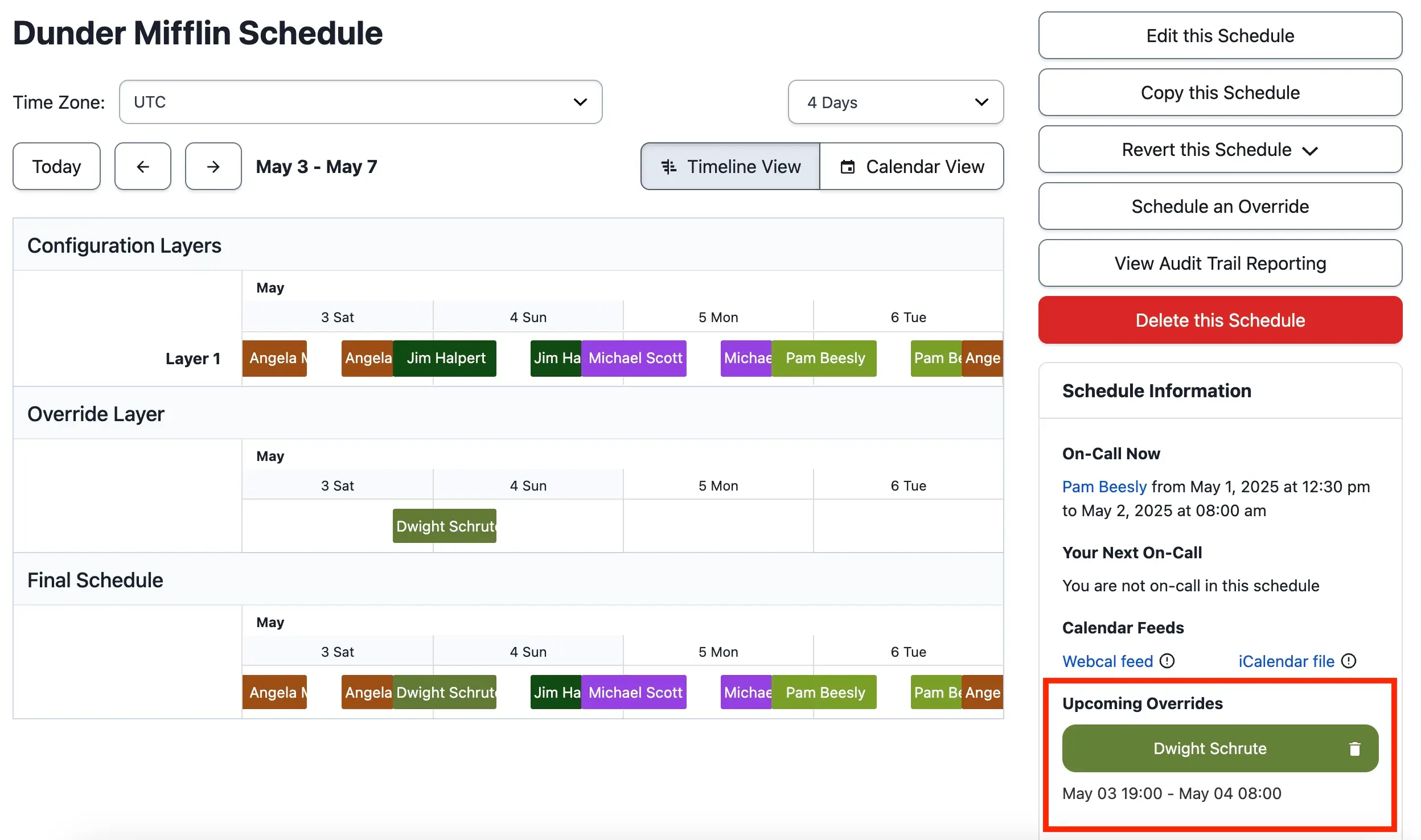
Organizations above 50 engineers that need a vendor SLA, complex multi-region scheduling, deep ServiceNow or Jira integration, and the budget for per-user pricing plus AIOps add-ons. The tool FireHydrant itself positions Signals against, and still the fallback when procurement asks for the name they know.
Notable features
- Schedules, escalation policies, overrides and round-robin routing across any number of teams.
- Event Orchestration for conditional routing, deduplication and suppression before anyone is paged.
- 750+ integrations, including legacy enterprise systems the newer tools do not reach.
- AIOps and Automation Actions as paid add-ons for noise reduction and runbook automation.
- Mobile app that r/devops threads still call the gold standard for waking people up.
- Terraform provider and a mature API.
Why choose PagerDuty over FireHydrant
Routing depth. Follow-the-sun rotations across five regions, 20-rule escalation policies and bidirectional ServiceNow sync are things PagerDuty has done for a decade. FireHydrant Signals has schedules, escalation policies and alert rules, with alert grouping and live call routing reserved for Enterprise.
Integration catalog. If "does it integrate with X" is the first question in your evaluation, PagerDuty's answer is yes more often than anyone else's. FireHydrant Pro caps you at 5 integrations.
Procurement comfort. PagerDuty clears security review and legal faster than a smaller vendor. That matters more at 500 engineers than at 20.
Where PagerDuty falls short
Cost. Professional at $21/user/mo, then a PD Reliability Platform fee billed upfront per year for AIOps, from $2,800 for 10 seats. A 20-person team is $420/mo on Professional or $1,000/mo on the Essential platform tier, and Statuspage is a separate subscription on top. FireHydrant's own Signals launch post claims teams switching from PagerDuty save 50% on average, a vendor number, but one that matches the complaints in every r/devops thread.
Web-app-centric coordination. PagerDuty notifies into Slack, but the incident lives in PagerDuty's UI. Teams leaving FireHydrant because the incident was not in Slack will find the same problem here.
API and webhook gaps. Forum users flag missing webhook fields and N+1 API calls for service custom fields.
Privacy defaults. The Slack integration enables chat message ingestion and private channel ingestion by default. Review that during setup.
Pricing
From PagerDuty's pricing page:
- Free: up to 5 users, 1 schedule, 1 escalation policy, 100 SMS and phone notifications a month
- Professional: $21/user/mo yearly ($25 monthly)
- PD Reliability Platform, billed upfront per year: Starter $2,800 (10 seats), Essential $12,000 (20 seats), Plus $48,000 (50 seats), Ultimate custom (500 seats)
- AIOps and Automation sit in the platform tiers; extra seats come from credit packs
A 20-person team is $420/mo on Professional, $1,000/mo on the Essential platform tier.
Choose PagerDuty if
You are leaving FireHydrant because an audit or a procurement team asked for a supported vendor with an SLA, and integration breadth matters more than price. Skip it under 50 people, or if chat-native response is why you were on FireHydrant. Our PagerDuty alternatives guide covers the full picture.
5. Grafana Cloud IRM: best if your alerts already come from Grafana
Perfect for
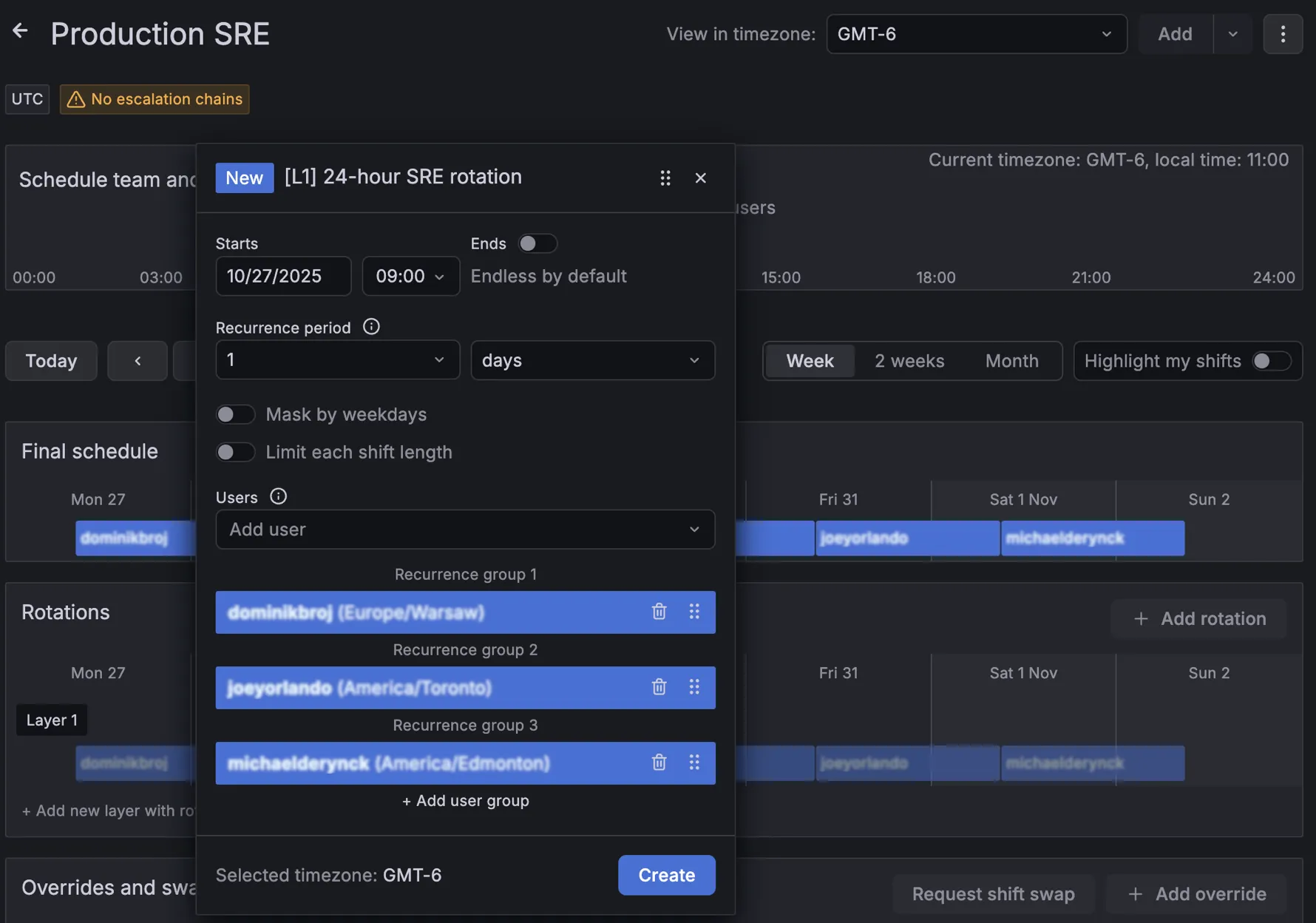
SRE teams that pay for Grafana Cloud, write their alert rules in Grafana alerting, and want the page to carry the dashboard link and the metric value without a webhook in between. The managed successor to Grafana OnCall, which merged with Grafana Incident in April 2025.
Notable features
- Native alert routing from Grafana alerting, with escalation chains, schedules, shifts and routes.
- ChatOps in Slack and Teams for acknowledging, escalating and declaring incidents.
- Incident management in the same app, with timelines and post-incident review.
- Mobile app with push, SMS and phone.
- Terraform provider and API, plus a migrator for teams coming from OnCall OSS.
Why choose Grafana Cloud IRM over FireHydrant
No webhook between the alert and the page. If the alert rule already lives in Grafana, IRM sees it natively. FireHydrant Signals receives the same alert through a webhook and loses the dashboard context on the way.
Cheaper for a small rotation. The platform fee is $19/mo with 3 active IRM users included, then $20 per additional active user. A 10-person rotation is $159/mo, against $250/mo on FireHydrant Pro.
One vendor for observability and paging. For a team already paying Grafana for metrics, logs and traces, adding IRM is a line on an existing invoice rather than a new vendor review.
Where Grafana Cloud IRM falls short
Active user is a broad definition. Anyone in a schedule or escalation chain during the month counts, whether or not they were paged. A 20-person rotation is $359/mo, and the price advantage over FireHydrant shrinks.
Nothing outside Grafana. No uptime checks, no public status page, and alerts from other sources arrive through webhooks like anywhere else. If Grafana is not your alert source, the reason to pick IRM disappears.
No runbooks and thinner lifecycle. IRM's incident management is lighter than FireHydrant's runbooks, service catalog and retrospective templates.
The OSS path is closed. Grafana OnCall OSS was archived in March 2026 and its SMS and push relay switched off. IRM is a Cloud product only. Our Grafana OnCall alternatives guide covers that migration.
Pricing
From Grafana's pricing page:
- Free: up to 3 active IRM users per month
- Pro: $19/mo platform fee including 3 active IRM users, then $20 per additional active IRM user, with volume discounts
- Enterprise: from a $25,000 yearly commitment
A 20-person rotation is $359/mo on Pro.
Choose Grafana Cloud IRM if
Grafana alerting is already the source of every page and you have no self-hosting requirement. Skip it if your alerts come from elsewhere, if you need a status page, or if you want to stop counting every engineer in the rotation.
6. GoAlert: best open-source, self-hosted on-call scheduling
Perfect for
Teams that need to keep on-call scheduling on their own servers for data residency or policy reasons, and have someone to operate one more service. The only open-source project that covers FireHydrant Signals' core job: schedules, rotations and escalation policies with real paging.
Notable features
- On-call schedules, rotations and temporary overrides with calendar subscriptions.
- Escalation policies with repeat steps.
- Alertmanager, Grafana, generic webhook and email integrations for inbound alerts.
- SMS and voice through your own Twilio account, plus Slack channel notifications.
- Single Go binary on PostgreSQL, maintained by Target under the Apache 2.0 license.
Why choose GoAlert over FireHydrant
Your data stays on your infrastructure. No vendor sees your alert payloads, your schedules or your responders' phone numbers. For a regulated team that was struggling to get FireHydrant through a data-residency review, this ends the conversation.
Zero license cost. A 20-person team pays for a small server, a Postgres instance and Twilio usage. Against FireHydrant Pro's $500/mo, that funds a lot of engineer hours for operating it.
Lighter than the alternatives. One binary and a database. Grafana OnCall OSS needed Django, Celery, Redis and MySQL.
Where GoAlert falls short
Release cadence. The last release, v0.34.1, dates from October 2024, after v0.34.0 in August 2024 and v0.33.0 in November 2023. The project is alive but slow. Read the commit log before betting your paging on it.
No mobile app. Pages arrive by SMS, voice, email or Slack.
No incident management, no runbooks, no status page. GoAlert replaces Signals, not FireHydrant. You keep coordinating incidents somewhere else and communicating with customers somewhere else.
You are the on-call for the on-call tool. If GoAlert goes down at 3 a.m., nobody pages you about it. Monitor it from the outside, with Hyperping or anything else that runs off your infrastructure.
Pricing
Free. You pay for a server, PostgreSQL and Twilio usage.
Choose GoAlert if
Self-hosting is a hard requirement and Slack plus Twilio are enough channels. If the requirement is "open source" rather than "self-hosted", weigh whether a slow-moving project is better than a managed tool you can leave in a month.
Head-to-head decisions
incident.io vs FireHydrant: which for Slack-native response?
incident.io runs the whole incident in Slack or Teams with opinionated defaults, and AI post-mortems ship on its Pro plan. FireHydrant keeps the incident in its own web app, leads with per-service runbooks and a service catalog, and gates AI behind Enterprise. On price they meet in the middle: a 20-person team is $500/mo on either FireHydrant Pro or incident.io Team with on-call. Pick incident.io if adoption by the whole company is the goal and the post-mortem backlog is the pain. Pick FireHydrant if you have documented runbooks, an SRE function that owns the process, and a preference for a tool that does not impose one.
FireHydrant vs Rootly: which for on-call and automation?
Rootly sells On-Call Essentials on its own at $20/user/mo, with shadow rotations, PTO handling and gap detection. FireHydrant bundles Signals into the $25/responder Pro plan and has the deeper runbook engine. Rootly's workflow builder reaches further across Jira, GitHub and Zoom; FireHydrant's runbooks execute more predictably for the "every SEV1 does exactly this" case. Rootly has five times the mindshare on PeerSpot, which shows up in hiring and in integration partners. Pick Rootly for automation reach and a standalone on-call module. Pick FireHydrant for runbook discipline.
Hyperping vs FireHydrant: do I need a lifecycle platform?
Count last quarter's incidents. If fewer than five a month needed more than one person and a channel, you were paying for coordination you did not use. Hyperping covers detection, paging, escalation and the status page for about $149/mo at 20 seats billed yearly, and does not accept Alertmanager webhooks. FireHydrant covers paging, coordination and runbooks for $500/mo at the same size, and does not check whether your site is up. Most teams under 30 engineers need the first list.
Grafana Cloud IRM vs FireHydrant: which for a Grafana shop?
If every alert rule is in Grafana alerting, IRM pages with the dashboard attached and costs $159/mo for a 10-person rotation. FireHydrant receives the same alert by webhook, loses the context, and costs $250/mo. Above 20 people the gap narrows, and FireHydrant's runbooks and status pages start to matter. Pick IRM when Grafana is the alert source and you want one vendor. Pick FireHydrant when alerts come from several sources or when the lifecycle features are the reason you are shopping.
PagerDuty vs FireHydrant: which for large enterprises?
PagerDuty has the routing engine, the 750+ integrations and the procurement comfort. FireHydrant has runbooks, a service catalog and a Signals product it says saves PagerDuty customers 50% on average. For an organization above 200 engineers with ServiceNow in the loop, PagerDuty. For one that has decided the response process is the thing to fix and can live with a 5-integration cap on Pro or an Enterprise quote, FireHydrant. Many run both during a multi-year transition.
Decision framework
By team size:
- Solo or small team (1 to 10): Hyperping, or GoAlert if self-hosting is required.
- Mid-size (10 to 50): Hyperping for monitoring plus on-call plus status page, incident.io if response happens in Slack, Grafana Cloud IRM if Grafana is the alert source.
- Large (50 to 200): incident.io or Rootly for chat-native response, PagerDuty if scheduling complexity dominates.
- Enterprise (200+): PagerDuty, Rootly Enterprise, or FireHydrant Enterprise itself.
By where alerts come from:
- Uptime, SSL and cron checks: Hyperping, and retire the separate monitor.
- Grafana alerting: Grafana Cloud IRM.
- Alertmanager, Datadog or a mix: incident.io, Rootly, PagerDuty or GoAlert.
By workflow:
- Slack-native, opinionated defaults: incident.io.
- Slack-native, deep workflow automation: Rootly.
- Web-app-first, complex routing: PagerDuty.
- Runbooks and a service catalog at the center: stay on FireHydrant.
- Self-hosted: GoAlert.
By budget (20-person team, yearly billing):
- Under $200/mo: Hyperping Pro (about $149/mo).
- $200 to $400/mo: Grafana Cloud IRM ($359/mo), Rootly On-Call Essentials ($400/mo), incident.io On-call ($400/mo).
- $400 to $600/mo: PagerDuty Professional ($420/mo), incident.io Team with on-call ($500/mo), FireHydrant Pro ($500/mo).
- $800/mo and up: PagerDuty's Essential platform tier ($1,000/mo, billed $12,000 upfront), Rootly with both modules ($800/mo), FireHydrant Enterprise.
Full list of FireHydrant alternatives I considered
Pricing is as displayed on each vendor's site in September 2026 and varies with usage and team size.
| Name | Pricing (approx. 2026) | Main strength | Main weakness |
|---|---|---|---|
| Hyperping | Free; Essentials $24/mo; Pro $74/mo; Business $249/mo, seats included | Monitoring, on-call and status pages on one flat plan | No inbound Alertmanager webhooks; no runbooks |
| incident.io | Team $15/user/mo + $10 on-call; Pro $25 + $20; On-call only $20 | Slack-native lifecycle, AI post-mortems on Pro | Two meters stack; Slack-dependent |
| Rootly | On-Call $20/user/mo; Incident Response $20/user/mo | Workflow reach, shadow rotations, PTO-aware schedules | Two modules double the bill; no free tier |
| PagerDuty | Professional $21/user/mo; platform from $2,800/yr with AIOps | Routing depth, 750+ integrations, procurement comfort | Cost; incident lives in the web app |
| Grafana Cloud IRM | $19/mo platform + $20 per active IRM user; free to 3 users | Native Grafana alerting context | Nothing outside Grafana; every rotation member counts |
| GoAlert | Free, self-hosted | Schedules, escalations and Twilio paging on your servers | Last release October 2024; no incident layer |
| FireHydrant (for reference) | Free to 10 responders; Pro $25/responder/mo; Enterprise custom | Runbooks, service catalog, Signals bundled | AI and analytics on Enterprise; SMS and voice extra |
| Better Stack | Free; paid from $29/mo plus per-responder and per-page add-ons | Monitoring, logs and incidents in one polished UI | Add-ons drift the bill |
| Squadcast (SolarWinds) | Free to 5 users; Pro $12/user/mo; Premium $19/user/mo | Cheapest credible on-call with SLO tracking | Post-acquisition roadmap unclear |
| Opsgenie (Atlassian) | Bundled in JSM | Jira integration | Shuts down April 2027 |
| Blameless | Contact sales | SRE-practice post-mortems | Opaque pricing; momentum lagged |
| xMatters | From ~$9/user/mo; free to 10 users | Analytics and complex workflows | Dated interface |
| Zenduty (Xurrent IMR) | Free then ~$5/user/mo; up to $21 Enterprise | Affordable AI-driven RCA and post-mortems | Smaller brand |
| iLert | Free (limited); Pro ~€19/user/mo | EU-hosted, status pages included | Regional focus |
| Splunk On-Call (VictorOps) | Contact sales | Tight Splunk integration | Aging UI; weak standalone |
| Jira Service Management | Free (limited); Standard ~$20/agent/mo; Premium ~$49 | Atlassian-native ITSM | Ticket-first, not real-time response |
| ServiceNow | Custom, often $100+/user/mo | Full ITSM suite | Long implementation |
| Freshservice | From ~$19/agent/mo | Friendly cloud ITSM | Helpdesk-oriented |
| OneUptime | Open source; cloud from usage | Monitoring, status pages and on-call, self-hostable | Heavy to operate; smaller community |
| Keep | Open source | Alert aggregation and deduplication | Not an on-call scheduler |
| PagerTree | From ~$10/user/mo | Simple alert routing | Thin lifecycle |
| Spike.sh | From ~$5/mo | Budget paging | Basic features |
| All Quiet | From ~$5/user/mo | Budget on-call | Newer entrant |
| OnPage | ~$12/user/mo | Secure paging for regulated sectors | Niche |
| BigPanda | Contact sales | AIOps correlation | Not a full lifecycle tool |
| BMC Helix | Contact sales | Enterprise ITSM | Costly and complex |
Common mistakes when leaving FireHydrant
A few patterns from the threads and from teams I have talked to:
- Replacing the runbooks with nothing. If your team relied on FireHydrant runbooks to know what to do in a SEV1, moving to a pager-only tool (Hyperping, GoAlert, PagerDuty Professional) means those steps now live in a wiki. Write them down before you switch, not after the first incident without them.
- Counting only the per-user price. FireHydrant Pro at $25 looks close to incident.io Team at $15 until you add incident.io's on-call meter. And Hyperping's $74/mo Pro plan looks small until you add 10 seats at $9. Price the whole team, on the plan you will actually use, at the billing period you will actually pick.
- Forgetting SMS and voice. FireHydrant Pro sells them separately, Grafana Cloud IRM includes them, Hyperping includes a monthly SMS quota per plan, GoAlert bills through your own Twilio account. Whichever tool you pick, fire a test page through every channel before cutting over.
- Losing the Alertmanager path. If some of your pages come from Prometheus rules, confirm the new tool accepts the webhook. Hyperping does not; incident.io, Rootly, PagerDuty, Grafana Cloud IRM and GoAlert do.
- Cutting over in one day. Run both tools for two weeks. The r/sre threads are full of "the demo was great, the daily reality less so" stories, and parallel running is the only way to find out before it matters.
How to use Hyperping for on-call scheduling
The workflow below moves a team's on-call rotation off FireHydrant Signals in about two weeks, most of it parallel running.
1. Create the monitors that will page you
Add one monitor per endpoint that used to reach FireHydrant through a webhook: HTTP checks with status code and keyword assertions, SSL expiry, cron heartbeats for scheduled jobs, and Playwright browser checks for login and checkout flows. Pick the interval (30 seconds on Essentials and Pro) and the regions. Turn on grouped alerts so a shared outage pages once.
2. Build the on-call schedule
Open On-Call in the sidebar and create one schedule per team. Add a rotation with its members, the handoff time and the timezone, and compare the calendar preview with the FireHydrant rotation you are replacing. Overrides live on the rotation, so a swapped shift does not mean rebuilding the schedule.
3. Write the escalation policy
Create an escalation policy with ordered steps: Slack or Teams at 0 minutes, SMS to the on-call schedule after 5 minutes, a phone call to the schedule and the team lead after 10 more. Assign the policy to the monitors from step 1.
4. Connect notification channels
Add the Slack or Teams integration, then ask every responder to add and verify a phone number in their profile. If part of the organization stays on PagerDuty or Opsgenie during the transition, add the PagerDuty or Opsgenie integration so Hyperping incidents reach them too.
5. Publish the status page
Create a status page, attach the monitors, and put it on your own domain. Enable subscribers so customers get the update by email instead of asking support. On Pro, protect it with a password or email access codes if it is for internal use.
6. Run both tools in parallel and cut over
Leave FireHydrant Signals paging for two weeks while Hyperping runs alongside. Compare time to first notification and time to acknowledge, fire a test incident through every escalation step, then disable the FireHydrant escalation policies and point runbooks at Hyperping.
The bottom line
There is no single best FireHydrant alternative, only the best tool for the layer FireHydrant was doing for you.
- For monitoring, on-call and status pages on one flat plan: Hyperping.
- For Slack-native response with on-call attached and AI post-mortems on a published price: incident.io.
- For deeper workflow automation and a standalone on-call module with shadows and PTO: Rootly.
- For enterprise routing, 750+ integrations and procurement comfort: PagerDuty.
- For a rotation whose alerts already come from Grafana: Grafana Cloud IRM.
- For open-source, self-hosted on-call scheduling: GoAlert.
If you want monitoring that catches issues in 30 seconds, on-call schedules with escalation policies, and a status page your customers will actually check, on a plan that does not add a line item for every hire, try Hyperping free.
Related reading
- Best incident.io alternatives: if incident.io is the other name on your shortlist
- Best Rootly alternatives: the same evaluation from the Rootly side
- Grafana OnCall alternatives: what stopped in OnCall OSS and where to go
- Best PagerDuty alternatives: if PagerDuty is on the list for procurement reasons
- Top 10 on-call scheduling tools: the broader category
- On-call scheduling for small teams: if your rotation has 2 or 3 people
- Hyperping pricing
FAQ
What is the best FireHydrant alternative for on-call scheduling? ▼
For a team whose pages mostly come from uptime checks, Hyperping: on-call schedules, escalation policies, monitoring and status pages on one flat plan from $24/mo. For Slack-native response with on-call attached, incident.io. For deeper workflow automation and a rotation model with shadows and PTO, Rootly. For enterprise routing with 750+ integrations, PagerDuty. For alerts that already come from Grafana, Grafana Cloud IRM. For a self-hosted, open-source pager, GoAlert.
What's the best replacement for FireHydrant for on-call scheduling? ▼
It depends on where your alerts come from. If most pages are 'the site is down', Hyperping replaces the check, the pager and the status page at once, and a 20-person team pays about $149/mo billed yearly. If your alerts come from Prometheus, Datadog or Grafana and you need a webhook-driven pager, Rootly On-Call Essentials ($20/user/mo) or incident.io On-call ($20/user/mo) are the direct replacements for FireHydrant Signals, and both accept those webhooks.
incident.io vs FireHydrant: which is better? ▼
incident.io runs the whole incident inside Slack or Microsoft Teams with opinionated defaults, and its AI post-mortems ship on the Pro plan. FireHydrant keeps the incident in its own web app, is built around per-service runbooks and a service catalog, and reserves AI summaries, retrospectives and analytics for the Enterprise plan. Teams that want fast adoption and chat-native response pick incident.io. Teams with documented runbooks and an SRE function that owns the process pick FireHydrant.
FireHydrant vs Rootly: what's the difference? ▼
Rootly is Slack-native and sells On-Call and Incident Response as two modules at $20/user/mo each, with schedule features FireHydrant lacks such as shadow rotations, PTO handling and gap detection. FireHydrant bundles on-call (Signals) into its $25/responder/mo Pro plan and leads with runbooks and a service catalog. Rootly has more mindshare (8.5% vs 1.6% on PeerSpot in December 2025), FireHydrant has the deeper runbook engine.
How much does FireHydrant cost? ▼
As listed on firehydrant.com in September 2026: Free for up to 10 responders with 2 runbooks, 1 public status page and 3 integrations; Pro at $25 per responder per month billed annually, which includes Signals on-call and alerting but sells SMS and voice notifications separately; Enterprise on custom pricing, which is where AI features, private status pages, alert grouping, incident analytics and audit logs live. A 20-person team on Pro pays $500/mo before SMS and voice.
Is there an open-source alternative to FireHydrant? ▼
For the on-call layer, GoAlert, maintained by Target under the Apache 2.0 license: schedules, rotations, escalation policies, Alertmanager and Grafana webhooks, and SMS or voice through your own Twilio account. It has no incident channels, no runbooks and no status page, and its last release dates from October 2024. There is no open-source project that replaces FireHydrant's full incident lifecycle.