Chapter 6 of 20Browse the complete guide
Playwright Waits and Timeouts: How Auto-Waiting Works
Understand Playwright auto-waiting, the timeout hierarchy, and how to replace waitForTimeout and waitForSelector with assertions that make tests reliable.
The auto-waiting model
Most flaky browser tests fail for the same reason: the test moves faster than the app. Playwright's core defense against this is auto-waiting. Before performing any action, it runs a set of actionability checks on the target element and keeps retrying them until they all pass or the timeout expires.
Before a click, Playwright waits for the element to be:
- attached to the DOM
- visible, with a non-empty bounding box and no
visibility: hidden - stable, meaning its bounding box stayed the same across two consecutive animation frames, so it is not mid-animation
- able to receive pointer events at the click point, so no overlay covers it
- enabled
Actions that type, like fill, also wait for the element to be editable. You never call these checks yourself. They are built into every action.
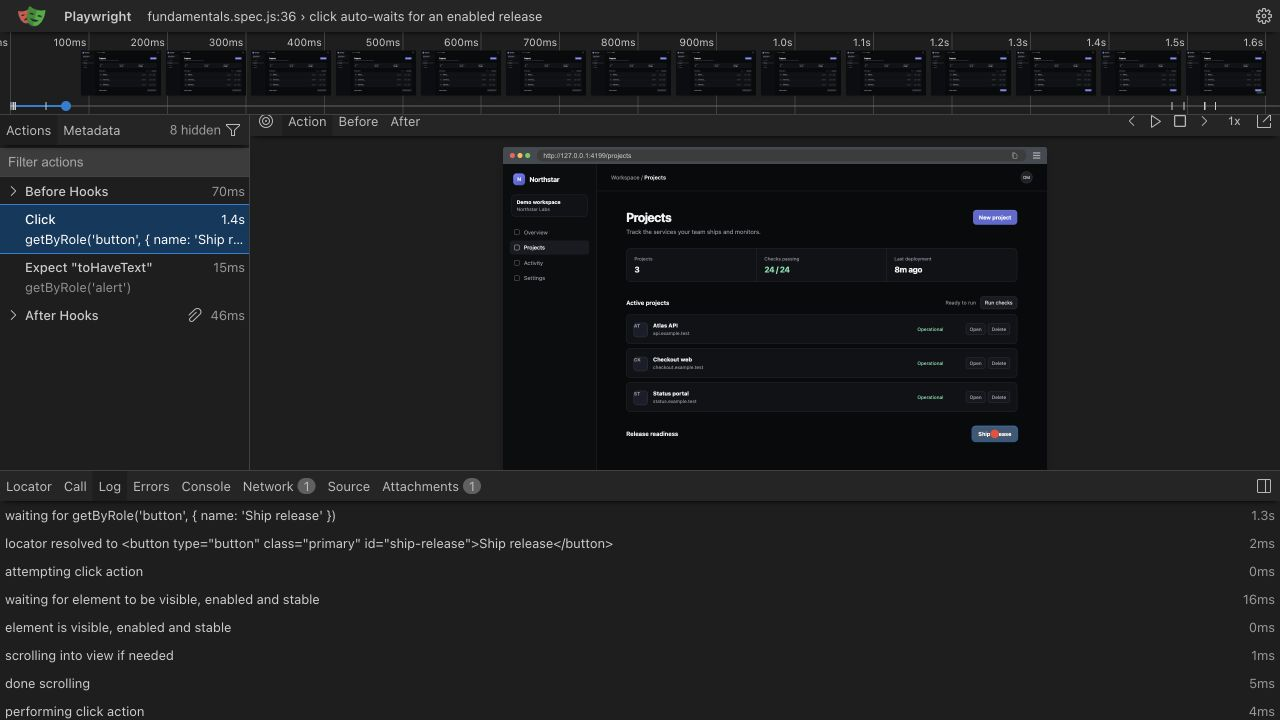
The other half of the model is web-first assertions. An assertion like this does not check once and give up:
await expect(page.getByRole('alert')).toHaveText('Payment accepted');It re-queries the element and re-checks the condition repeatedly until it passes or the expect timeout runs out. Between auto-waiting actions and retrying assertions, almost every explicit wait you would write in Selenium or Cypress becomes unnecessary. If you find yourself reaching for a manual wait, the first question to ask is which condition you are actually waiting for, because there is usually an assertion that expresses it directly. The assertions guide covers the full list.
The timeout hierarchy
Playwright has several timeouts that nest inside each other. Knowing which one fired tells you where to look when a test fails.
| Timeout | Default | What it bounds | Where to configure |
|---|---|---|---|
| Test timeout | 30 seconds | One test, including its beforeEach hooks | timeout in config, test.setTimeout() |
| Expect timeout | 5 seconds | Each web-first assertion's retry loop | expect.timeout in config, { timeout } on the assertion |
| Action timeout | None | Each action such as click or fill | use.actionTimeout in config, { timeout } on the action |
| Navigation timeout | None | goto, reload, waitForURL | use.navigationTimeout in config, { timeout } on the call |
| Global timeout | None | The entire test run | globalTimeout in config |
Action and navigation timeouts default to unlimited, which in practice means they are capped by the 30 second test timeout. The values nest: an action can never get more time than the test it runs in, so setting actionTimeout: 60_000 with the default test timeout has no effect.
All of these live in playwright.config.ts:
import { defineConfig } from '@playwright/test';

export default defineConfig({
  timeout: 30_000,
  globalTimeout: 60 * 60 * 1000,
  expect: {
    timeout: 5_000,
  },
  use: {
    actionTimeout: 10_000,
    navigationTimeout: 15_000,
  },
});
You can also override them per test or per call, which beats raising the global defaults to accommodate one slow page:
test('generates a large export', async ({ page }) => {
  test.setTimeout(120_000);

  await page.getByRole('button', { name: 'Export' }).click();
  await expect(page.getByText('Export complete')).toBeVisible({ timeout: 60_000 });
});
test.slow() is a lighter option that triples the test timeout without hardcoding a number.
Anti-patterns and how to fix them
page.waitForTimeout
// Bad
await page.getByRole('button', { name: 'Save' }).click();
await page.waitForTimeout(3000);
await expect(page.getByText('Saved')).toBeVisible();
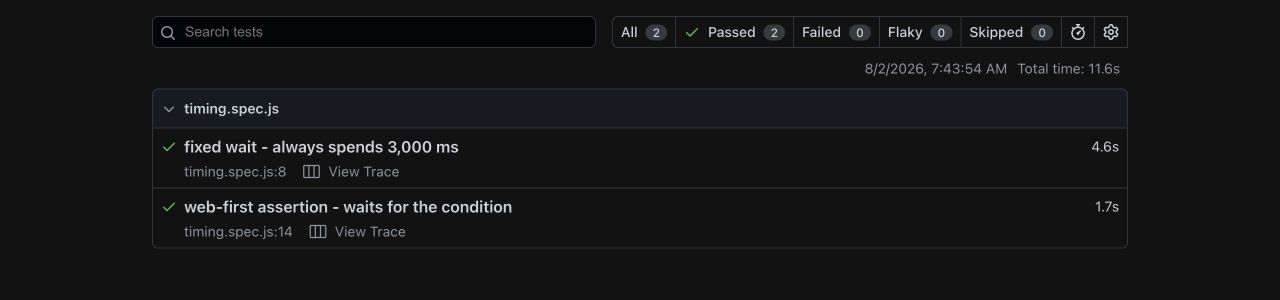
A hard sleep waits for time, not for the app. When the save takes 300ms, you burn 2.7 seconds on every run, and a suite full of these adds minutes of dead time. When the save takes 4 seconds on a loaded CI runner, the test still fails. You get the worst of both: slower suites and residual flakiness.
The fix is to name the condition you were sleeping for and assert on it:
// Good
await page.getByRole('button', { name: 'Save' }).click();
await expect(page.getByText('Saved')).toBeVisible();
The assertion waits exactly as long as needed, up to the expect timeout, and not a millisecond more.
page.waitForSelector
// Legacy
await page.waitForSelector('.results-list');
waitForSelector predates locators and web-first assertions. It still works, but the docs steer you away from it because it returns an ElementHandle pinned to one specific DOM node, which goes stale if the app re-renders. A locator plus an assertion does the same job and re-queries the DOM on every retry:
// Modern
await expect(page.locator('.results-list')).toBeVisible();
If you need the element afterwards, the locator is already there to act on. See the locators guide for how locator re-querying works.
Waiting for networkidle
// Discouraged
await page.goto('/dashboard', { waitUntil: 'networkidle' });
networkidle resolves when there have been no network connections for 500ms. The official docs mark it as discouraged. Apps that poll, stream, or load analytics may never go quiet, so the wait times out even though the page is fine. And a quiet network proves nothing about the UI, since the app may still be rendering the data it fetched. Wait for what a user would see instead:
// Good
await page.goto('/dashboard');
await expect(page.getByRole('heading', { name: 'Dashboard' })).toBeVisible();
Explicit waits that earn their place
Some waits are legitimate because they express a real condition that assertions on elements cannot capture.
page.waitForURL handles client-side redirects cleanly, for example after a login:
await page.getByRole('button', { name: 'Sign in' }).click();
await page.waitForURL('**/dashboard');
page.waitForResponse and page.waitForRequest are useful for API-driven UIs where you want to synchronize on a specific call. Set up the wait before triggering the action so the response cannot slip past you:
const responsePromise = page.waitForResponse(
  (response) => response.url().includes('/api/search') && response.status() === 200
);
await page.getByRole('button', { name: 'Search' }).click();
const response = await responsePromise;
page.waitForLoadState('load') or ('domcontentloaded') occasionally helps when a script you need runs on those events, though goto already waits for load by default.
For conditions Playwright has no built-in assertion for, expect.poll retries an async function until its return value matches:
await expect
  .poll(async () => {
    const response = await page.request.get('/api/jobs/42');
    return (await response.json()).status;
  }, { timeout: 20_000 })
  .toBe('completed');
And expect(async () => { ... }).toPass() retries a whole block of assertions together, which suits multi-step checks that need to succeed as a unit.
Decoding the two timeout errors
The two messages you will see most often point at different layers of the hierarchy.
Test timeout of 30000ms exceeded means the entire test ran out of time. Some step consumed the remaining budget, and the error output names it, typically as a pending action or assertion under "Pending operations". Look at that step, not the timeout value. Raising the test timeout is only the right move when the test is genuinely long, such as a large file upload.
Timeout 5000ms exceeded on an assertion, phrased like Timed out 5000ms waiting for expect(locator).toBeVisible(), means one web-first assertion retried for the full expect timeout without passing. The error shows the locator, what it expected, and what it actually found on the last retry. Read the received value first. It usually reveals one of three problems: the locator matches nothing (check the selector), the locator matches the wrong element (tighten it), or the app really is in a different state than the test assumes (fix the test's model of the flow).
Flakiness usually means you raced the app
When a test passes locally and fails in CI one run out of ten, the cause is rarely Playwright. It is almost always a race between the test and the app, and slower CI hardware just widens the window.
A common example is clicking a button that the framework re-renders. The test clicks a submit button, React swaps in a new button element during a state update, and the click lands on a detached node or on the wrong spot. The symptom is a click that "did nothing".
The fix is to make the test wait for the state it depends on before acting, using a precise locator and an assertion:
// Wait for the app to settle into the expected state first
await expect(page.getByRole('button', { name: 'Place order' })).toBeEnabled();
await page.getByRole('button', { name: 'Place order' }).click();
await expect(page.getByRole('heading', { name: 'Order confirmed' })).toBeVisible();
The pattern generalizes: assert your way into a known state, act, then assert the outcome. Tests written this way document the app's behavior and stay stable as timing shifts. For the structural side of this, see writing Playwright tests, and keep the cheat sheet nearby for the exact signatures.
Run it in production
The same script that guards your test suite can guard your production site. A Hyperping Browser Check runs your Playwright script on a schedule from multiple regions and alerts you the moment a step fails, so a broken login or checkout gets caught before your users report it. Auto-waiting behaves exactly the same there, so a script that is stable in CI is stable as a monitor.