Chapter 7 of 20Browse the complete guide
Playwright Codegen: Record Tests by Clicking
Learn how to use Playwright codegen to record tests by clicking through your app, pick resilient locators, record logged-in sessions, and clean up the output.
What codegen does
Playwright ships with a test generator that records your interactions in a real browser and turns them into test code. You click through a flow once, and codegen emits a TypeScript test that replays it. It is the fastest way to get a first draft of a test, and a genuinely good way to learn how Playwright code is supposed to look.
The output quality is what makes it worth using. Codegen does not record brittle CSS paths like div > div:nth-child(3) > span. It runs the page through the same locator engine you would use by hand and prefers, in order, role locators, text and label locators, and data-testid attributes. A recorded click on a submit button comes out as:
await page.getByRole('button', { name: 'Sign in' }).click();That is the same locator an experienced Playwright user would write, which is why the locators guide and codegen agree with each other. If codegen falls back to an ugly selector for some element, that usually means the element has no accessible name, and fixing the markup improves both your tests and your accessibility.
Recording your first test
Codegen needs no configuration beyond an installed Playwright project. Point it at a URL:
npx playwright codegen demo.playwright.dev/todomvcTwo windows open: a browser showing the page, and the Playwright Inspector showing generated code. Interact with the page normally. Every click, fill, and keypress appends a line to the test in the Inspector:
import { test, expect } from '@playwright/test';

test('test', async ({ page }) => {
  await page.goto('https://demo.playwright.dev/todomvc/');
  await page.getByPlaceholder('What needs to be done?').fill('Buy milk');
  await page.getByPlaceholder('What needs to be done?').press('Enter');
  await page.getByPlaceholder('What needs to be done?').fill('Walk the dog');
  await page.getByPlaceholder('What needs to be done?').press('Enter');
});
When you are done, copy the code from the Inspector toolbar and paste it into a file in your tests directory. Run it with npx playwright test like any hand-written test.
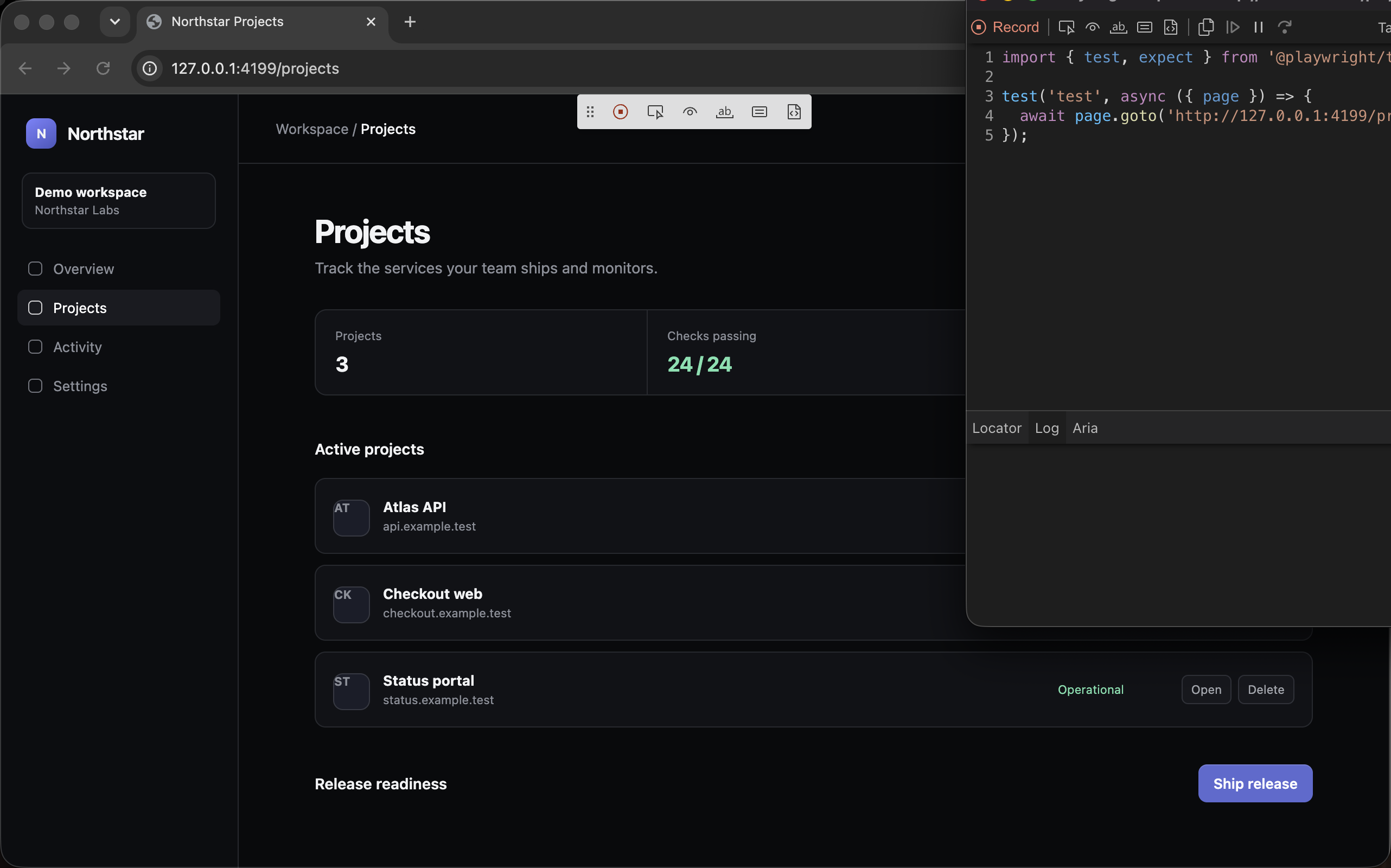
The Inspector window
Three controls in the Inspector matter day to day:
- The record button toggles recording on and off. Pause it when you need to click around without generating code, then resume for the part you care about.
- Pick locator lets you hover any element in the browser and shows the locator Playwright would generate for it, with a live edit field to test alternatives. This is useful far beyond recording; it is the quickest way to answer "what locator should I use for this element" while writing tests by hand.
- The assertion buttons in the toolbar let you record a few kinds of checks while recording: assert visibility, assert text, and assert value. Clicking one, then clicking an element, generates the matching
expectline.
The clear button wipes the recorded test so you can start the flow over without relaunching.
Emulation flags
Codegen accepts flags that configure the recording browser, so you can record in the same conditions your test will run in:
# Record on an emulated device
npx playwright codegen --device="iPhone 13" playwright.dev

# Record at a specific viewport size
npx playwright codegen --viewport-size="800,600" playwright.dev

# Record in dark mode
npx playwright codegen --color-scheme=dark playwright.dev
The most useful pair for real apps handles authentication. Log in once, save the browser state, then reuse it for later recording sessions:
# First session: log in manually, state is saved on exit
npx playwright codegen --save-storage=auth.json app.example.com

# Later sessions: start already logged in
npx playwright codegen --load-storage=auth.json app.example.com/settings
The auth.json file contains cookies and local storage, so treat it like a credential and keep it out of git. With --load-storage you can record flows that live deep behind a login without re-recording the login itself every time.
From recording to real test
Treat codegen output as a draft, not a finished test. Recorded code replays actions faithfully but knows nothing about what the flow is supposed to prove. Three cleanup passes turn a recording into a test worth keeping.
First, rename it. Codegen names every test test, which tells a failing CI run nothing. Give it a behavior-focused name as covered in the guide to writing tests.
Second, add assertions. This is the big one. A recorded flow that clicks through checkout will happily pass while the order confirmation shows an error, because nothing checks the outcome. Even if you recorded a visibility assertion or two, the meaningful checks are yours to write:
// Recorded draft: actions only
test('test', async ({ page }) => {
  await page.goto('https://app.example.com/projects');
  await page.getByRole('button', { name: 'New project' }).click();
  await page.getByLabel('Project name').fill('Marketing site');
  await page.getByRole('button', { name: 'Create' }).click();
});

// After cleanup: named, and verifies the outcome
test('user can create a project', async ({ page }) => {
  await page.goto('https://app.example.com/projects');
  await page.getByRole('button', { name: 'New project' }).click();
  await page.getByLabel('Project name').fill('Marketing site');
  await page.getByRole('button', { name: 'Create' }).click();

  await expect(page.getByRole('heading', { name: 'Marketing site' })).toBeVisible();
  await expect(page).toHaveURL(/\/projects\/.+/);
});
The assertions guide covers which matchers to reach for. Third, extract repetition. If you recorded three flows that each start by navigating to the same page, move that into a beforeEach hook instead of keeping three copies.
The VS Code extension
The official Playwright extension for VS Code offers the same recording tools without leaving the editor. From the Testing sidebar you get:
- Record new, which opens a browser and writes a fresh test file as you interact.
- Record at cursor, which appends generated lines at your cursor position inside an existing test. This is the workflow that holds up best over time: hand-write the structure and assertions, then record the fiddly part of a flow directly into the middle of the test.
- Pick locator, which opens a browser, lets you hover an element, and puts the resulting locator on your clipboard.
Record at cursor changes codegen from "generate my whole test" into "type this locator for me", which is where it does the least damage and the most good.
Limits of recorded tests
Codegen has real limits, and knowing them saves you from maintaining a suite of fragile recordings:
| Limitation | Consequence |
|---|---|
| No assertions by default | Recorded tests pass as long as the clicks succeed, even when the feature is broken |
| Records literal values | Dynamic data like dates, generated names, or one-time codes get frozen into the script |
| One linear path | No branching, no retries around flaky UI, no data-driven variants |
| Verbose output | Every stray click and focus change is recorded, including your mistakes |
| No abstraction | Repeated setup is duplicated in full rather than shared through hooks or fixtures |
Recordings also age badly on flows that change often. A hand-written test built on stable role locators and a few well-chosen assertions survives a redesign far better than a 60-line recording of last quarter's UI.
A reasonable rule: use codegen to discover locators, to draft the skeleton of a flow, and to learn idiomatic Playwright. Hand-write anything with conditional logic, dynamic data, shared setup, or long-term importance. For a suite you will maintain for years, recording is the first ten percent of the work, and that is fine, because it is also the most tedious ten percent. Keep the cheat sheet nearby for the syntax you will write yourself.
Run it in production
A cleaned-up recording of your critical flow does not have to stop at CI. The same script can run every few minutes from multiple regions as a Hyperping Browser Check, with alerts when a step fails in production. Record the flow once, add assertions, and let it watch the live app around the clock.