DNS Monitoring
Get alerted when a DNS record stops resolving or resolves to the wrong value, before your users notice.
DNS problems are easy to miss: your servers stay up, your HTTP checks may keep passing from cached resolvers, yet part of your audience can no longer reach you. A DNS monitor queries your records on a schedule and treats a wrong or missing answer as downtime, so it goes through the same alerting pipeline as any other monitor.
What DNS monitoring catches
- Expired domains: When a domain registration lapses, its records stop resolving. A DNS monitor fails immediately instead of waiting for someone to report that your site is unreachable. To be warned before that happens, turn on domain expiry alerts.
- Hijacked or misconfigured records: The record still resolves, but to a value you didn't set. Pair the monitor with an expected answer so any unexpected change triggers an alert.
- Propagation failures: After a DNS change, some resolvers keep serving stale answers. Point monitors at specific nameservers to confirm the new value is live where it matters.
Create a DNS monitor
- Open the new monitor form
From your dashboard, click the New monitor card.
- Choose the DNS protocol
Select DNS in the protocol list.
- Enter the hostname
For example
example.com. Unlike HTTP monitors, you enter a bare hostname rather than a full URL. - Pick the record type
Optionally set an expected answer and a nameserver, both covered below.
- Save the monitor
Checks start right away at your chosen frequency.
DNS monitors share the rest of their configuration with other monitor types: check frequency, regions, and alert settings all work the same way. See Create a monitor for the general workflow.
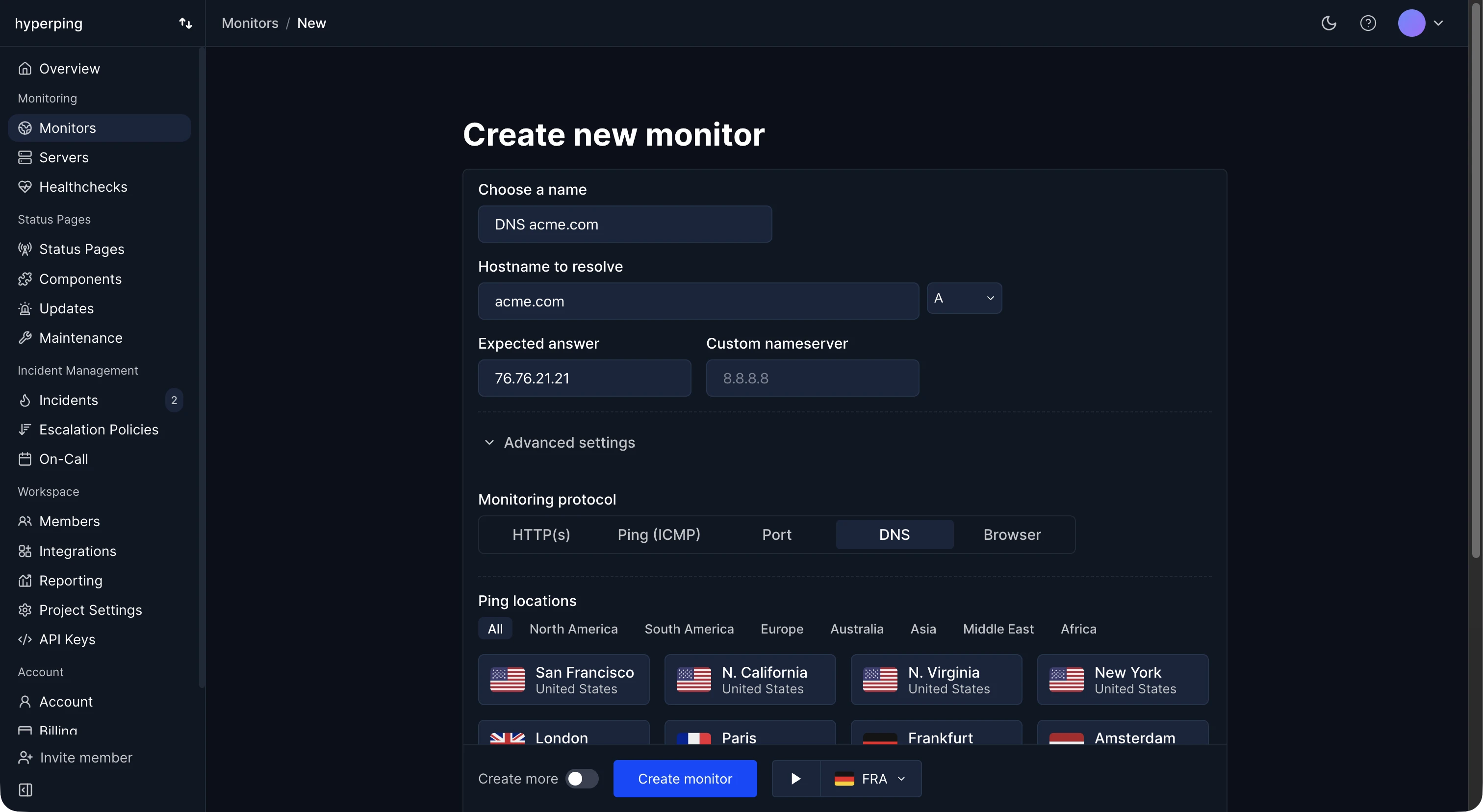
Choose a record type
Each DNS monitor checks one record type on the hostname. The default is A. Supported types:
- A: IPv4 address of the hostname.
- AAAA: IPv6 address of the hostname.
- CNAME: Alias pointing to another hostname.
- MX: Mail servers for the domain. Useful to catch email delivery breakage early.
- NS: Authoritative nameservers for the domain.
- TXT: Text records, such as SPF, DKIM, or domain verification entries.
- SOA: Start of authority record for the zone.
- SRV: Service locator records.
- CAA: Certificate authority authorization, controlling who can issue certificates for the domain.
- PTR: Reverse DNS lookup.
To watch several record types on the same domain, create one monitor per record type.
Validate answers with an expected value
By default, a DNS monitor is up as long as the query returns an answer. To also verify what it returns, set an expected answer. The monitor fails when no record contains the expected string.
For example, an A record monitor with the expected answer 192.0.2.1 stays up while the hostname resolves to that address, and goes down if the record is deleted or changed to point somewhere else. This is how you detect hijacked or accidentally edited records rather than just missing ones.
The match is a substring check that ignores case, and one matching record is enough, so for records with multiple values (like MX or TXT) you can validate that one specific entry is present. MX and SRV records are compared on their host (not the priority), SOA on its primary nameserver and CAA on its value.
Query a specific nameserver
By default, each monitoring region queries through its own resolver, which reflects what a typical visitor experiences. You can instead point a monitor at a specific nameserver, by IP address or hostname, for example 8.8.8.8 or ns1.example.net.
Querying a specific nameserver is useful when you want to:
- Check your authoritative nameservers directly, bypassing resolver caches, so you see record changes the moment they're published.
- Verify propagation on a public resolver after a DNS change.
- Compare answers across resolvers by creating one monitor per nameserver with the same expected answer.
Alerting and escalation
DNS monitors plug into the same alerting as HTTP monitors. When a check fails, you're notified on your configured channels, and you can attach an escalation policy so DNS incidents escalate through your team like any other outage. Alert delay settings apply too, so you can wait a few minutes before alerting or route failures straight to your on-call.
Create DNS monitors via the API
DNS monitors can be managed programmatically. With the monitors API, set protocol to dns and use the dns_record_type, dns_expected_answer, and dns_nameserver fields:
curl -X POST https://api.hyperping.io/v1/monitors \
  -H "Authorization: Bearer ${API_TOKEN}" \
  -H "Content-Type: application/json" \
  -d '{
    "name": "Website DNS",
    "url": "example.com",
    "protocol": "dns",
    "dns_record_type": "A",
    "dns_expected_answer": "192.0.2.1",
    "dns_nameserver": "8.8.8.8"
  }'
The same fields are available when updating a monitor, and through the MCP server. The Terraform provider doesn't manage DNS monitors yet.