To send SMS notifications to your status page subscribers, connect a Twilio account to your Hyperping project, then enable the SMS channel on the status page. Twilio sends the texts from a number you own, and bills them to your Twilio account. The whole setup takes about ten minutes, plus a few days of carrier registration if your subscribers are in the US.
I wrote this guide after walking a customer through it. The Hyperping side is short. Most of the waiting happens on the Twilio side, where US carrier rules decide whether your texts are delivered at all. Every screenshot below comes from a real Twilio account and a real Hyperping project, with the account details replaced by placeholders.
Key takeaways
- You need a paid Twilio account, an SMS-capable Twilio number, and a Hyperping plan that includes status page subscribers.
- Hyperping connects with your Account SID, Auth Token and phone number, and checks all three with Twilio before saving.
- US local numbers must be registered under an A2P 10DLC campaign or carriers block the messages. As of September 2026, Twilio charges a $4.50 or $46 one-time brand fee, a $15 campaign verification fee, and $1.50 to $10 per month per campaign.
- A US local number costs $1.15 per month on Twilio, and messages are billed per segment at Twilio's rates. Hyperping adds nothing on top.
- Subscribers get a text for each incident or maintenance update you publish, and when a monitor on the page goes down or comes back up.
What you need before you start
| Where | What | Notes |
|---|---|---|
| Twilio | A paid (upgraded) account | Trial accounts only text numbers you verified yourself |
| Twilio | An SMS-capable phone number | Local, toll-free or other, in your subscribers' country |
| Twilio | US carrier registration | A2P 10DLC for local numbers, toll-free verification for toll-free numbers |
| Hyperping | A plan with status page subscribers | Subscriber limits per plan are on the pricing page |
| Hyperping | A status page | Any v2 status page in the same project |
The Twilio connection belongs to the Hyperping project, so every status page in that project sends from the same number.
Step 1: Find your Account SID and Auth Token
Sign in to the Twilio Console and scroll down the home page to the Account Info panel. Copy the Account SID, which starts with AC followed by 32 characters, and the Auth Token, which is hidden until you click Show.
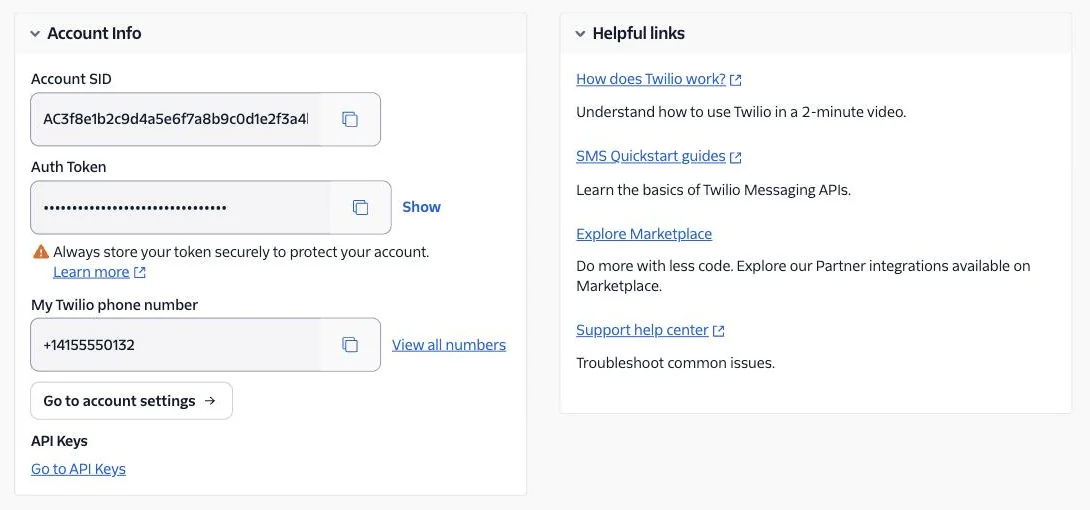
If your company has several Twilio accounts or subaccounts, make sure the account selector at the top of the Console shows the one that owns the number you plan to use. The SID, the token and the number must all belong to the same account.
Step 2: Buy an SMS-capable phone number
Go to Phone Numbers > Manage > Buy a number. Pick the country where most of your subscribers live, tick SMS under Capabilities, and search.
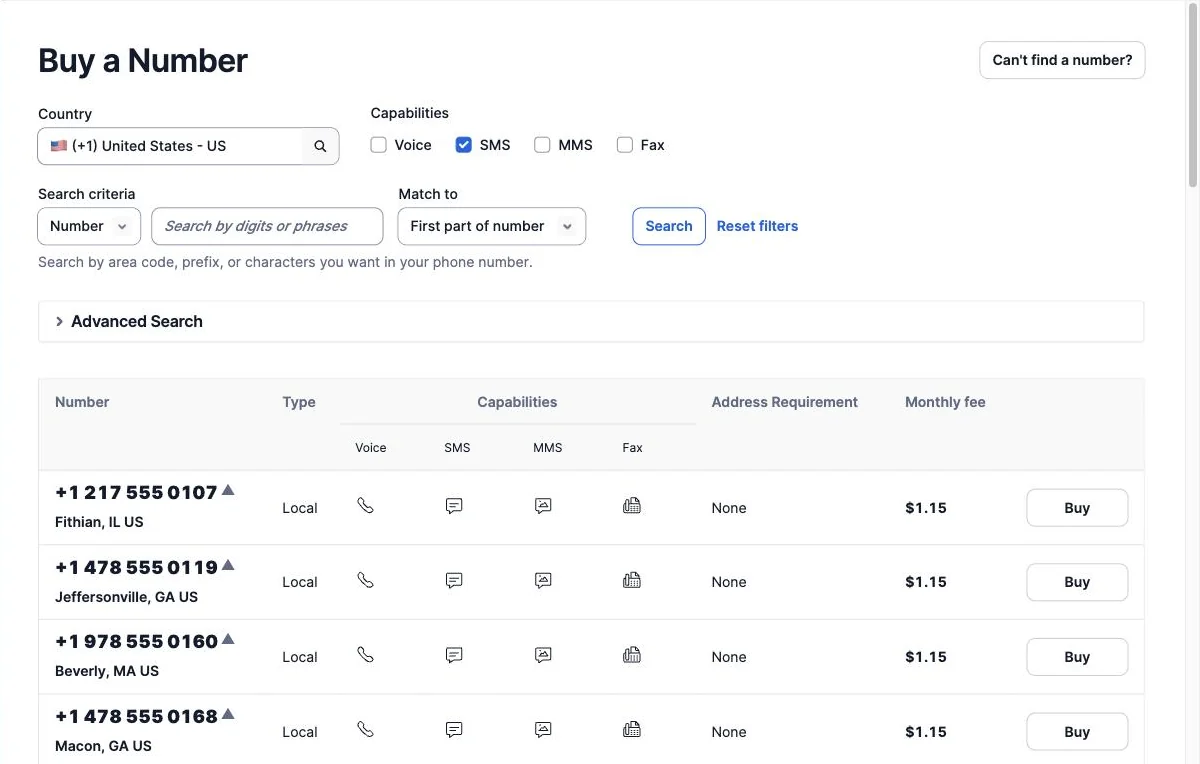
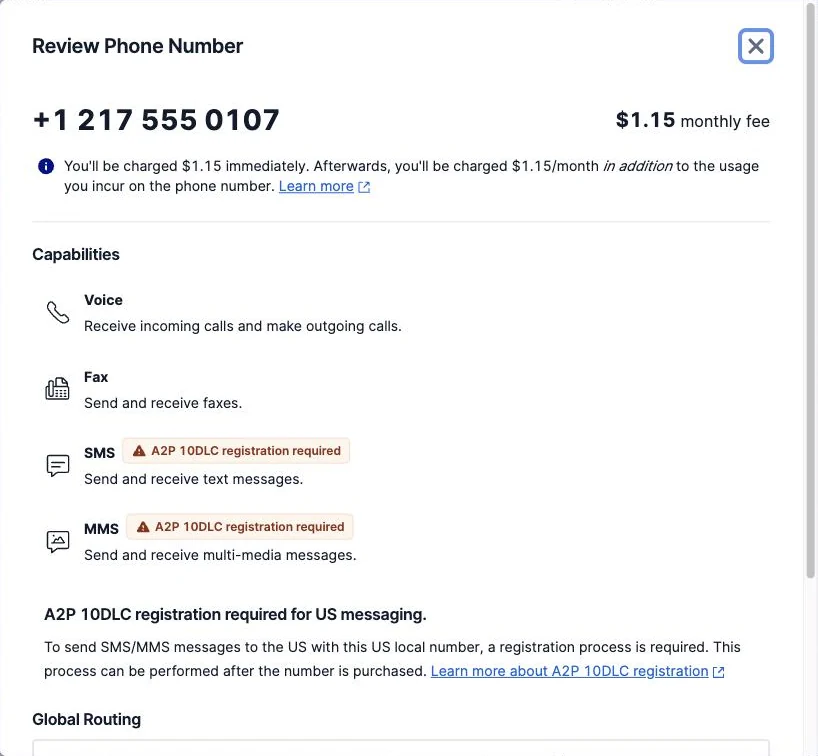
Click Buy next to a number to review it. For a US local number, Twilio shows the monthly fee and flags SMS and MMS with A2P 10DLC registration required. That label is the next step, not an error.
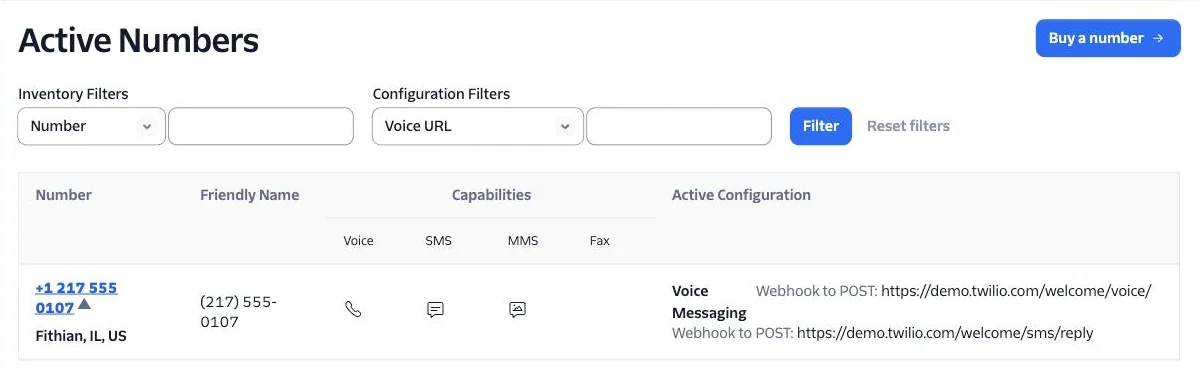
The number then appears under Active numbers. Keep it in E.164 format (+12175550107), which is the format Hyperping asks for.
If you already own a number that sends SMS for another use, you can reuse it. Subscribers will see the same sender for both.
Step 3: Register the number for US messaging
This is the step people skip, and the one that silently breaks delivery. US carriers require every application-to-person message sent from a local number to go through an approved A2P 10DLC campaign. Without it, Twilio accepts the request and the carrier blocks the message. The Console then shows an error like this one:

Open Messaging > Regulatory Compliance > A2P 10DLC Overview to start the registration. Twilio walks you through three stages: a customer profile, a brand, and a campaign.
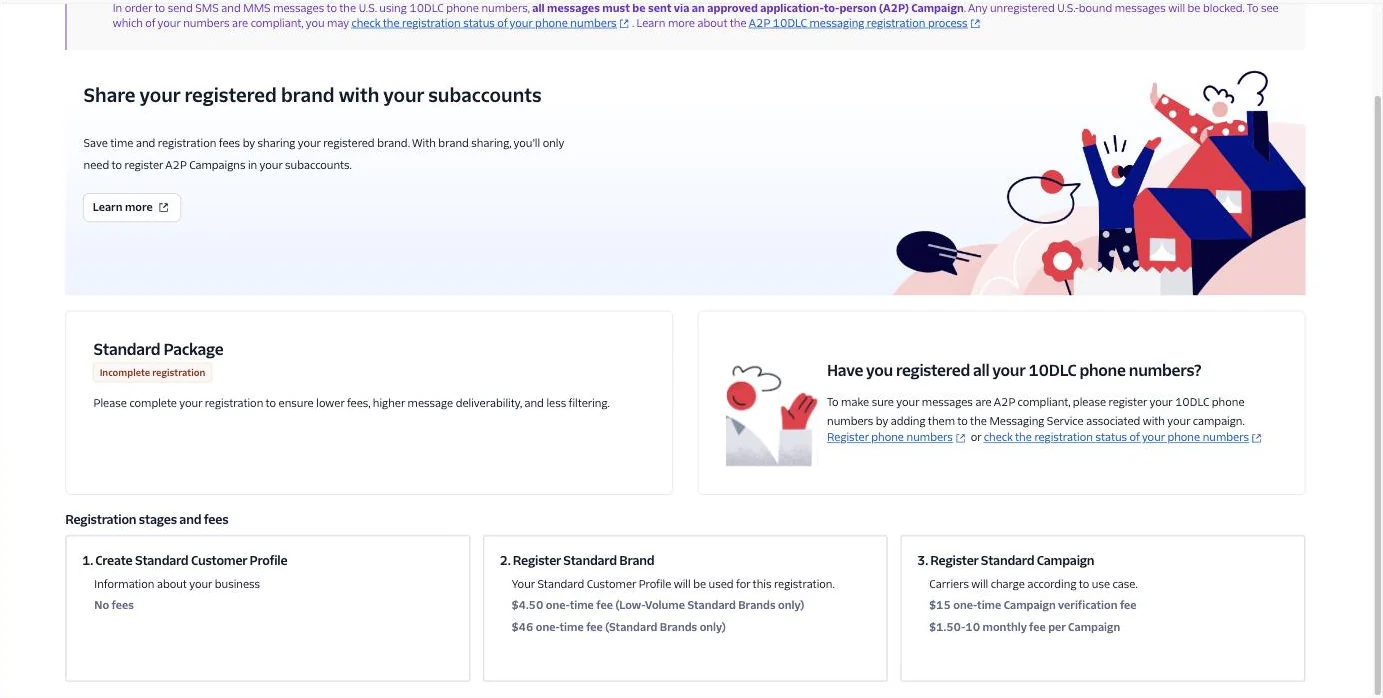
These are the fees Twilio displayed in September 2026:
| Stage | What you provide | Fee |
|---|---|---|
| 1. Customer profile | Your business details | Free |
| 2. Brand | Uses the customer profile | $4.50 one-time (Low-Volume Standard) or $46 one-time (Standard) |
| 3. Campaign | Use case and sample messages | $15 one-time verification, then $1.50 to $10 per month |
For the campaign, describe the real use case: service status notifications sent to people who subscribed on your status page. Sample messages copied from Step 5 below help the review. Once the campaign is approved, add your number to the Messaging Service attached to it.
A toll-free number is the other route for US traffic. It skips 10DLC but needs Twilio's toll-free verification before it can send at volume. Either way, plan a few days of review before your first incident.
Outside the US, check Messaging > Settings > Geo permissions in Twilio: messages to countries that are not enabled there are refused. Some countries have their own sender registration rules, which Twilio documents per country.
Step 4: Connect Twilio in Hyperping
In Hyperping, open Integrations. The Twilio card sits in the Status page section.
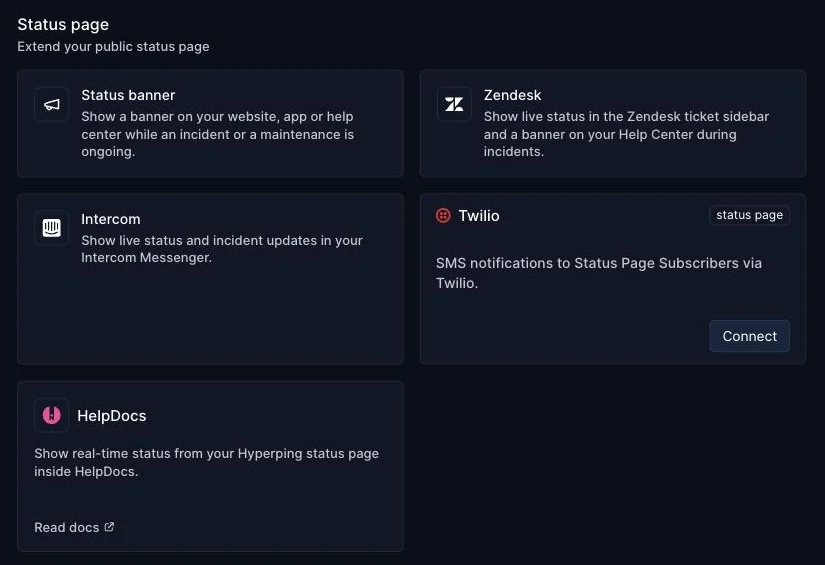
Click Connect. The modal offers two paths:
- Proceed sends you to Twilio Connect, which authorizes Hyperping on your Twilio account and buys a new toll-free number for you.
- Use my own credentials instead connects the account and number you prepared in the previous steps.
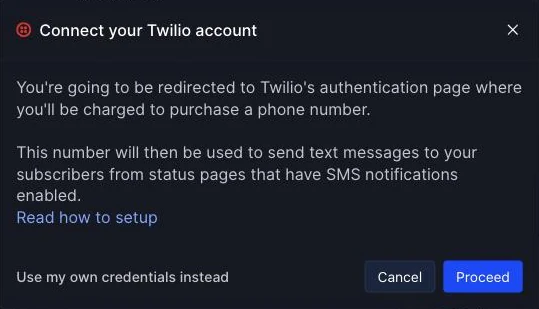
I recommend your own credentials. You pick the number, you control its registration, and it avoids the Twilio Connect authorization, which can fail on Twilio's side with "Something went wrong, please retry" on the Approve access step.
Paste the Account SID, the Auth Token and the phone number, then click Save.
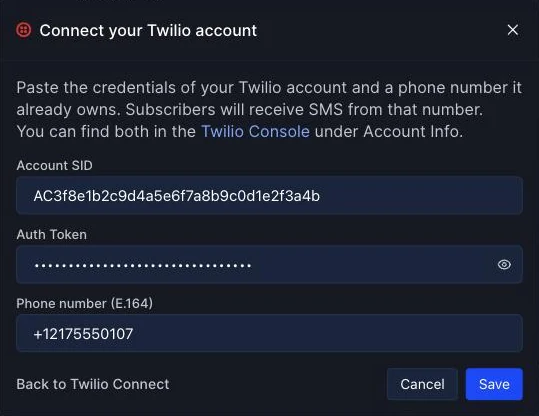
Before saving anything, Hyperping calls Twilio with those credentials and checks that the account owns the number. If something is off, the form tells you which part:
| Message in Hyperping | What to fix |
|---|---|
| Invalid Account SID: it starts with "AC" followed by 32 characters | You pasted an API key SID (SK...) or a truncated value |
| Twilio rejected these credentials: check the Account SID and Auth Token | The token belongs to another account, or it was rotated |
| +1... is not a phone number of this Twilio account | The number lives in a different account or subaccount |
| The phone number must be in E.164 format, e.g. +18005550100 | Add the + and the country code, without spaces |
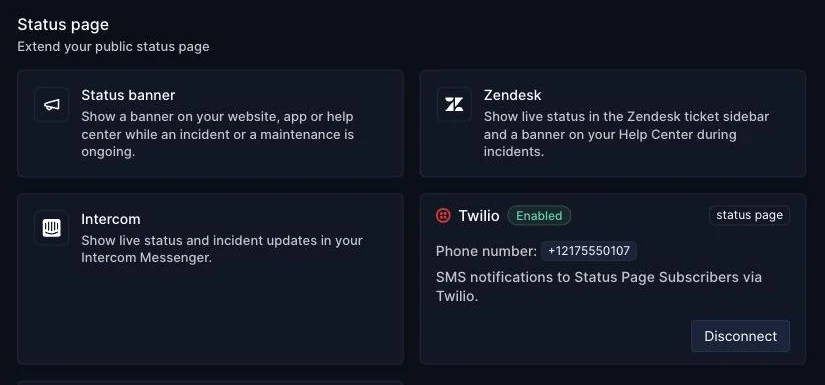
Once saved, the card shows Enabled and the number your subscribers will receive texts from.
Step 5: Turn on SMS for your status page
Open your status page, then Settings > Notifications. Turn on Subscribe to status page, then the SMS channel under Subscription channels. Email, Slack and Teams can stay on next to it. Publish the page to apply the change.
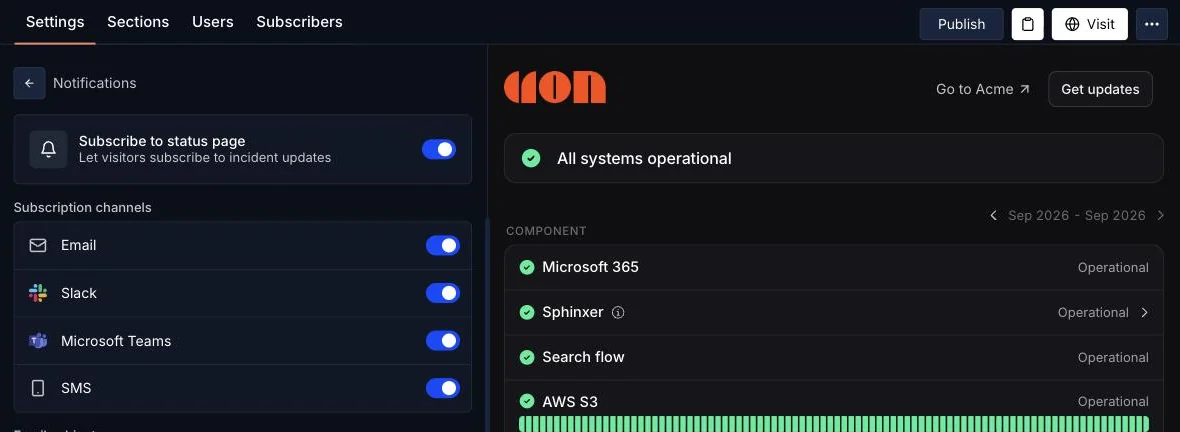
Visitors now see an SMS tab when they click Get updates on your page. They pick their country, type their number, and receive a confirmation text from your Twilio number.
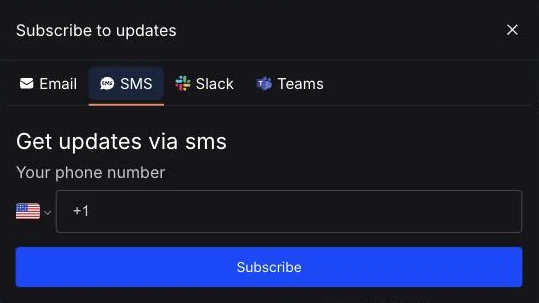
Subscribe your own phone first and publish a test incident on a private page. It is the fastest way to confirm the whole chain, registration included, before a real outage.
What subscribers receive
Each text starts with your status page name, so subscribers know who is writing. An incident update looks like this:
[Acme status]
Elevated API error rates: investigating status.acme.com/history/...
When a monitor shown on the page changes state, subscribers get a shorter message:
[Acme status]
API: Service Disruption
followed by Service Restored once it recovers. The link in incident texts opens the incident on your status page, where the full update is. For more on who to notify and how often, see the status page subscriber management guide.
How much it costs
Hyperping does not charge for status page SMS. Everything is billed by Twilio to your account:
- Phone number: $1.15 per month for a US local number (September 2026). Toll-free and international numbers have their own prices.
- Messages: billed per segment at Twilio's rate for each destination country. A short status text like the examples above fits in one segment.
- US registration: the one-time A2P 10DLC brand and campaign fees plus the monthly campaign fee listed in Step 3.
The SMS credits included in Hyperping plans are separate. They cover the alerts your own team receives when a monitor goes down, and status page texts never draw from them. See Notification channels for how those work.
Troubleshooting
Subscribers don't receive anything, and Twilio shows error 30034. The number is not registered under an approved A2P 10DLC campaign, or it is not attached to the campaign's Messaging Service. Finish Step 3.
Only some countries receive texts. Enable the missing destinations in Twilio's Geo permissions and check that country's sender rules.
Texts stopped after working for weeks. Check your Twilio balance, and whether someone rotated the Auth Token. Reconnect in Hyperping with the new token.
The SMS tab doesn't show on the status page. The Twilio card must say Enabled in the same project, the SMS channel must be on, and the page must be published after the change.
The Twilio integration docs and the subscribers docs cover the remaining settings. If something still doesn't add up, write to me from the chat in your dashboard and I'll look at your setup.
FAQ
Can status page subscribers get SMS notifications? ▼
Yes. Once a Twilio account is connected to your Hyperping project and the SMS channel is enabled on a status page, visitors can subscribe with their phone number. They get a text when you post an incident or maintenance update, and when a monitor on the page goes down or recovers.
Who pays for status page SMS sent through Twilio? ▼
Twilio bills every message to your own Twilio account at its rates for each destination country. Hyperping does not mark up these messages, and they do not use the SMS credits included in your Hyperping plan, which are reserved for alerts sent to your team.
Do I need A2P 10DLC registration to text subscribers in the US? ▼
Yes, if you send from a US local (10DLC) number. Carriers block messages from local numbers that are not registered under an approved A2P 10DLC campaign. The alternative is a toll-free number that has gone through Twilio's toll-free verification.
Why does Twilio say 'Something went wrong' when I approve access? ▼
That error happens on Twilio's side during the Twilio Connect authorization, before you are sent back to Hyperping. Skip Connect and use the 'Use my own credentials instead' option in the Twilio modal: paste your Account SID, Auth Token and a number your account already owns.
Can I use a Twilio trial account for status page SMS? ▼
Only for testing. A Twilio trial account can only text phone numbers you have verified in the Twilio Console, and it prefixes every message with a trial notice. Upgrade the Twilio account before real subscribers sign up.
What happens if I rotate my Twilio Auth Token? ▼
Hyperping sends with the token you saved, so texts stop after the old token is revoked. Open the Twilio card in Hyperping, click Disconnect, and connect again with the new token.