Atlassian is pulling the plug on Opsgenie. If you're looking for a direct replacement, see our OpsGenie alternative comparison page for a side-by-side feature and pricing breakdown.
On March 3, 2025, Atlassian announced that Opsgenie will reach end-of-life on April 5, 2027. New sales stopped on June 4, 2025, and if you're using the JSM-bundled version, you'll lose access even sooner, by October 2025.
The catch: Atlassian wants you to migrate to their fragmented JSM + Compass combo, which splits your incident management across multiple tools. Teams are frustrated. After years of relying on Opsgenie's unified approach, being forced into a fragmented setup feels like a step backward.
If you're one of the thousands of teams looking for alternatives, this guide covers everything you need to know about the shutdown, the best replacements, and how to migrate.
Key Takeaways
- Opsgenie shuts down April 2027. JSM-bundled users lose access October 2025.
- Atlassian's suggested path (JSM + Compass) fragments your incident management across multiple tools.
- The shutdown is an opportunity to consolidate your monitoring, alerting, and status pages into one platform.
- Hyperping replaces OpsGenie AND your separate monitoring tool, saving cost and reducing complexity.
- Start migrating now. A 14-step migration checklist can guide the process.
- Recommendations by team: small engineering teams and SRE and platform teams.
Why is Atlassian shutting down Opsgenie?
Atlassian's official reason is "product consolidation." They want to unify incident management capabilities into Jira Service Management (JSM) and service cataloging into Compass.
But from what I gathered, the real drivers are:
- Product complexity. Maintaining separate incident management products was getting difficult to justify.
- Market positioning. Atlassian wants to position JSM as their comprehensive ITSM platform.
- Strategic focus. Consolidating development resources into fewer products.
The problem? This consolidation creates a worse experience for teams that valued Opsgenie's simplicity and unified approach.
What does this mean for current Opsgenie users?
Timeline breakdown
| Date | What happens |
|---|---|
| June 4, 2025 | New Opsgenie sales stopped |
| October 2025 | JSM-bundled Opsgenie access ends |
| April 5, 2027 | Complete Opsgenie shutdown |
For the day-by-day version, what stops working on each date, and the separate JSM-bundled track, see Opsgenie end of life: full timeline.
Your migration options
Atlassian is pushing customers toward:
- Jira Service Management for incident response workflows
- Compass for service cataloging and dependency mapping
The catch? This combination lacks many features that made Opsgenie valuable:
- No integrated uptime monitoring
- More complex setup and maintenance
- Fragmented user experience across multiple tools
- JSM Premium required for full on-call features (significant price jump)
OpsGenie vs JSM + Compass: Why Atlassian's suggested path falls short
I noticed a recurring theme in community discussions: teams that try the JSM migration path end up frustrated by the added complexity.
| Capability | OpsGenie | JSM + Compass | Hyperping |
|---|---|---|---|
| On-call scheduling | Built-in | JSM Premium only | Built-in |
| Escalation policies | Built-in | JSM Premium only | Built-in |
| Incident management | Built-in | JSM (separate UI) | Built-in |
| Uptime monitoring | Not included | Not included | Built-in |
| Status pages | Basic | Not included | Advanced (SSO, custom domain) |
| Per-user pricing | Yes ($9.45+/user) | Yes ($17.65+/agent) | No (flat rate) |
| Mobile app | Dedicated app | Jira mobile (cluttered) | Mobile-optimized alerts |
JSM's on-call features require the Premium tier at $17.65/agent/month, compared to OpsGenie's Essentials at $9.45/user/month. That's nearly double the per-user cost, and you still don't get monitoring or status pages.
For a detailed breakdown, see our full OpsGenie vs Jira Service Management comparison.
Why teams are looking elsewhere
Based on community discussions and user feedback, here are the main reasons teams are skipping Atlassian's suggested migration path:
1. Tool fragmentation
Opsgenie's strength was its unified approach. The JSM + Compass combo forces you to manage incident response across multiple interfaces, creating friction during critical situations.
2. Reliability concerns
Opsgenie's 14-day outage in 2022 is still fresh for many teams. This transition is an opportunity to move to more reliable platforms.
3. Feature gaps
The JSM + Compass combination doesn't include integrated monitoring capabilities that many teams rely on. You'll need additional tools to replace this functionality.
4. Future uncertainty
After being burned by this shutdown, many teams are wary of investing further in Atlassian's incident management products.
Complete guide to Opsgenie alternatives
I analyzed 20+ incident management platforms to find the best Opsgenie replacements. Here are the top picks:
Hyperping: Best unified alternative
Perfect for: Small to medium teams wanting an all-in-one platform without tool sprawl.
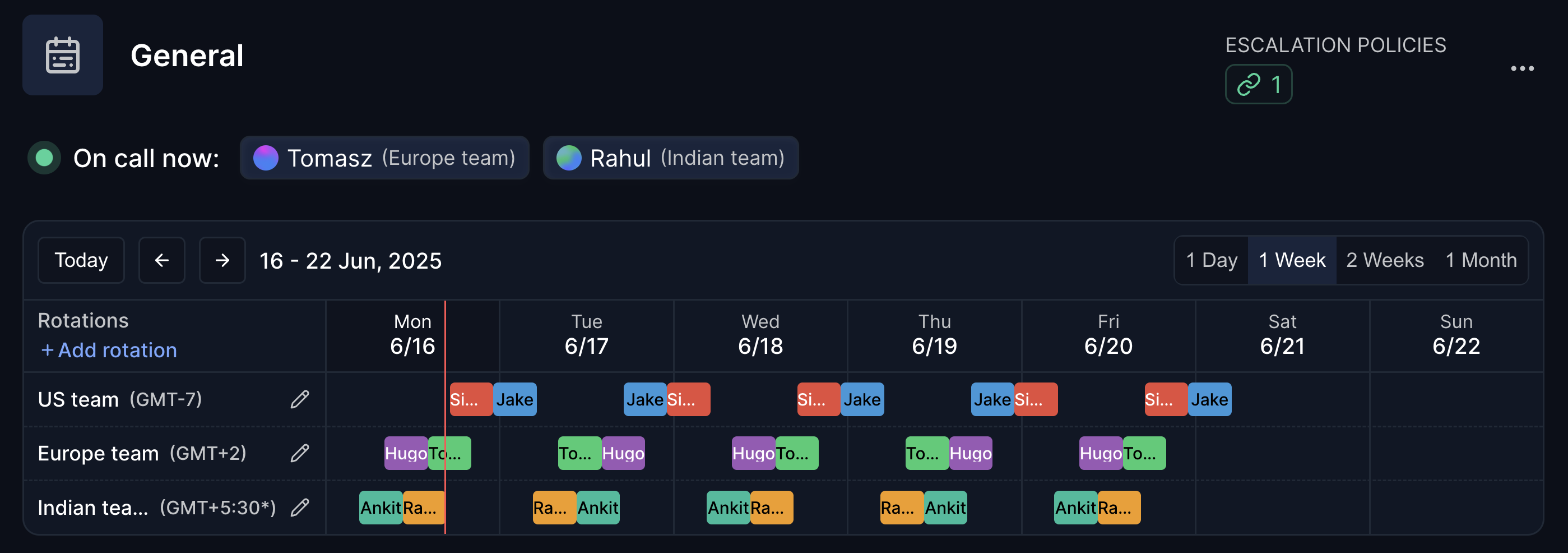
Hyperping combines monitoring, on-call management, and status pages into one platform. That's exactly what made Opsgenie valuable, but with better reliability and built-in monitoring that OpsGenie never had.
Notable features
- Integrated monitoring. HTTP, SSL, cron job, browser checks (Playwright), and port monitoring built-in
- On-call management. Escalation policies, scheduling, and smart alerting
- Status pages. Auto-updating pages with custom domains, SSO, and multi-tenant support
- Team collaboration. Slack, Teams, and email integrations
- No per-user pricing. Flat rate regardless of team size
- Free tier available. Get started without any upfront costs
What makes Hyperping different from other OpsGenie alternatives: it replaces OpsGenie and the separate monitoring tool you were piping into OpsGenie (Pingdom, Datadog Synthetics, UptimeRobot). That's two or three tools consolidated into one.
Pricing: Starting at $24/mo (Essential), with Pro at $74/mo including browser checks, on-call, and incident management. Compare pricing details.
PagerDuty: Best for enterprise teams
Perfect for: Large organizations needing advanced automation and complex alert routing.
What I like:
- Comprehensive automation capabilities
- Extensive third-party integrations (900+)
- Advanced analytics and reporting
Considerations:
- Complex setup and configuration
- No built-in monitoring (requires additional tools)
- Per-user pricing gets expensive fast ($21+/user/month)
- Some teams find it overpowered for their needs
Incident.io: Best for Slack-native teams
Perfect for: Teams that live in Slack and want incident workflows embedded there.
What I like:
- Deep Slack integration for incident management
- Good automation workflows
- Strong post-incident documentation features
- Modern user experience
Considerations:
- Requires Slack for full functionality
- No built-in monitoring (you still need a separate tool)
- Limited status page features
- Per-user pricing model
Grafana OnCall: Best free open-source option
Perfect for: Teams already running Grafana and Prometheus.
What I like:
- Free and open source
- Native Grafana integration
- Good alerting flexibility
Considerations:
- Requires self-hosting or Grafana Cloud subscription
- No built-in HTTP/SSL monitoring
- No status pages
- Smaller community than PagerDuty
Zenduty: Good basic option
Perfect for: Teams wanting simple, affordable on-call management.
What I like:
- Straightforward setup
- Reasonable pricing
- Decent core features
Considerations:
- Limited automation capabilities
- Basic status page functionality
- Smaller integration catalog
Best OpsGenie alternative for small engineering teams
Per-user pricing is the cost trap for a small team choosing an on-call tool. OpsGenie, PagerDuty, incident.io and Better Stack all charge per user, so when the team grows from 3 to 10 people the bill triples without a single extra monitor. These are the on-call costs alone, before monitoring or a status page:
| Team size | OpsGenie Essentials ($9.45/user) | PagerDuty Professional ($21/user) | incident.io ($15/user) | Better Stack ($35/user) |
|---|---|---|---|---|
| 3 people | $28/mo | $63/mo | $45/mo | $105/mo |
| 5 people | $47/mo | $105/mo | $75/mo | $175/mo |
| 10 people | $95/mo | $210/mo | $150/mo | $350/mo |
Add a monitoring tool ($7 to 18/mo) and a Statuspage.io subscription ($29/mo) and a 5-person team on OpsGenie Essentials is paying $83 to 94/mo across three tools. Small teams need five things from a replacement: a rotation that works with 2 or 3 people, an escalation fallback when the on-call engineer does not answer, monitoring included rather than bought separately, a status page without a third subscription, and a setup that takes an hour rather than a week.
Hyperping covers all five on one bill. Essentials is $24/mo billed yearly ($29 monthly) with 2 seats included and $7 per extra seat; Pro is $74/mo yearly ($89 monthly) with 5 seats included and $9 per extra seat. Both include HTTP, SSL, cron, browser and port monitoring, escalation policies and a status page on your own domain, so a 5-person team on Pro pays $74 for the three tools above combined. The trade-off is a smaller integration catalog than PagerDuty (Slack, Teams, email, SMS, phone, webhooks are covered).
Grafana OnCall is the free option if you already run Grafana and Prometheus and someone on the team is comfortable operating a server ($5 to 20/mo). It routes alerts; it does not check endpoints and has no status page. Better Stack is a polished product, but at $35/user a 5-person team pays $175/mo. Rootly and FireHydrant are built for organizations with dedicated SRE functions: per-user enterprise pricing, workflow builders and service catalogs a 5-person team will not use, and no monitoring of their own.
| Total monthly cost, 5-person team | On-call | Monitoring | Status page | Total |
|---|---|---|---|---|
| Hyperping Pro | $74 (5 seats included) | Included | Included | $74 |
| Grafana OnCall (self-hosted) | Free | Not included | Not included | $5 to 20 (server) |
| OpsGenie Essentials + Pingdom + Statuspage.io | $47 | $18 | $29 | $94 |
| incident.io | $75 | Not included ($15+) | Limited | $90+ |
| PagerDuty Professional | $105 | Not included ($15+) | Not included ($29+) | $149+ |
| Better Stack | $175 | Included | Included | $175 |
Choose Hyperping if you want a managed platform and one bill; choose Grafana OnCall if free and self-hosted matters more than your time. Either way, the 14-step migration checklist applies.
Best OpsGenie alternative for SRE and platform engineering teams
SRE teams need more than alert routing. The requirements that generic lists skip: monitoring breadth across HTTP, SSL, cron heartbeats, browser checks and ports, so alerts and checks live in one system; uptime history you can show in an SLO review or an SLA dispute; multi-step escalation with time-based routing and overrides; a REST API and a Terraform provider so the configuration lives in version control; and pricing that survives a 25-person rotation. OpsGenie had the escalation and the API, but it never included monitoring, so every team paired it with Datadog, Prometheus or an uptime tool and maintained the webhooks in between.
| Feature | Hyperping | PagerDuty | Grafana OnCall | incident.io |
|---|---|---|---|---|
| HTTP, SSL, cron, browser, port monitoring | Yes | No | No (Grafana alerting) | No |
| On-call schedules and escalation policies | Yes | Yes | Yes | Yes |
| Status pages with uptime history | Yes | Add-on | No | Limited |
| REST API | Yes | Yes | Yes | Yes |
| Infrastructure as code | Terraform provider + API | Terraform provider | Terraform provider | API |
| AIOps and event intelligence | No | Yes | No | No |
| Cost at 10 engineers | Pro $74 + 5 extra seats = $119 | $210 | Free self-hosted | $150 |
| Cost at 25 engineers | Business $249 + 10 extra seats = $369 | $525 | Free self-hosted | $375 |
The cost rows exclude the separate monitoring tool that PagerDuty, Grafana OnCall and incident.io still require. PagerDuty is the right call for a large enterprise SRE organization that keeps its monitoring stack and needs AIOps, runbook automation and its 900+ integrations, at $21/user for Professional and more for the Business tiers. Grafana OnCall fits Prometheus-native teams: Grafana unified alerting flows into it without webhooks, and the open-source version is free to run, but there is no status page and the managed Grafana Cloud tiers add per-user cost. incident.io suits teams that run incidents from Slack and care about structured post-incident reviews; plan for per-seat pricing and a separate monitoring tool.
Three migration points specific to SRE teams. First, if OpsGenie is managed through Terraform or the API, inventory every resource and rebuild it as code on the new platform rather than by hand. Second, count the integrations feeding OpsGenie (Datadog, Alertmanager, CloudWatch, Jira, custom webhooks); on a platform with built-in monitoring, several of them disappear because the check and the routing are the same system. Third, put the on-call engineers on the evaluation: the mobile app, the notification delivery and the escalation behavior at 3 a.m. decide adoption, not the demo.
The opportunity: Consolidate your entire monitoring stack
The OpsGenie shutdown is disruptive, but it's also a chance to simplify your tool stack. Most OpsGenie users run a separate monitoring tool alongside it. That's two subscriptions, two dashboards, two sets of documentation.
Instead of replacing OpsGenie with another alerting-only tool, consider replacing OpsGenie AND your monitoring tool with one platform. I wrote a dedicated guide on how to replace OpsGenie and your monitoring tool with one platform that breaks down the cost math and migration path.
| 3-tool stack | Monthly cost |
|---|---|
| OpsGenie Essentials (5 users) | ~$47 |
| Pingdom or UptimeRobot | $18-46 |
| Statuspage.io | $29 |
| Total | $94-122+ |
| Hyperping Pro | Monthly cost |
|---|---|
| Monitoring + on-call + status pages (flat rate) | $74 |
For more on each tool, see our best on-call scheduling tools and best incident management tools comparisons.
Migration strategy: Moving away from Opsgenie
I put together a detailed 14-step OpsGenie migration checklist that covers the full process. Here's the summary:
Phase 1: Audit (weeks 1-2)
- Export on-call schedules and escalation policies
- Inventory all integrations and alert sources
- Map alert routing rules and team workflows
- For integration-specific guidance, see our OpsGenie integration migration guide
Phase 2: Set up (weeks 3-4)
- Recreate on-call schedules on your new platform
- Configure monitors (HTTP, SSL, cron, browser checks)
- Set up status pages and notification channels
Phase 3: Parallel run (weeks 5-6)
- Run both platforms simultaneously
- Validate alert delivery and response times
- Hyperping's OpsGenie integration makes gradual migration easy
Phase 4: Cutover (week 7+)
- Disable OpsGenie routing
- Update runbooks and documentation
- Archive OpsGenie configuration exports
What to do next
The Opsgenie shutdown timeline gives you time to plan, but don't wait too long.
Immediate (next 30 days)
- Audit your current Opsgenie usage. Document features, integrations, and workflows.
- Try alternatives. Sign up for free trials. Hyperping's free tier includes 20 monitors and a status page.
- Read the guides. Our migration checklist and consolidation guide cover the full process.
Short-term (next 3 months)
- Run proof-of-concept migrations. Test critical workflows on your chosen platform.
- Get team buy-in. Involve your team in the evaluation process.
- Plan your migration timeline. Avoid the last-minute rush before April 2027.
Long-term (next 6-12 months)
- Execute migration. Move services according to your plan.
- Optimize new setup. Fine-tune workflows and integrations.
- Document new processes. Update runbooks and team documentation.
More OpsGenie migration resources
- OpsGenie migration checklist: 14-step plan
- How to replace OpsGenie AND your monitoring tool
- OpsGenie vs Jira Service Management comparison
- OpsGenie integration migration guide (Datadog, Prometheus, AWS, Grafana)
- OpsGenie status page migration guide
- OpsGenie vs Hyperping comparison
While the Opsgenie shutdown is disruptive, it's also an opportunity to upgrade your incident management stack. Teams that take this opportunity to evaluate modern platforms often end up with better incident response capabilities than they had before.
Ready to explore Opsgenie alternatives? Try Hyperping's unified platform with monitoring, on-call management, and status pages, all in one place. Get started with the free tier and see why teams are making the switch.
FAQ
When is Opsgenie shutting down? ▼
Opsgenie reaches end of support on April 5, 2027, when access is shut off. New sales stopped on June 4, 2025, and customers on the JSM-bundled version lost access in October 2025. The full timeline is on our Opsgenie end of life page.
Why is Atlassian shutting down Opsgenie? ▼
Atlassian is consolidating its incident management capabilities into Jira Service Management (JSM) and Compass. They want customers to use JSM for incident response and Compass for service cataloging instead of the standalone Opsgenie product.
What's the best alternative to Opsgenie? ▼
For teams that want an all-in-one platform, Hyperping combines monitoring, on-call management, and status pages without per-user pricing. PagerDuty is better for large enterprises needing advanced automation. Incident.io works well for teams that live in Slack.
Will JSM + Compass replace all Opsgenie features? ▼
Not fully. JSM + Compass covers incident response and service cataloging, but lacks integrated monitoring capabilities. Many teams find the fragmented approach less efficient than Opsgenie's unified design. You'll also need JSM Premium for full on-call features, which increases cost significantly.
Can I use Hyperping and OpsGenie together during migration? ▼
Yes. Hyperping has a native OpsGenie integration that lets you route Hyperping alerts through OpsGenie during your transition period. This makes gradual migration possible without any gap in coverage.
What happens to my OpsGenie data, and can I migrate it? ▼
Anything not migrated is permanently deleted when access is shut off on April 5, 2027. Until then, on-call schedules, escalation policies and user data are exportable through the OpsGenie REST API, and most platforms offer import help. Our 14-step migration checklist walks through the export and the parallel run.
What is the cheapest OpsGenie alternative for a small team? ▼
Grafana OnCall is free if you self-host it, but it does not include monitoring or a status page. Among managed platforms, Hyperping Essentials at $24/mo billed yearly (2 seats included, $7 per extra seat) or Pro at $74/mo (5 seats) is the lowest total cost once you count the monitoring and status page that per-user tools sell separately.