
The best SSL certificate monitoring tools are Hyperping (certificate and domain expiry checks in the same tool as uptime, on-call and status pages), TrackSSL (dedicated certificate inventory and change alerts), Xitoring (deepest published TLS analysis at the lowest price), UptimeRobot (largest free tier), Better Stack (certificate checks alongside logs, traces and incident response) and Oh Dear (whole-site health for agencies). I analyzed 26 tools and narrowed the list to these six.
Most teams shopping for SSL monitoring are reacting to the same incident: a certificate expired on an endpoint nobody owned, browsers threw a full-page interstitial, and a partner integration started failing certificate validation before anyone in the team noticed. The renewal was probably automated. The automation just stopped working quietly, and nothing was watching it.
In this guide, you'll learn:
- What SSL monitoring should actually detect, and why most tools cover only part of it
- Why 47-day certificates change the job from expiry reminders to renewal verification
- Six tools that each solve a different slice of the problem, with a capability matrix that separates documented features from beta and roadmap promises
- What each one costs in the same realistic scenario, not just the headline price
- How strong the review evidence is behind each tool, because it varies enormously
If you want certificate checks, domain expiry reminders, uptime monitoring, on-call and status pages in one tool, Hyperping's SSL certificate monitoring runs on every HTTPS monitor with no extra setup. Schedule a demo to see it in action.
Key takeaways
- Hyperping checks every HTTPS certificate daily for expiry, chain, hostname, revocation and outdated TLS, lets you set the first expiry alert anywhere from 1 to 90 days out, watches domain expiry too, and sits next to on-call schedules and status pages from $24/mo.
- TrackSSL is the certificate specialist, from $17/mo for 20 certificates, with certificate change alerts and private certificate support. Certificate Transparency is still labeled coming soon on its homepage.
- Xitoring publishes the deepest technical SSL checklist of any tool here (chain validation, OCSP and CRL revocation, A+ to F grading, cipher analysis, CT monitoring, SAN mismatch) starting at $3.99/mo on annual billing.
- UptimeRobot has the largest free tier at 50 monitors and warns at 30, 14, 7 and 1 day with custom lead times, but its public pages are ambiguous about which SSL checks are free.
- Oh Dear is the strongest pick for agencies: full chain validation plus before-and-after certificate change history, sitting alongside broken links, mixed content and Core Web Vitals, from €15/mo for 2 sites.
Why you should trust this guide
I'm Léo, founder of Hyperping. I have a stake in one of these tools, and I'm not going to pretend otherwise. Hyperping does not win on certificate depth here, and I say so explicitly in its own section. If Certificate Transparency monitoring or TLS grading is your actual requirement, Xitoring and the CT specialists beat us and you should buy them.
For this guide I read every vendor's certificate documentation and pricing page directly in August 2026, then collected G2 review data through a scraper rather than relying on displayed aggregate scores. I also pulled Reddit discussion from r/sysadmin, r/selfhosted, r/devops, r/laravel and r/SaaS.
I updated Hyperping's entries in October 2026, when we shipped revocation checks, certificate change notifications, configurable expiry thresholds and domain expiry monitoring. The other five vendors' cells still reflect August 2026.
One thing fell out of that work that I did not expect:
Certificate feature claims and certificate features are not the same thing. Several tools advertise capabilities that their own pages mark as beta or coming soon. I built the capability matrix below to record that distinction explicitly.
What SSL certificate monitoring should detect
SSL certificate monitoring is the practice of continuously reading the certificate an endpoint actually serves and alerting when something about it is wrong or about to be. The full job covers seven checks:
- Expiration. Days remaining before the certificate becomes invalid. Every tool does this.
- Chain validation. Whether the leaf, intermediate and root certificates form a complete trusted path. A valid certificate with a missing intermediate still produces browser warnings on some clients.
- Hostname and SAN matching. Whether the hostname you requested appears in the certificate's common name or Subject Alternative Name list. This is how a misrouted wildcard or a staging certificate deployed to production gets caught.
- Revocation. Whether the certificate has been revoked, checked through OCSP or a CRL. Rare, but a revoked certificate fails silently in some clients and hard in others.
- TLS configuration. Which protocol versions and cipher suites the endpoint negotiates. This is posture, not validity, and it's where graded scanning tools live.
- Unexpected issuance. Whether a certificate has been issued for your domain that you did not request, visible in public Certificate Transparency logs. This is the security check rather than the availability check.
- Certificate change. Whether the certificate being served today differs from yesterday's, with the before-and-after detail to tell an expected renewal from an unexpected substitution.
Most products in this category cover the first two or three well. Very few cover all seven, and no product in this guide does.
Renewal automation makes monitoring more important, not less
The common objection is that certbot handles this. It mostly does, and that is exactly why the failure mode has changed.
When renewal was manual, the failure was forgetting. When renewal is automated, the failure is a job that stops running, a hook that fails to reload nginx, a new certificate that lands on disk while the load balancer keeps serving the old one from memory, or a CDN edge that never picks up the origin's new chain. In every one of those cases the renewal "succeeded" and your users still get the expired certificate.
Only an external check reading what the endpoint actually serves catches that. This is the single strongest argument for endpoint monitoring over any inventory or calendar approach.
The 47-day change is the reason this category is moving
Public TLS certificate lifetimes are being cut on a fixed schedule. The CA/Browser Forum adopted Ballot SC-081v3 in April 2025, reducing maximum validity from 398 days to 47 days in stages between March 2026 and March 2029.
Let's Encrypt already issues 90-day certificates, recommends renewing around day 60, and has published plans to move to 64 days in 2027 and 45 days in 2028.
The practical effect: a certificate that needed attention roughly once a year will need it roughly eight times a year by 2029. Every manual step in your renewal path gets executed eight times as often, and every silent automation failure has eight times as many chances to bite. Alert lead times matter more too, because a 30-day warning on a 47-day certificate is a warning that fires when the certificate is barely past the middle of its life.
"SSL monitoring" describes four different products
This category has a naming problem. Four distinct product types all get sold as SSL monitoring, and they answer different questions:
| Product type | Question it answers | Example tools |
|---|---|---|
| Endpoint monitoring | Is the certificate my users receive valid, and when does it expire? | Hyperping, UptimeRobot, Better Stack, Oh Dear, TrackSSL |
| TLS posture testing | How well is this endpoint configured, protocol and cipher by cipher? | Qualys SSL Labs, SSLBoard, Xitoring (partially) |
| Certificate Transparency monitoring | Has anyone issued a certificate for my domain that I did not request? | SSLMate Cert Spotter, Hardenize, Xitoring |
| Certificate lifecycle management (CLM) | How do I discover, issue, renew and govern certificates across a large internal estate? | Keyfactor, Venafi, DigiCert, Sectigo, AppViewX |
A free grading site and a six-figure PKI platform are both "SSL monitoring tools." Deciding which of these four you actually need eliminates about twenty of the twenty-six tools before you compare a single feature.
This guide focuses on the first category, endpoint monitoring, with notes on where the others fit.
Top picks at a glance
| Best for | Product |
|---|---|
| SSL and domain expiry next to uptime, on-call and status pages | Hyperping |
| A dedicated certificate inventory with change alerts | TrackSSL |
| Deepest technical TLS analysis at the lowest price | Xitoring |
| The largest free tier | UptimeRobot |
| Certificates alongside logs, traces and AI investigation | Better Stack |
| Agencies monitoring whole client sites | Oh Dear |
What teams are actually looking for
Reading through the review data and Reddit threads, the recurring asks cluster into a tight set.
Alerts that reach a human, not a shared inbox
The most common story behind an expired certificate is not that no alert fired. It's that the alert went to an address nobody watches, or to a Slack channel at 2 AM on a Saturday. Certificate expiry is a slow-moving problem with a hard deadline, which makes it uniquely easy to acknowledge and then forget. Tools differ enormously here: TrackSSL, UptimeRobot and Oh Dear route notifications, and Better Stack manages rotations and escalates when nobody acknowledges. Hyperping sits in between: expiry reminders go to the whole team by email and to the monitor's chat channels, and PagerDuty or Opsgenie get paged for certificate errors and in the final 24 hours before expiry.
Configurable lead times, not a fixed 30-day warning
With 47-day certificates arriving, a single fixed warning window is too blunt. Better Stack lets you pick from 1, 2, 3, 7, 14, 30 or 60 days. UptimeRobot sends at 30, 14, 7 and 1 day and lets you layer a custom reminder on top. Hyperping lets you set the first alert per monitor at 1, 3, 7, 15, 30, 60 or 90 days, sends reminders at 30, 15, 7, 3 and 1 day below it, and stops them once the certificate is renewed. Oh Dear's public documentation contradicts itself on this point, which I get into below.
Detecting the certificate that changed unexpectedly
An expiry countdown tells you nothing about the certificate that was silently replaced with a different one. TrackSSL and Oh Dear both make change detection a headline feature, and Oh Dear shows before-and-after detail. Hyperping added optional change notifications that show the new and the previous certificate. This is the check that catches a misconfigured deploy pushing a staging certificate to production.
Coverage of internal and private certificates
Public probes cannot reach an internal service on a private network, and Certificate Transparency logs never contain internal hostnames. Teams with internal PKI need either an agent-based approach, a self-hosted exporter such as x509-certificate-exporter, or a tool that explicitly supports private certificates. TrackSSL supports them and labels the support as beta.
Pricing that does not punish you for having many domains
Certificate-count pricing looks cheap at 20 certificates and expensive at 200. Site-count pricing punishes agencies with many small client sites, which is the single most common complaint in Oh Dear's G2 reviews. Monitor-count pricing is usually the most forgiving for teams with many subdomains under one wildcard.
One tool, not four
The most repeated practical ask is consolidation. A team that needs certificate alerts almost always also needs uptime checks, somewhere to escalate an alert, and a way to tell customers what's happening. Buying a certificate-only tool means buying three more.
Quick comparison: SSL certificate monitoring tools
| Tool | Starting price | Cost model | Best for | Main limitation |
|---|---|---|---|---|
| Hyperping | $24/mo annually ($29 monthly) | Monitors | SSL and domain expiry next to on-call and status pages | Daily checks, no CT monitoring or TLS grading |
| TrackSSL | Free for 2; $17/mo annually for 20 | Certificates | A focused certificate inventory | No uptime, on-call or native status pages |
| Xitoring | $3.99/mo annually for 20 monitors | Monitors | The deepest TLS and certificate checks | Very little independent review evidence |
| UptimeRobot | Free for 50; Solo from $12/mo annually | Tier plus monitor count | Free-tier volume and familiarity | Shallow SSL analysis, no on-call rotations |
| Better Stack | Free; $29/responder/mo annually | Responders plus add-ons | Certificates alongside logs and traces | Modular pricing is hard to predict |
| Oh Dear | €15/mo for 2 sites | Sites and servers | Agencies monitoring whole client sites | Site-count pricing, no native on-call |
Capability matrix: what each tool documents
This is the table I wish had existed when I started. Every cell reflects what the vendor publishes on its own certificate and documentation pages as of August 2026, except Hyperping's column, updated in October 2026. "Not documented" means the vendor does not claim it, which is not the same as the feature being absent, but it's the only honest thing to record.
| Capability | Hyperping | TrackSSL | Xitoring | UptimeRobot | Better Stack | Oh Dear |
|---|---|---|---|---|---|---|
| Expiration alerts | Yes | Yes | Yes | Yes | Yes | Yes |
| Warning schedule | 1 to 90 days, selectable, then reminders | Configurable | Graduated | 30/14/7/1 day plus custom | 1 to 60 days, selectable | Docs conflict (see below) |
| Check frequency | Daily, plus manual recheck | Not documented | Not documented | Per monitor interval | Hourly | Not documented |
| Chain validation | Yes, including missing intermediates | Not documented | Yes, root to leaf | SSL error detection only | Not documented | Yes, full chain |
| Hostname / SAN mismatch | Yes, wildcards and IPs | Not documented | Yes | Not documented | Not documented | Not documented |
| Certificate change detection | Yes, optional, new vs previous | Yes | Yes | Not documented | Not documented | Yes, with history |
| Revocation (OCSP / CRL) | Yes, OCSP and CRL | Not documented | Yes | Not documented | Not documented | Not documented |
| TLS version and cipher analysis | Flags TLS 1.0/1.1 and SHA-1/MD5, no grading | Not documented | Yes, A+ to F grading | Not documented | Not documented | Not documented |
| Certificate Transparency | No | Coming soon | Yes | Not documented | Not documented | Not documented |
| Private / internal certificates | No, public endpoints only | Beta | Not documented | Not documented | Not documented | Not documented |
| Uptime monitoring | Yes | No | Yes | Yes | Yes | Yes |
| On-call schedules and escalation | Yes | No | Escalation policies | Not central | Yes | No |
| Status pages | Yes | Via StatusGator | Yes | Yes | Yes | Yes |
Certificate Transparency is the row to look at first: it's where the specialist tools live, and every general monitoring platform here except Xitoring is absent from it. TLS grading is documented by exactly one tool in this set, and revocation by two, Xitoring and Hyperping. If CT or grading is a hard requirement, your shortlist is much shorter than it looks.
Hyperping: Best for SSL and domain expiry monitoring next to on-call and status pages
Who Hyperping is built for
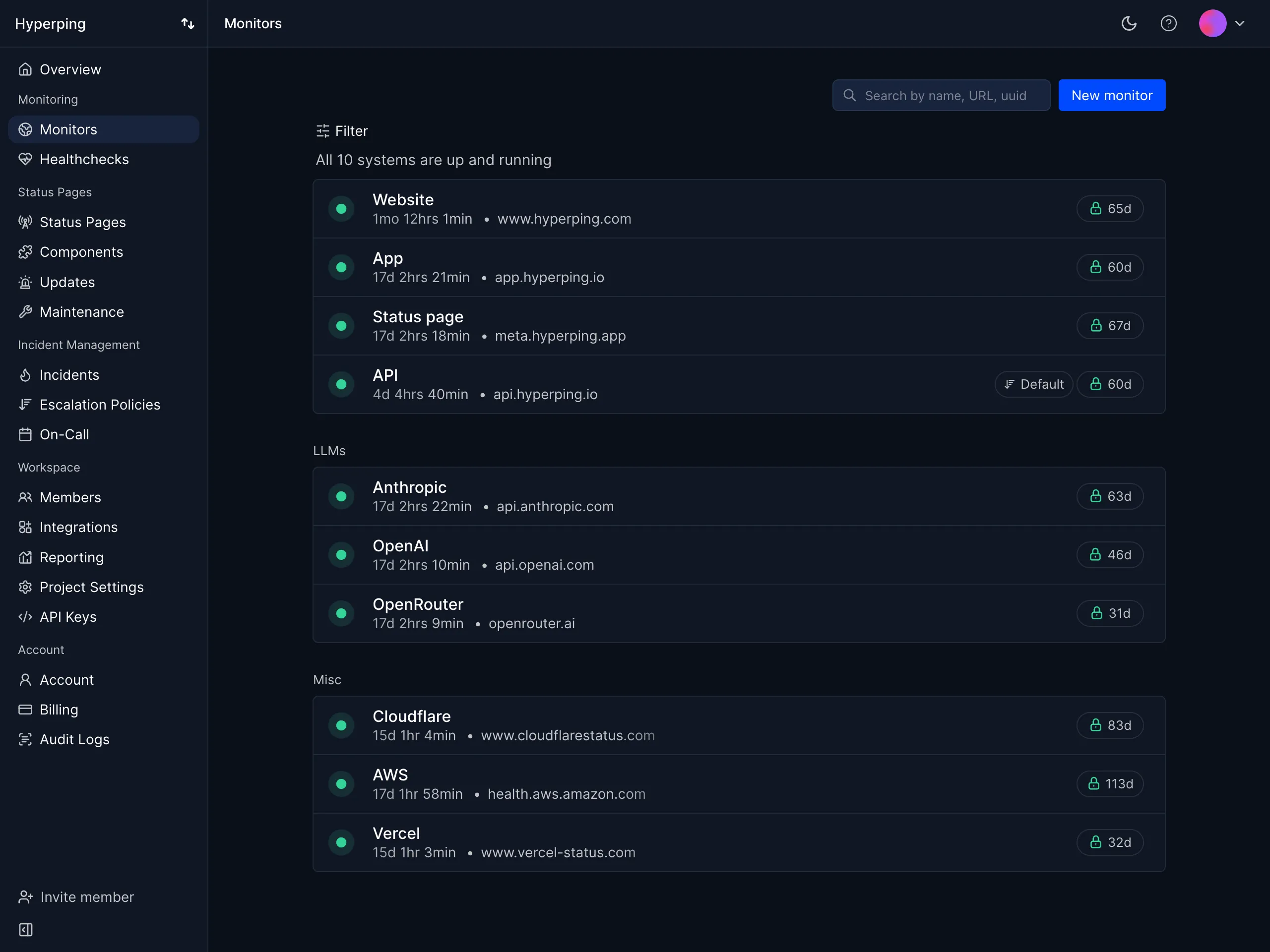
Teams that want certificate checks in the same tool as their uptime monitoring, on-call and status pages, rather than as one more product with its own bill and its own alert routing. Hyperping's SSL certificate monitoring runs on every HTTPS monitor without any setup.
It fits growing SaaS companies, European teams that care about GDPR-compliant EU hosting, and any team currently running a certificate tool plus an uptime tool plus a status page tool plus PagerDuty.
Notable features
- Automatic certificate monitoring on every HTTPS monitor, and on port monitors that speak TLS directly (443, 8443, 993, 465 and others). There is no separate certificate object to create or bill for. Each certificate is checked once a day, and a Recheck button reads a renewed certificate right away.
- Validation the way clients do it: expired or not yet valid certificates, hostname mismatches (wildcards and IP addresses included), self-signed certificates, untrusted roots, incomplete chains that browsers repair but curl and Android don't, and invalid chains.
- Revocation checks through the OCSP response the server staples, then the authority's OCSP responder, then its revocation list (CRL). The CRL step is what covers Let's Encrypt, which stopped running OCSP in 2025.
- Outdated TLS and weak signatures: servers that only offer TLS 1.0 or 1.1, and certificates signed with SHA-1 or MD5. Keys shorter than 2048-bit RSA are shown on the monitor without alerting.
- Expiry alerts you set per monitor. The first alert goes out 1, 3, 7, 15, 30, 60 or 90 days before expiry, and reminders follow at 30, 15, 7, 3 and 1 day below that threshold. A reminder missed because a check couldn't run goes out on the next one. The certificate is read again right before each reminder, so a renewal stops them, and anyone already warned gets a renewed notice.
- Alert routing: the monitor's SSL channels (Slack, Microsoft Teams, Discord, Google Chat, Telegram, webhooks, PagerDuty, Opsgenie) get certificate errors and a resolved notification once they're fixed. Expiry reminders also go to the whole team by email, and they only page PagerDuty and Opsgenie in the last 24 hours, where the renewal resolves the page.
- Certificate change notifications, optional, showing the new certificate next to the previous one. A CDN rotating between a few certificates doesn't trigger them.
- Domain expiry monitoring. Hyperping reads the registration's expiry date from the registry over RDAP, with a WHOIS fallback for extensions like .io, .co and .me, and starts reminding you 7 to 90 days ahead, once per domain per project however many monitors point at it. Registries that don't publish dates, such as .de, .eu, .ch, .be and .nl, get no reminders.
- API, Terraform and MCP:
ssl_alert_days,ssl_reminders,ssl_notify_on_changeanddomain_alert_dayson every monitor, with the days left in the read-onlyssl_expirationanddomain_expiration. - On-call schedules and escalation policies for uptime alerts: timezone-aware rotations, multi-step escalation with configurable delays, acknowledgement, and phone call alerts on Pro and above.
- Status pages with custom domains, subscribers, white labeling on Business, and incidents that flow automatically from monitors that go down.
- Healthchecks so your certbot or ACME renewal cron can ping a URL on success. A renewal job that stops running raises an alert weeks before the certificate expires.
- Playwright browser checks that fail loudly when a certificate error blocks a real login or checkout flow.
- Agent-based server monitoring for the hosts running the renewal jobs, so a full disk that breaks certbot shows up on its own.
Why choose Hyperping for SSL monitoring?
Certificate depth without a second tool
Chain, hostname, revocation and outdated TLS checks used to mean pairing an uptime tool with a dedicated certificate tool. Hyperping now runs them on the same HTTPS monitors as your uptime checks, and only Xitoring documents a broader certificate checklist in this guide.
Reminders that stop when the certificate is renewed
An expiry alert that keeps firing after the renewal teaches people to ignore it. Hyperping reads the certificate again before every reminder, skips it if the renewal already landed, and tells the people it warned that the certificate was renewed. If you use PagerDuty or Opsgenie, they're paged on the last day, and the renewal resolves the page.
Certificates are not a separate line item
Certificate monitoring is included on every plan including Free. There is no per-certificate charge, so 200 subdomains under one wildcard do not cost more than one. Compare that with TrackSSL's $136/mo for 500 certificates.
One bill instead of four
A team running TrackSSL Starter ($17/mo) plus UptimeRobot Team ($39/mo) plus a status page tool plus an on-call tool is at $85 to $250/mo depending on the last two. Hyperping Pro at $74/mo covers all four for 250 monitors, ten seats, three status pages and three on-call schedules.
What actual Hyperping users say
"Hyperping has been a total game-changer for us. The service is reliable, easy to use, and incredibly feature-rich. I love that it constantly checks our site and alerts us right away if there are any issues."
"We made our Hyperping status page publicly available and it became a crucial part of our sales pitches. We are proud of our uptime and we love that we can share it with prospects and customers in such an easy way."
How much does Hyperping cost?
- Free: $0 for 20 monitors, 5-minute checks, 1 status page. SSL, domain expiry and DNS monitoring included.
- Essentials: $29/month, or $24/month billed annually. 50 monitors, 30-second checks, 3 seats, 1 status page with a custom domain, on-call and escalation policies.
- Pro: $89/month, or $74/month annually. 250 monitors, 10 seats, 3 public or private status pages, 3 on-call schedules, phone call alerts. Includes email access codes, multilingual pages, and native account SAML SSO.
- Business: $299/month, or $249/month annually. 1,000 monitors, 20-second checks, 20 seats, 10 status pages, unlimited on-call schedules, white labeling, SAML SSO and MTTA/MTTR reporting.
All paid plans include a 14-day trial. Annual billing gives two months free.
Where Hyperping falls short
No Certificate Transparency monitoring. If catching unauthorized issuance for your domains is a requirement, Hyperping does not do it. Xitoring or SSLMate Cert Spotter do.
No TLS grading. Hyperping flags servers that only offer TLS 1.0 or 1.1 and certificates signed with SHA-1 or MD5, but it does not grade your protocol and cipher configuration. Xitoring publishes an A+ to F grade, and Qualys SSL Labs remains the free reference for it.
Certificates are checked once a day. The scan runs around 04:00 UTC, and Hyperping's 30-second uptime checks don't validate the certificate, so a certificate broken by a deploy at 10:00 is reported the next morning unless someone clicks Recheck. Better Stack checks hourly. For expiry this makes no difference; for a broken chain or a wrong certificate pushed to production, it does.
Certificate alerts skip Hyperping's own escalation policies. They go to the monitor's SSL channels and, for expiry, to the team by email. There is no SMS or phone call for a certificate, and the on-call path is PagerDuty or Opsgenie rather than Hyperping's rotations. A certificate error doesn't mark the monitor down either, so it never opens a status page incident on its own.
Change notifications, not a change history. Hyperping tells you when the served certificate changes and shows the new one next to the previous one. Oh Dear keeps a history of every certificate update.
No private or internal certificate support. Checks run from Hyperping's servers over the public internet, so internal hostnames are out of reach, and a service behind a private CA is reported as an untrusted root.
Is Hyperping right for you?
Choose Hyperping if certificate and domain expiry are two of several availability problems you need to catch, and you want them in the same tool as uptime checks, on-call and status pages. It's the strongest fit for SaaS teams that want monitoring, on-call and customer communication under one predictable bill. If you need Certificate Transparency, TLS grading or checks more often than daily, keep reading.
TrackSSL: Best dedicated certificate monitoring tool
Who TrackSSL is built for
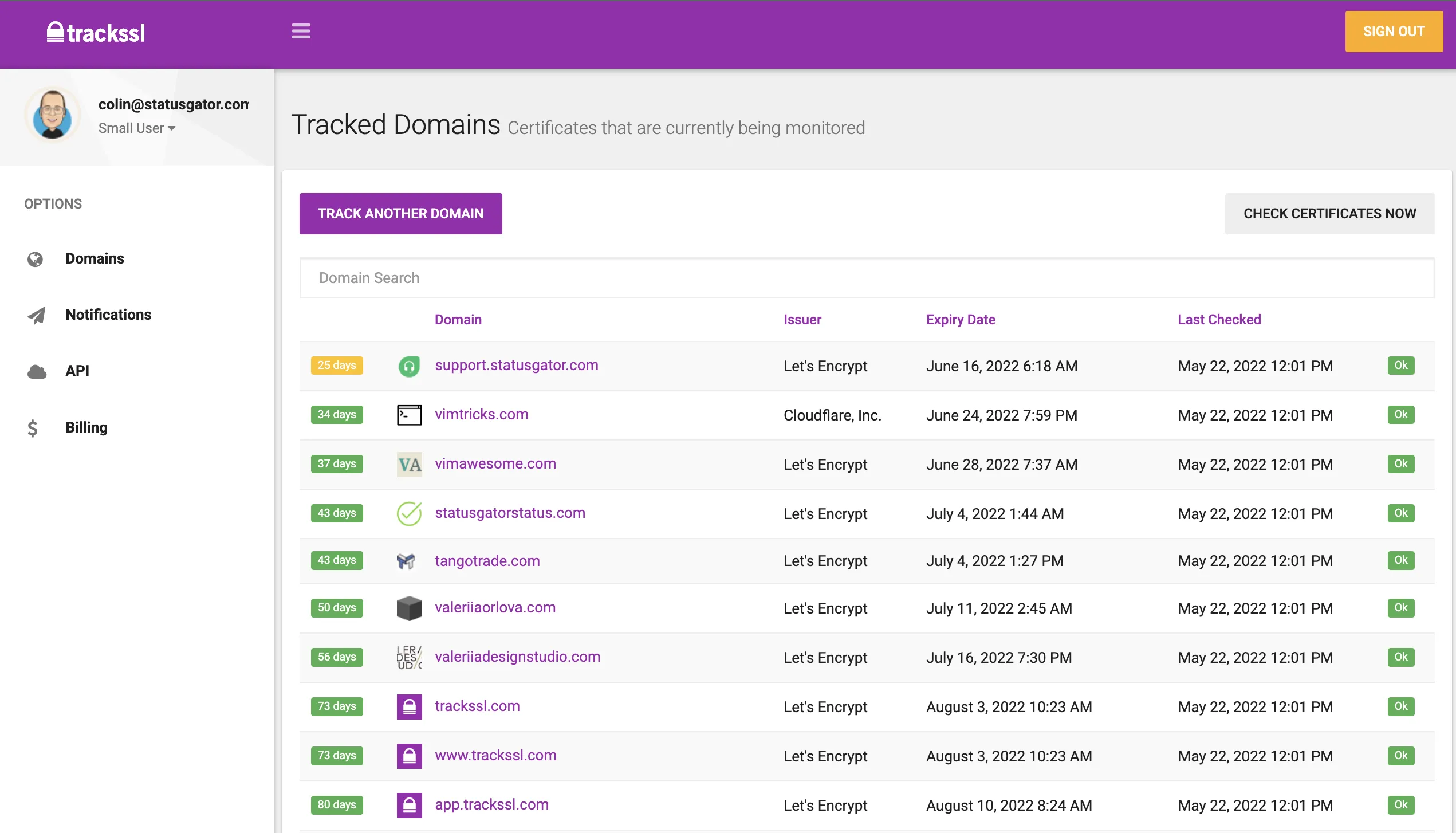
Teams and agencies that want one place to see every certificate they own, with alerts when one is about to expire or has changed. TrackSSL is operated by Nimble Industries and presented alongside StatusGator. It monitors more than 23,000 certificates according to its homepage, and it names Dell, IBM, Western Digital, FastSpring and BigCommerce as customers.
The distinguishing thing about TrackSSL is that certificates are the entire product rather than one check type inside a monitoring platform. If you want a certificate inventory as a first-class object, this is the tool that gives you one.
Notable features
- Expiration monitoring for public TLS certificates, with configurable reminder timing.
- Certificate change notifications when a renewal or provider change alters the served certificate.
- Private and internal certificate monitoring, labeled beta on the current homepage.
- Notification channels: email, Slack, Microsoft Teams, webhooks, extra notification emails, a REST API and StatusGator. The homepage mentions SMS, though the detailed notifications page does not list it, so current SMS availability is unclear.
- Organizations, workspaces, team invitations and roles, added in December 2025. This is what makes agency use credible.
- StatusGator integration that can surface certificate state in a status dashboard without TrackSSL building status pages itself.
- Certificate Transparency alerts, still labeled coming soon on the homepage as of August 2026.
Why choose TrackSSL?
Certificate change alerts as a headline feature
Most monitoring platforms tell you a certificate is valid and when it expires. TrackSSL tells you when it changed. That's the check that catches a staging certificate deployed to production, or a CDN swapping in its own certificate on your custom domain.
A genuinely low entry price for small inventories
Free for 2 certificates, $17/mo annually for 20. The homepage claims prices from around $0.72 per domain. For a team with a fixed, small certificate count and no other monitoring needs, nothing here is cheaper per certificate.
Private certificate support
Public probes cannot see internal hostnames. TrackSSL is the only tool in this comparison set that markets support for internal, private and self-signed certificates, even in beta.
How much does TrackSSL cost?
- Free: 2 certificates, 1 user, expiration and change monitoring, Slack
- Starter: $19/month, or $17/month annually. 20 certificates, 1 user, extra notification emails
- Growth: $39/month, or $35/month annually. 80 certificates, 2 users, API and Teams
- Complete: $79/month, or $72/month annually. 200 certificates, 3 users, webhooks and private certificates
- Scale: $149/month, or $136/month annually. 500 certificates, 5 users
- Enterprise: Custom, above 500 certificates
Note the plan gates: webhooks and private certificates require Complete at $72/mo annually, and the API requires Growth.
Where TrackSSL falls short
The scope is genuinely narrow. No uptime monitoring, no DNS checks, no on-call scheduling, no native status pages. A team buying TrackSSL for expiry alerts still needs a monitoring tool, a status page and an escalation path. The most quotable G2 review makes exactly this point:
"Focused on single functionality to monitor SSL which can be easily done by setting up a remainder. There are many comprehensive monitoring solutions that offer the same service with additional tools."
Two flagship capabilities are not shipped. Certificate Transparency is coming soon and internal certificates are beta. If you're buying for either, verify current state before committing.
Pricing scales by certificate count. Fine at 20. At 500 certificates you're paying $136/mo for expiry and change alerts alone, which is more than Hyperping's Pro plan costs for 250 monitors plus on-call plus status pages.
The review evidence is weak. All 26 G2 records are incentivized, none is rated below four stars, and Reddit signal is thin and mostly from 2023. The praise for simplicity and price is credible and consistent, but this is not a dataset that can surface real complaints.
Is TrackSSL right for you?
Choose TrackSSL if your certificates are the problem and everything else is already covered. It's a strong fit for security or infrastructure teams that want a certificate inventory separate from application monitoring, and for teams with internal certificates that public probes cannot reach. If you also need uptime checks or an escalation path, you're buying the first of several tools.
Xitoring: Best technical SSL checks at the lowest price
Who Xitoring is built for
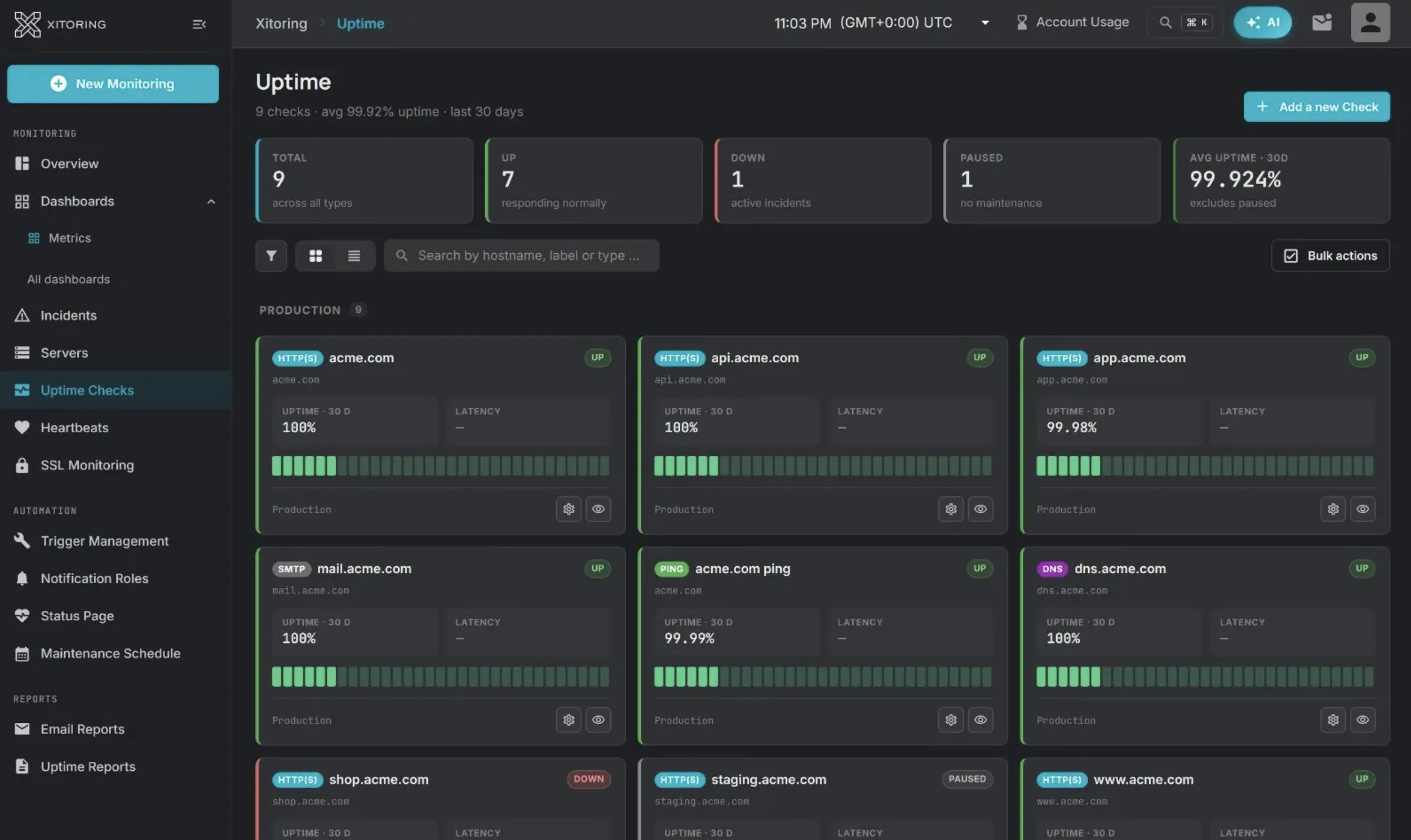
Small infrastructure teams, hosting providers and solo operators who want the deepest technical certificate analysis available at a self-serve price. Founded in 2021, Xitoring combines server monitoring through its Xitogent agent with uptime checks, SSL monitoring, status pages and alerting.
On paper, Xitoring publishes the most complete SSL checklist of any tool in this guide, and it does so at a price that undercuts everything else here.
Notable features
- Root-to-leaf chain validation, including detection of missing intermediates and self-signed certificates.
- Hostname and SAN mismatch detection.
- OCSP and CRL revocation checks. Hyperping is the only other tool in this comparison that documents them.
- A+ to F TLS grading with protocol version and weak cipher analysis.
- Certificate Transparency monitoring, documented rather than promised.
- Graduated expiration alerts and bulk certificate imports.
- Broad check types beyond SSL: HTTP(S), DNS, TCP, UDP, ping, mail server, API, heartbeat and cron.
- Server monitoring through a one-command Xitogent install, with automatic service discovery for Nginx, MySQL, Docker and Redis.
- Included SMS and phone call allowances, from 20 on Solo to 500 on Business+, which is unusual at these prices.
- One-minute checks and one-year retention on every self-serve tier, plus 15 or more global probing nodes.
Why choose Xitoring?
The certificate feature list is not close
Look back at the capability matrix. Xitoring is the only column with a yes in the revocation, TLS grading and Certificate Transparency rows simultaneously. For a security-minded team, that combination normally means buying a dedicated scanner plus a CT monitor plus an uptime tool.
The price is genuinely low
$3.99/mo annually for 20 monitors. $15.99/mo for 120 monitors, 2 status pages and 5 teammates. $51.99/mo for 1,000 monitors. If you're building a comparison table on monitors per dollar, Xitoring wins it outright.
Server and synthetic monitoring in one vendor
The Xitogent agent covers CPU, memory, disk and network with service discovery, which puts the renewal host and the certificate under the same tool.
How much does Xitoring cost?
Synthetic monitoring plans:
- Solo: $4.99/month, or $3.99/month annually. 20 monitors, 1 status page, 1 user
- Starter: $9.99/month, or $7.99/month annually. 50 monitors
- Pro: $19.99/month, or $15.99/month annually. 120 monitors, 2 status pages, 5 teammates
- Business: $34.99/month, or $27.99/month annually. 300 monitors, 3 status pages
- Business+: $64.99/month, or $51.99/month annually. 1,000 monitors, unlimited status pages
Synthetic plus server monitoring runs $24.99 to $199.99/month before Enterprise. A 14-day trial is advertised without a credit card, and the site also advertises an always-free allowance, though the public pages disagree on its size.
Where Xitoring falls short
There is almost no independent evidence. Two G2 reviews, both five-star, both from February 2024. One useful Reddit recommendation. No auditable named customers or case studies in its public pages, alongside claims of thousands of teams and millions of daily checks. I cannot tell you how Xitoring behaves in production because nobody public has said. That's not an accusation, it's a gap you should price into the decision.
Checks stay at one minute across every self-serve tier. Hyperping runs 30 seconds on Essentials and Pro and 20 seconds on Business. For certificate monitoring that difference is irrelevant. For the uptime checks you'll run alongside it, it isn't.
Fifteen or more probing nodes versus 18 documented Hyperping regions. A smaller footprint means less geographic confirmation of a failure.
Incident response is thinner. Escalation policies exist, but on-call rotations, acknowledgement and incident coordination are not the developed part of the product.
Public free-plan wording is inconsistent across pages, which is a small thing that suggests documentation is not the priority.
Is Xitoring right for you?
Choose Xitoring if the technical certificate checks are what you're buying and you're comfortable being an early adopter with limited peer evidence. It's the best value in this guide by a wide margin on paper, and it's the only tool here that covers revocation, grading and Certificate Transparency together. Run it on a trial against a certificate you deliberately break before you commit anything critical to it.
UptimeRobot: Best free tier
Who UptimeRobot is built for
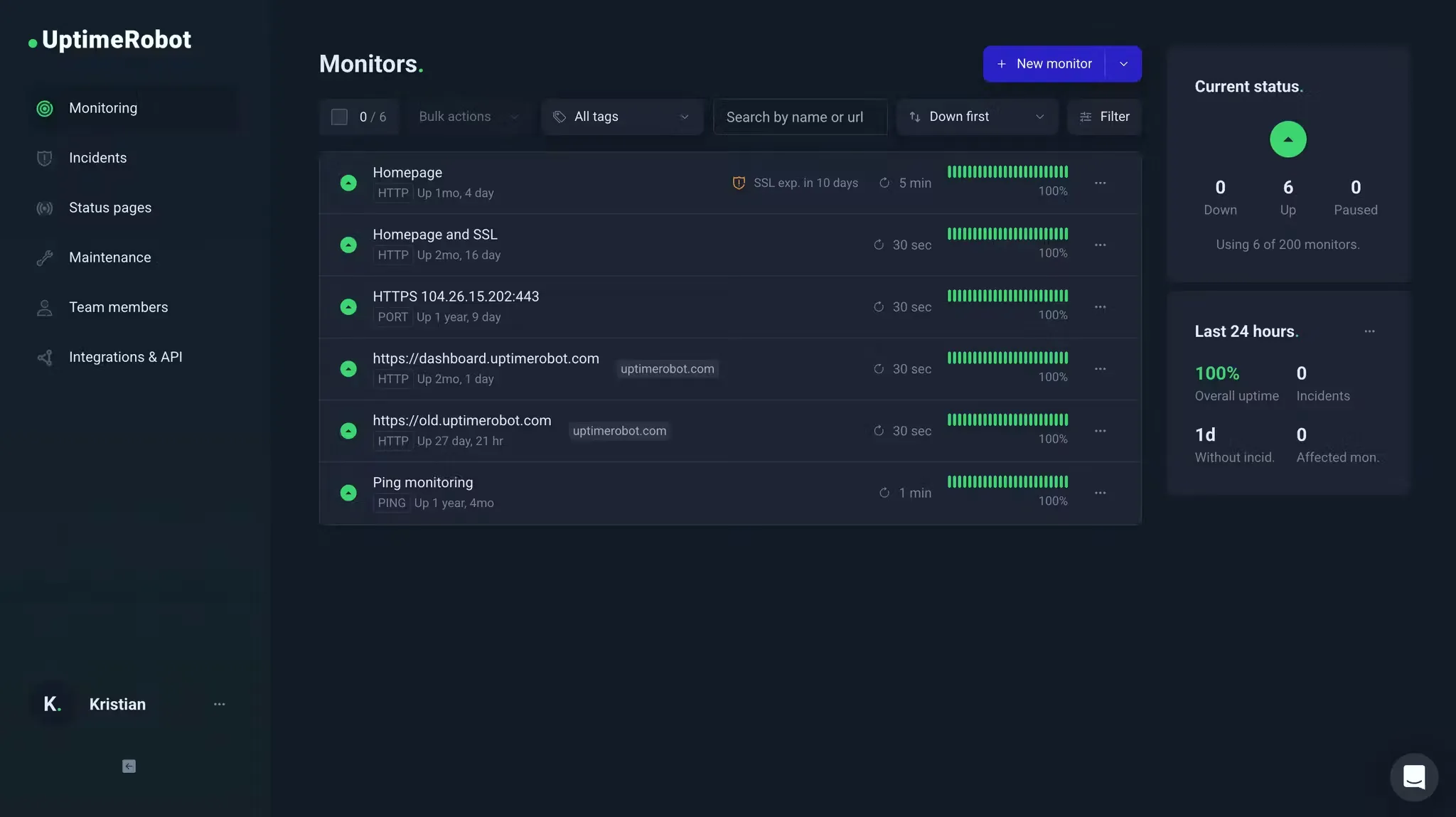
Freelancers, solo developers, small teams and agencies that want certificate expiry alerts attached to uptime checks they were going to run anyway, at the lowest possible cost. Launched in 2010, UptimeRobot claims more than 3.4 million users and runs the most generous free tier in the category at 50 monitors.
Notable features
- SSL expiration alerts at 30, 14, 7 and 1 day, with the option to layer a custom lead time on top of the defaults.
- SSL error detection for expired, invalid or misconfigured certificates, which flips the monitor to DOWN rather than filing a separate report.
- Domain expiration monitoring alongside certificate expiration, covering the adjacent failure where the domain itself lapses.
- Broad check types: HTTP(S), keyword, ping, port, cron, API, UDP and DNS.
- Status pages with custom domains, branding, subscribers and incident history. 100 pages on Team, unlimited on Scale.
- 15-second checks on Scale, the fastest published interval in this guide.
- Mobile apps and a wide integration list including Slack, Zapier and PagerDuty on paid tiers.
Why choose UptimeRobot?
The free tier is the most generous here
50 monitors at 5-minute intervals, indefinitely. For a personal estate or a small agency, that's a real amount of monitoring for nothing.
Certificate and domain expiry together
Certificates and domain registrations fail the same way, on a date nobody has in their calendar. UptimeRobot covers both in one product, which not every tool here does.
Familiarity is worth something
3.4 million users means every engineer you hire has probably used it, and the setup takes minutes.
What G2 users say about UptimeRobot
"I like that UptimeRobot is very intuitive and very easy to set up. It gives me timely email notifications and also the weekly summaries."
"They've changed the plan capabilities 5 months into an 12 month commitment without any notice or compensation."
How much does UptimeRobot cost?
Annual billing saves about 8% on Solo, 15% on Team and 19% on Scale. Prices as listed on Nov 6, 2026.
- Free: $0. 50 monitors, 5-minute intervals, basic status pages
- Solo: $13/month, or $12/month annually for 10 monitors. 60-second checks, 1 seat, 3 status pages, all monitor types including SSL and DNS
- Team: $46/month, or $39/month annually. 100 monitors, 30-second checks, 3 seats, 100 status pages, webhooks, Zapier, PagerDuty
- Scale: $98/month, or $79/month annually for 200 monitors. 15-second checks, 5 seats, 200 or 500 monitor options, unlimited status pages
- Enterprise: Custom
Solo and Scale both use a monitor-count selector, so the $12 headline describes the 10-monitor configuration rather than the largest one on that tier. Note also that the free plan covers 50 monitors while paid Solo starts at 10, so moving from free to paid can mean fewer monitors at faster intervals.
Where UptimeRobot falls short
The SSL wording is genuinely ambiguous. The comparison table lists an SSL and domain expiration monitor under Free, while later copy says HTTPS SSL error monitoring is paid. The public page does not clearly separate those two lines. Verify what you're getting before relying on the free tier for certificate coverage.
The certificate analysis is shallow. Expiry and error detection, and that's it. No chain reporting, no hostname mismatch detail, no revocation, no grading, no Certificate Transparency. Compare that column against Xitoring's in the matrix above.
No on-call scheduling or rotations. Alerts route to channels. Nobody owns them and nothing escalates.
Plan migration complaints are a real pattern, though a dated one. Four low-rated G2 reviews describe plan changes, removed capabilities or upgrade pressure, mostly from 2022 to 2024. A July 2025 r/selfhosted thread reports a user moved from an $8 legacy plan to a $34 Team plan for roughly 30 to 35 homelab monitors. A separate July 2025 r/sysadmin thread reports false flapping alerts, though other commenters said they weren't seeing it. Treat these as history worth knowing rather than current behavior.
Is UptimeRobot right for you?
Choose UptimeRobot if you want expiry alerts on many endpoints for as little money as possible and shallow certificate analysis is enough. It's the right pick for freelancers monitoring client sites and personal projects. If you need certificate checks beyond expiry and validity, such as chain, hostname or revocation, look at Hyperping or Xitoring. If you're already on it and want the response layer, there's a migration guide.
Better Stack: Best for certificates alongside logs and traces
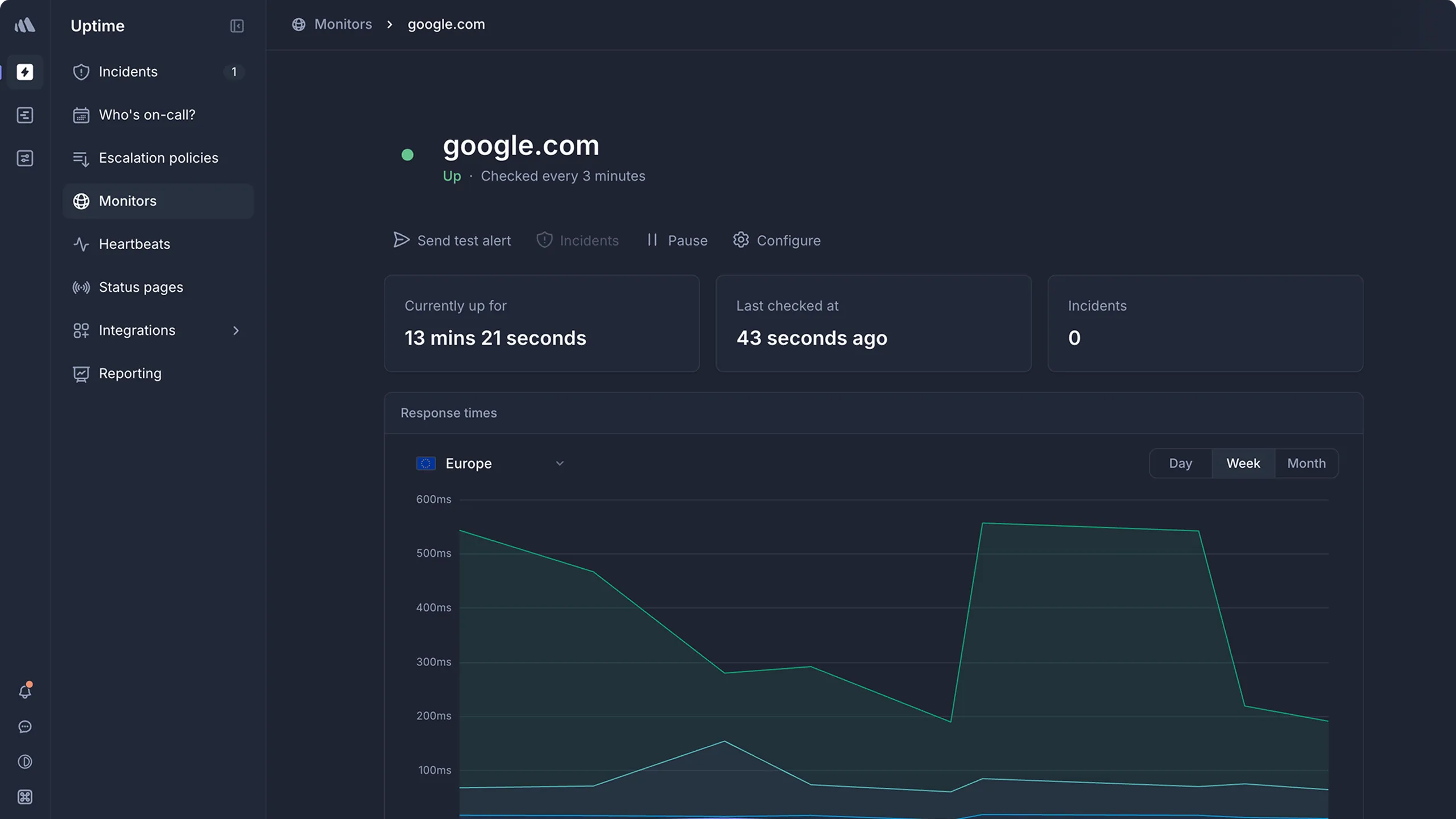
Who Better Stack is built for
Engineering teams that want certificate checks as one signal in a broader observability and incident response platform. Founded in 2021 by Veronika Kolejakova and Juraj Masar, with $28.6 million in reported funding, Better Stack now positions itself as an AI SRE observability stack rather than an uptime tool.
Certificate monitoring here is a small feature of a large product. Whether that's the right trade depends entirely on whether you want the rest of the product.
Notable features
- SSL validity and expiration checks run hourly, with advance warning selectable at 1, 2, 3, 7, 14, 30 or 60 days. Along with Hyperping's 1 to 90 days, that's the most flexible warning configuration in this guide.
- Website, API, port, ping, keyword, heartbeat and cron monitoring.
- On-call schedules, escalation, and unlimited phone and SMS alerts in the responder package.
- Incident management inside Slack and Microsoft Teams, with AI-generated post-mortems.
- Logs, OpenTelemetry-native tracing, infrastructure metrics, error tracking, real user monitoring and session replay. None of this exists in the other five tools here.
- AI SRE chat and root-cause workflows connected to Datadog, Grafana, Sentry, Notion, Linear and GitHub.
- REST API, Terraform provider, webhooks and mobile apps.
- Public and private status pages with subscribers, custom domains, SSO and IP allowlisting, all as paid add-ons.
Why choose Better Stack?
Configurable expiry warnings, checked hourly
Seven selectable lead times from 1 to 60 days is the right shape of control for a world moving to 47-day certificates. Hyperping offers a similar range but reads certificates once a day, where Better Stack reads them every hour.
Certificate failure to root cause in one place
When a certificate error takes an endpoint down, the logs from that service are in the same product. For teams that debug through logs, that's a real workflow improvement rather than a feature list entry.
On-call is included, not bolted on
Rotations, escalation, acknowledgement, Slack and Teams incident channels, AI post-mortems. A certificate alert goes through the same rotations and escalation as an outage. Hyperping has rotations too, but sends certificate alerts to channels and to PagerDuty or Opsgenie.
What G2 users say about Better Stack
"The pricing can feel a bit high for small teams or individual developers. Also, some of the more advanced features and configuration options come with a learning curve."
"I love using Better Stack for logging, telemetry, and alerting. It's been great for unifying data from our multiple services."
How much does Better Stack cost?
Better Stack prices modularly, and the headline number describes a small part of a real bill.
- Free: 10 monitors, 10 heartbeats, 1 status page, Slack and email alerts
- Responder: $34/month, or $29/month annually per license. Includes uptime, incidents, on-call, monitoring and status pages with unlimited phone and SMS alerts
- Additional 50 monitors: $25/month, or $21/month annually
- AI SRE chat: usage based at $5 per million tokens
- Additional public status page: $15/month, or $12/month annually
- Custom CSS and JavaScript: $15/page monthly, or $12/page annually
- White-label footer removal: $250/page monthly, or $208/page annually
- Password authentication: $50/page monthly, or $42/page annually
- IP allowlisting: $250/page monthly, or $208/page annually
- Status page SSO: $250/page monthly, or $208/page annually
- Extra 1,000 subscribers: $40/month
Those status page add-on prices are not typos. Removing the "powered by" footer from one page costs $208/month annually, which is more than Hyperping's entire Business plan at $249/month with white labeling included across 10 pages.
Where Better Stack falls short
Certificate analysis is basic. Validity and expiration, checked hourly. No chain reporting, no revocation, no grading, no Certificate Transparency, no change history. On the certificate axis specifically, Better Stack sits close to UptimeRobot.
Hourly checks still leave a gap. They beat Hyperping's daily scan, and for an expiry countdown either is fine. For catching a certificate that broke during a deploy, an hour is still a long time.
Total cost is hard to predict. Responder licenses, monitor packs, telemetry volume, retention, AI tokens, status pages, subscribers and security add-ons all move independently. The $29 headline describes almost nobody's actual bill.
Breadth costs complexity. The recurring G2 complaint is the learning curve on advanced configuration, and one one-star reviewer reported log pages taking two to five minutes to load. That's a single serious report rather than a pattern, but it's in the record.
Is Better Stack right for you?
Choose Better Stack if you want observability and certificates from one vendor and you're buying the telemetry platform anyway. If you only need certificate and uptime monitoring with a response path, you're paying for logs, traces, RUM and session replay you won't open. Hyperping covers that narrower job with a bill you can predict, and there's a migration guide if you decide to move.
Oh Dear: Best for agencies monitoring whole client sites
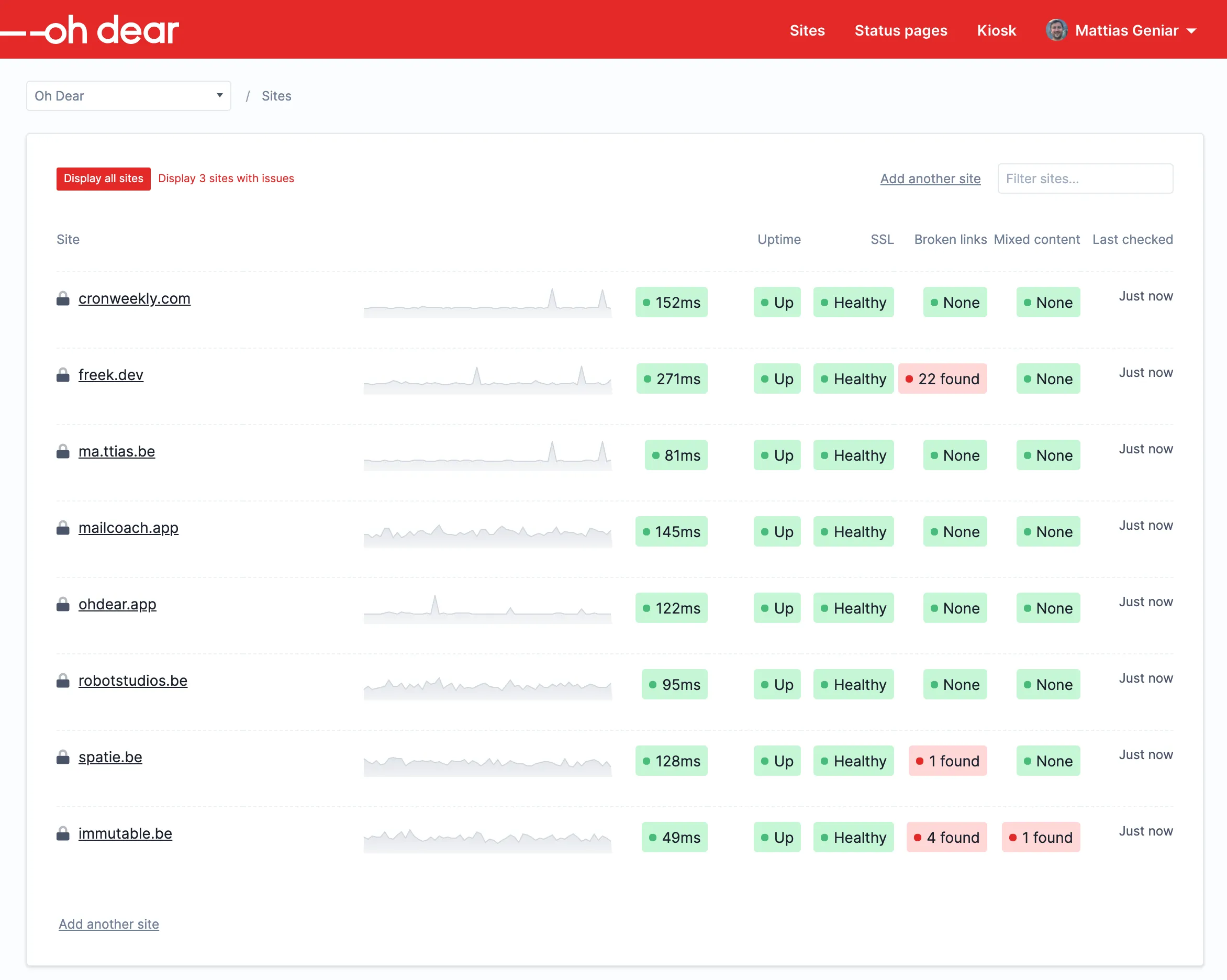
Who Oh Dear is built for
Agencies, freelancers, and PHP and Laravel teams managing a portfolio of client sites. Founded in 2018 by Freek Van der Herten and Mattias Geniar, based in Belgium with EU data storage, Oh Dear's homepage headline is "Stop hearing about downtime from your clients," which tells you exactly who it's for.
Its certificate monitoring is strong, and it arrives attached to a set of website health checks nobody else here offers.
Notable features
- Full chain validation across leaf, intermediate and root certificates.
- Certificate change detection with before-and-after detail, plus a history of every certificate update. This is the best-documented change tracking in this guide.
- Broken link crawling, mixed content detection and sitemap checks. Mixed content is directly adjacent to certificate work: a valid certificate on a page loading HTTP assets still shows a broken padlock.
- Lighthouse and Core Web Vitals monitoring.
- DNS and domain expiration monitoring.
- Scheduled task and cron monitoring, plus application health endpoint ingestion for Laravel.
- Multi-location verification before an alert fires, which reduces false alarms.
- Status pages, subscribers, incident templates and client reporting.
- Every feature on every plan. Price changes only with site and server count, so SSO and unlimited users are available at €15/month.
Why choose Oh Dear?
Certificate change history with real detail
Oh Dear shows you what the certificate was and what it became. When a deploy swaps a certificate unexpectedly, that's the difference between a five-minute diagnosis and an afternoon.
Certificates in context of the whole site
An expired certificate, a mixed content warning and a broken link all produce the same customer complaint: "your site looks broken." Oh Dear is the only tool here that catches all three.
Pricing that doesn't gate features
No plan gates at all. Compare that with TrackSSL putting private certificates behind a $72/month tier or Better Stack charging $208/month to remove a status page footer.
What G2 users say about Oh Dear
"The pricing model isn't the best for me, I'm a freelancer and work with a bunch of different clients."
"It's not the most advanced tool available, so if you need a lot of insight maybe this is not for you."
How much does Oh Dear cost?
Prices in EUR before VAT. Annual billing charges ten months.
- Solo: €15/month for 2 sites and servers
- Freelance: €49/month for 10
- Studio: €99/month for 25
- Agency: €149/month for 50
- Agency Plus: €199/month for 75
- Portfolio: €249/month for 100
- Portfolio Plus: €329/month for 150
- Scale: €399/month for 200
- Enterprise: Custom above 200
A 10-day trial with all features and no credit card, plus a 30-day money-back guarantee.
Where Oh Dear falls short
Site-count pricing is the recurring complaint. It's the single most-cited limitation in the G2 sample. An agency with 30 low-traffic client sites pays €149/month regardless of how little monitoring each one needs. A SaaS company with 30 API endpoints on one domain pays for one site and gets a bargain. Which side of that line you're on determines everything.
The SSL alert timing documentation contradicts itself. The marketing FAQ says reminders start 30 days ahead by default and are adjustable. The technical documentation describes daily notices inside 14 days for non-Let's Encrypt certificates and inside 7 days for Let's Encrypt certificates. Those are not the same policy, and with 47-day certificates arriving, alert timing is not a detail. Ask before you buy.
No native on-call scheduling or escalation. Notifications go to channels. One G2 reviewer notes that snoozing from Slack snoozes everything, which could hide a more important alert.
Server monitoring is health-endpoint based, not a first-class CPU, memory, disk and network agent.
Is Oh Dear right for you?
Choose Oh Dear if you manage client websites and certificates are one of several things that can make a site look broken. The change history and the whole-site checks are genuinely differentiated. If you run a SaaS product with many endpoints under few domains, or if you need on-call ownership of alerts, the site-count model and the missing escalation layer will both work against you. Hyperping's Oh Dear comparison covers that trade in more detail.
Real-world pricing: the same requirement priced six ways
Headline prices in this category are not comparable, because every vendor counts something different. Here is one realistic scenario priced across all six tools.
The scenario: 20 public certificates, 100 uptime monitors across those domains, 5 people who need to receive alerts, and 1 branded status page on your own domain with the vendor's branding removed.
| Tool | Configuration | Monthly cost (annual billing) | What's missing |
|---|---|---|---|
| Xitoring | Synthetic Pro, 120 monitors, 5 teammates, 2 status pages | $15.99 | On-call rotations, faster than 1-minute checks |
| TrackSSL + UptimeRobot | Starter (20 certs) plus Team (100 monitors, 3 seats) | $56 | 2 more seats, on-call, one bill |
| UptimeRobot | Scale, 200 monitors, 5 seats, unlimited status pages | $79 | On-call rotations, certificate depth |
| Hyperping | Pro, 250 monitors, 10 seats, 3 public or private status pages, 3 on-call schedules | $74 | White labeling (Business, $249) |
| Oh Dear | Studio, 25 sites | ~€99 | On-call rotations |
| Better Stack | 5 responders, 2 extra monitor packs, 1 white-labeled page | ~$395 | Nothing, but note $208 of that is footer removal |
Two observations from building this table.
Xitoring is not slightly cheaper, it's a different order of magnitude. $15.99 versus $74 versus $395 for broadly overlapping certificate and uptime coverage. What you give up is check speed, on-call maturity and any peer evidence that it works at scale.
Better Stack's number is dominated by one add-on. Drop the white-label requirement and it falls to roughly $187/month. That single line item costs more than most of the other tools entirely, which is worth knowing before you promise a client an unbranded page.
How to use Hyperping for SSL certificate monitoring
If you want certificate checks next to your uptime monitoring, on-call and status pages, here's the setup that covers the whole failure chain rather than just the expiry date.
1. Add your HTTPS endpoints as monitors
Create an HTTP monitor for each HTTPS hostname you serve, including the ones nobody claims: the marketing subdomain, the legacy API host, the customer's vanity domain pointing at your CDN. Hyperping checks the certificate of every HTTPS monitor once a day, along with port monitors on TLS ports such as 8443, 993 or 465, so there is no separate certificate object to create and nothing extra to pay per certificate.
After a renewal or a certificate change, open the monitor's Certificate card and click Recheck instead of waiting for the next daily check.
2. Set the expiry threshold and reminders
In the monitor's Notifications tab, pick when the first expiry alert goes out: 1, 3, 7, 15, 30, 60 or 90 days before expiry. With reminders on, another alert follows at each step below it, so 30 days means alerts at 30, 15, 7, 3 and 1 day.
Match the threshold to the certificate. A 60 or 90-day threshold on a 90-day Let's Encrypt certificate puts every renewal inside the alert window, so keep those for certificates that last a year. Turn on certificate change notifications if you want to hear about every renewal or new issuer, not only about problems.
3. Send certificate alerts where someone acts on them
Add the monitor's SSL channels: Slack, Microsoft Teams, Discord, Google Chat, Telegram or a webhook. Certificate errors (a broken chain, a hostname mismatch, a revoked certificate) go to those channels, and expiry reminders also reach the whole team by email.
Add PagerDuty or Opsgenie as an SSL channel to involve on-call. They get certificate errors as soon as the daily check finds them, but expiry reminders only page them in the last 24 hours, and the renewal resolves the page. The most common cause of an expired certificate is an alert that fired into a channel nobody reads, so check that each channel reaches a person.
4. Turn on domain expiry alerts
A valid certificate doesn't help once the domain registration lapses. Set a domain expiry threshold between 7 and 90 days and Hyperping reads the expiry date from the registry over RDAP, or WHOIS for extensions like .io, .co and .me. Ten monitors on the same domain in a project send one reminder, not ten. Registries that don't publish dates, such as .de, .eu, .ch, .be and .nl, get no reminders, so keep a calendar entry for those.
5. Monitor the renewal job itself
Create a healthcheck and have your certbot, ACME or custom renewal cron ping its URL on successful completion. Set the expected frequency to match your renewal schedule.
This catches the failure that endpoint monitoring cannot see early: a renewal job that stopped running three weeks ago. The certificate is still valid, the monitor is still green, and you now know anyway. With 47-day certificates, this check stops being optional.
6. Plan the status page update
Certificate alerts don't mark a monitor down, so they don't change your status page on their own. Map the HTTPS monitors to services on a status page with your own domain, and when a certificate failure reaches customers, post an incident: subscribers are notified, which replaces the support queue with a link you can send.
Free and open-source options
If you already run a Prometheus stack or you need to reach certificates that public probes cannot see, these are the options worth knowing.
- Prometheus Blackbox Exporter exposes the earliest expiry in the certificate chain as a metric. Free, widely deployed, and it works with Alertmanager and Grafana you already run. There's no certificate inventory and no notification layer beyond what you build.
- x509-certificate-exporter monitors Kubernetes secrets, kubeconfigs, local files, PKCS#12 and JKS stores. This is the answer for internal certificates that no external probe can reach. It emits metrics only.
- Qualys SSL Labs remains the free reference for protocol, cipher and chain grading. It's an assessment tool, not a monitor: rate limited, no alerting, no inventory. Use it after a configuration change, not as continuous coverage.
- SSLMate Cert Spotter is the sharpest Certificate Transparency tool here, from $15/month for 20 domains at hourly checks. Its open-source edition leaves notification, storage and operations to you.
The trade with self-hosting is the usual one: if your monitoring host is down, you learn nothing, and there's no global probe network to confirm a failure from a second location. For certificates specifically the self-hosted option is more defensible than for uptime, because expiry is a slow-moving signal that a missed hour won't hide.
Enterprise certificate lifecycle management
If your requirement is discovery, issuance, renewal and policy enforcement across thousands of internal and public certificates, you're not shopping in this category at all. These platforms combine monitoring with private PKI management:
| Platform | Main strength | Main consideration |
|---|---|---|
| Keyfactor Command | CA-neutral discovery and lifecycle automation, strong private PKI, Kubernetes-native via Helm | High entry cost, paid add-ons, requires PKI expertise |
| Venafi TLS Protect / CyberArk Certificate Manager | Deep discovery and machine identity governance, built around the 47-day shift | Among the most expensive and complex, long deployment |
| DigiCert Trust Lifecycle Manager | Enterprise discovery and renewal automation with DigiCert CA integration | Expensive, limited public pricing, CA-anchored |
| Sectigo Certificate Manager | Discovery, enrollment, renewal and policy controls across public and private certs | Enterprise contracts, substantial pricing at modest inventories |
| AppViewX CERT+ | CA-neutral lifecycle automation with workflow controls and hybrid deployment | Enterprise pricing and implementation effort |
| ManageEngine Key Manager Plus | Built-in private CA plus public CA integrations, from $475/year | Administrative overhead grows with the estate |
These do not replace endpoint monitoring. They manage the certificate; something still has to verify what the endpoint serves. Most enterprises run both.
All SSL monitoring tools analyzed
The full set I worked through, grouped by what they actually are.
Dedicated certificate monitoring
| Name | Pricing | Main strength | Main weakness |
|---|---|---|---|
| TrackSSL | Free for 2; from $17/mo | Certificate change alerts, private cert support | No uptime, on-call or native status pages |
| Xitoring | From $3.99/mo | Chain, OCSP/CRL, grading, CT in one product | Almost no independent review evidence |
| SSLMate Cert Spotter | From $15/mo | Certificate Transparency and subdomain discovery | CT-focused, not general monitoring |
| CertAlert.pro | Self-serve | Expiration and chain monitoring, configurable intervals | Very limited independent coverage |
| CertAlert (Red Kestrel) | Enterprise | Self-hosted, agentless, non-standard port discovery | Procurement burden, little public pricing |
| SSLBoard | First scan free | CT subdomain discovery, HSTS and post-quantum audit | Audit-oriented, paid rescans add up |
Uptime and observability platforms with SSL monitoring
| Name | Pricing | Main strength | Main weakness |
|---|---|---|---|
| Hyperping | From $24/mo | SSL, revocation and domain expiry next to on-call and status pages | No CT or TLS grading, daily checks |
| UptimeRobot | Free for 50; from $12/mo | Largest free tier, domain expiry included | Shallow SSL analysis, no on-call |
| Better Stack | Free; $29/responder/mo | Certificates alongside logs and traces | Modular pricing, hourly checks |
| Oh Dear | From €15/mo | Chain validation plus change history, whole-site checks | Site-count pricing, no on-call |
| Sematext Synthetics | $2 per HTTP monitor | Chain validation every run, change detection every 10 min | Browser monitor pricing climbs fast |
| Pingdom | From $18/mo | Established global network | Dated features, false positive reports |
| Site24x7 | From ~$9/mo | Validity, OCSP, blocklist, SNI checks, ACM integration | Learning curve, complex pricing |
| StatusCake | Free; from $20.41/mo | Expiration, mixed content, certificate score | Limited discovery and CT monitoring |
| HetrixTools | Free tier | Free expiry tracking with HTTPS checks, blacklist monitoring | Basic expiry only |
| Dotcom-Monitor | Varies | Global chain, hostname and trust checks | Broad web-testing platform, thin inventory |
| Datadog Synthetics | Metered | Correlates certificate failures with logs and traces | Expensive for certificate-only use |
| ManageEngine Applications Manager | From ~$475/yr | Threshold expiry alerts inside broad APM, on-prem option | Heavyweight for a small inventory |
Open-source and self-hosted
| Name | Pricing | Main strength | Main weakness |
|---|---|---|---|
| Prometheus Blackbox Exporter | Free | Earliest chain expiry as a metric, huge install base | Requires the full Prometheus stack |
| x509-certificate-exporter | Free | Kubernetes secrets, PKCS#12, JKS, local files | Metrics only, no notifications |
| Mux Certificate Expiry Monitor | Free | Probes domains, pods and ingresses | Narrow scope, small community |
Enterprise CLM and cloud-native
| Name | Pricing | Main strength | Main weakness |
|---|---|---|---|
| Keyfactor Command | Quote | CA-neutral automation, Kubernetes-native | High entry cost, PKI expertise required |
| Venafi TLS Protect / CyberArk | Quote | Deepest discovery and machine identity governance | Most expensive and complex here |
| DigiCert Trust Lifecycle Manager | Quote | Enterprise discovery and renewal automation | CA-anchored, limited public pricing |
| Sectigo Certificate Manager | Quote | Enrollment, renewal and policy controls | Enterprise contracts and onboarding |
| AppViewX CERT+ | Quote | Workflow controls, hybrid deployment | Excessive for public-endpoint expiry alerts |
| AWS Certificate Manager | Free with AWS services | Automated issuance and renewal, CloudWatch alerts | AWS-managed certificates only |
I excluded KeyChest, which reportedly shut down in February 2026.
How to test these tools
Every tool in the top six offers a free tier or trial:
- Hyperping: free tier with 20 monitors, plus a 14-day trial on paid plans
- TrackSSL: free for 2 certificates, no time limit
- Xitoring: 14-day trial without a credit card, plus a free allowance
- UptimeRobot: free plan with 50 monitors
- Better Stack: free tier with 10 monitors and 1 status page
- Oh Dear: 10-day trial with every feature, no credit card
To evaluate them properly, do not just add a healthy domain and watch it stay green. That tells you nothing.
- Deliberately break a certificate. Point a test subdomain at a server with a self-signed certificate, then at one with a missing intermediate, then at one whose hostname doesn't match. Time how long each tool takes to notice and read what the alert actually says.
- Test the renewal failure case. Stop the renewal cron on a staging host and see which tool surfaces it before the certificate expires. Most won't, which is the argument for pairing endpoint checks with a heartbeat on the renewal job.
- Exercise the alert path end to end at an inconvenient hour. Does it reach a person? Does it escalate when that person ignores it? Certificate expiry is uniquely easy to acknowledge and forget.
- Check the certificate detail in the alert. "SSL error" and "chain incomplete, missing intermediate from Let's Encrypt R11, hostname api.example.com not in SAN list" are different products.
- Price your actual configuration, not the headline. Count the way each vendor counts: certificates for TrackSSL, sites for Oh Dear, monitors for Hyperping, UptimeRobot and Xitoring, responders plus add-ons for Better Stack.
Related reading
- SSL certificate monitoring: how Hyperping's certificate checks work
- Choosing the right monitoring checks: where SSL fits alongside HTTP, DNS, TCP and keyword checks
- Best cron job monitoring tools: for the heartbeat that watches your renewal job
- The hidden cost of separate monitoring and on-call tools: the math behind the consolidation argument
- Migrate from UptimeRobot to Hyperping: step-by-step migration guide
- Migrate from Better Stack to Hyperping: step-by-step migration guide
FAQ
What are the best SSL certificate monitoring tools? ▼
The best SSL certificate monitoring tools are Hyperping (certificate and domain expiry checks in the same tool as uptime, on-call and status pages), TrackSSL (dedicated certificate inventory and change alerts), Xitoring (deepest published TLS analysis at the lowest price), UptimeRobot (largest free tier), Better Stack (SSL alongside logs, traces and incident response) and Oh Dear (whole-site health for agencies).
What should SSL certificate monitoring actually check? ▼
A good SSL monitor checks seven things: days until expiration, whether the chain validates from leaf to root, whether the hostname matches the certificate's common name or SAN list, revocation status through OCSP or CRL, TLS protocol versions and cipher strength, unexpected issuance visible in Certificate Transparency logs, and whether the served certificate changed since the last check. Most tools cover the first two or three. Very few cover all seven.
Why do SSL certificates need continuous monitoring if renewal is automated? ▼
Automation replaces the certificate. Monitoring confirms the replacement actually reached the server. The common failure is a renewal job that succeeds on disk while the load balancer, CDN or reverse proxy keeps serving the old certificate until it expires. A calendar reminder cannot see that. An external check that reads the certificate your users receive can.
How are 47-day certificates going to change SSL monitoring? ▼
The CA/Browser Forum adopted Ballot SC-081v3 in April 2025, cutting maximum public TLS certificate validity from 398 days to 47 days in stages through March 2029. A certificate that needed attention once a year will need it roughly eight times a year. That makes manual tracking impractical and shifts the monitoring job from expiry reminders to verifying that renewal automation keeps working.
Is there a free SSL certificate monitoring tool? ▼
Yes. Hyperping's free plan includes 20 monitors with SSL and domain expiry monitoring on every HTTPS check. UptimeRobot's free plan covers 50 monitors, though its public pages are ambiguous about which SSL checks are free versus paid. TrackSSL is free for 2 certificates. Prometheus Blackbox Exporter is free and self-hosted if you already run Prometheus and Alertmanager.
What is the difference between SSL monitoring and TLS posture testing? ▼
SSL monitoring watches live certificates continuously and alerts on expiry or validation failures. TLS posture testing grades protocols, cipher suites and configuration at a point in time, which is what Qualys SSL Labs does. Monitoring tells you before something breaks. Posture testing tells you how well the endpoint is configured right now. Most teams need both. Hyperping flags servers stuck on TLS 1.0 or 1.1 and SHA-1 or MD5 signatures without grading them, and only Xitoring in this guide combines monitoring with a full grade.
Do I need Certificate Transparency monitoring? ▼
You need it if you want to catch certificates issued for your domains that your team did not request, which is the main signal for domain hijacking and mis-issuance. CT monitoring only sees publicly logged certificates, so it cannot cover internal hostnames. Of the tools in this guide, Xitoring documents CT monitoring, TrackSSL still labels it as coming soon, and the rest do not offer it.


