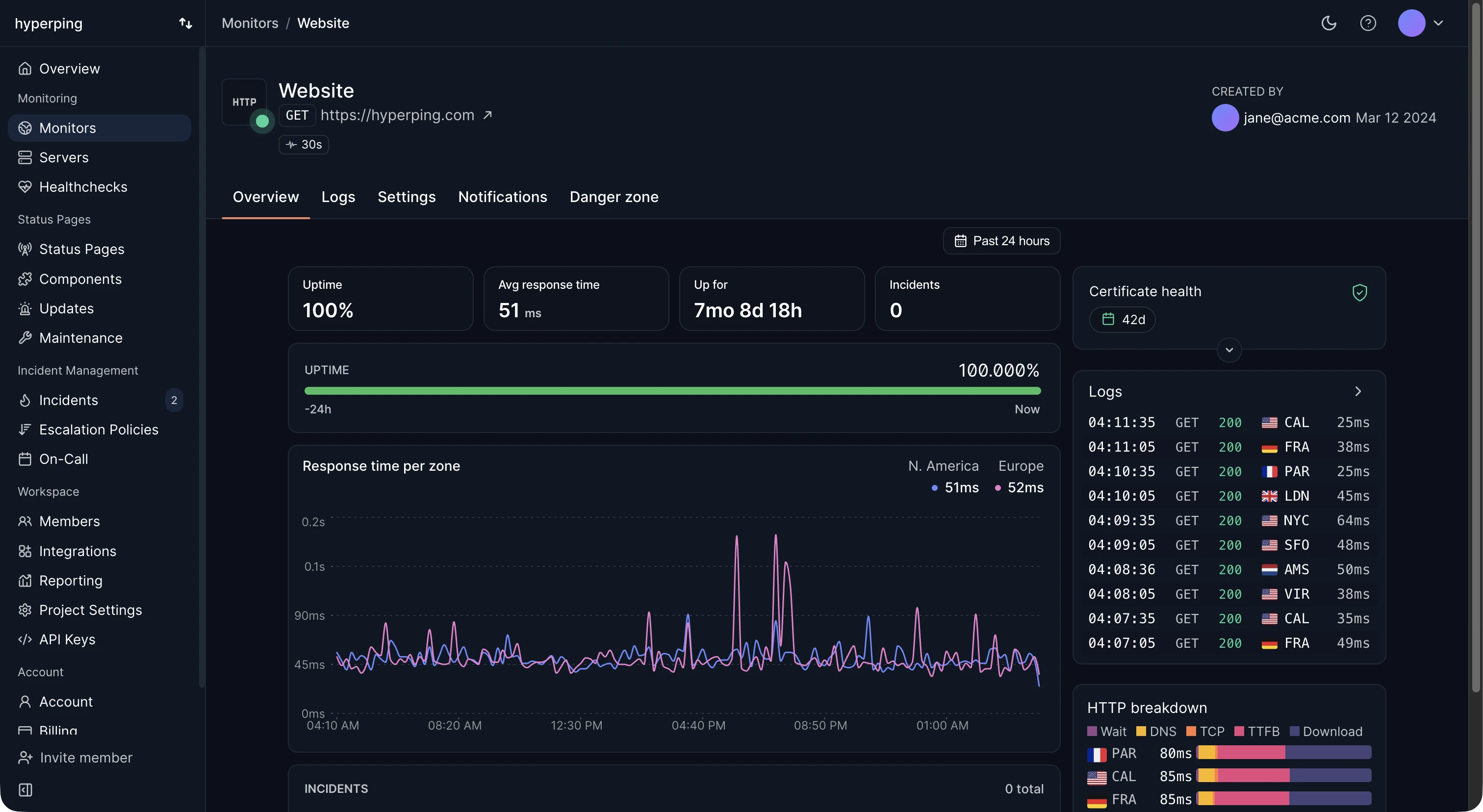
Response time depends on where it's measured from, so external monitors measure it from several places. Hyperping records the response time of every check, tagged with the region that ran it, and charts it per zone. The monitor page also breaks a request into its phases (wait, DNS, TCP, time to first byte, and download) for each region, which tells you which part got slow.
The parts of a response time
- DNS lookup: resolving the hostname to an IP address. Usually a few milliseconds when cached, tens to hundreds when not.
- TCP connection: the handshake with the server, one network round trip.
- TLS handshake: negotiating encryption, one more round trip with TLS 1.3, two with TLS 1.2.
- Time to first byte (TTFB): from sending the request to the first byte of the answer. This is where server processing time shows up.
- Download: transferring the rest of the response.
A slow TTFB points at the application, its database, or its dependencies. Slow DNS, TCP, and TLS phases point at the network, the DNS provider, or the distance between client and server.
Response time vs latency
Latency often means only the network delay, the time for data to travel between client and server. Response time includes latency plus everything the server does. In casual use the two words get swapped, so check which one a dashboard means.
Good response time benchmarks
For an API endpoint, under 200 ms at the median and under 1 second at the 99th percentile is a solid target. For a web page's first byte, under 800 ms is the threshold Google uses for a good TTFB. Compare your numbers with your own baseline more than with a general rule: a step change after a deploy matters more than whether the median is 180 or 220 ms. See what is a good API response time for benchmarks by type of endpoint.
Reading response time graphs
- A step change right after a deploy: a regression in the code or the infrastructure.
- A slow climb over days or weeks: growing data or traffic pushing toward a limit.
- Isolated spikes: scheduled jobs, backups, or garbage collection pauses.
- One region consistently slower: routing, a CDN problem, or DNS for that area.
FAQ
What is the difference between response time and TTFB?
TTFB stops at the first byte of the response. Response time continues until the last byte. For small API responses they're nearly equal, and for large pages the download can add a lot.
Why is response time higher from some regions?
Distance. A server in Virginia answers a check from New York faster than one from Singapore, by roughly 200 ms of round trips. Pick monitoring regions close to your users, and watch for changes per region rather than comparing regions with each other.
Should I alert on response time?
Set a timeout that matches what your clients tolerate, so a response slower than that counts as down. For slow degradation below the timeout, review the graphs weekly rather than paging someone.