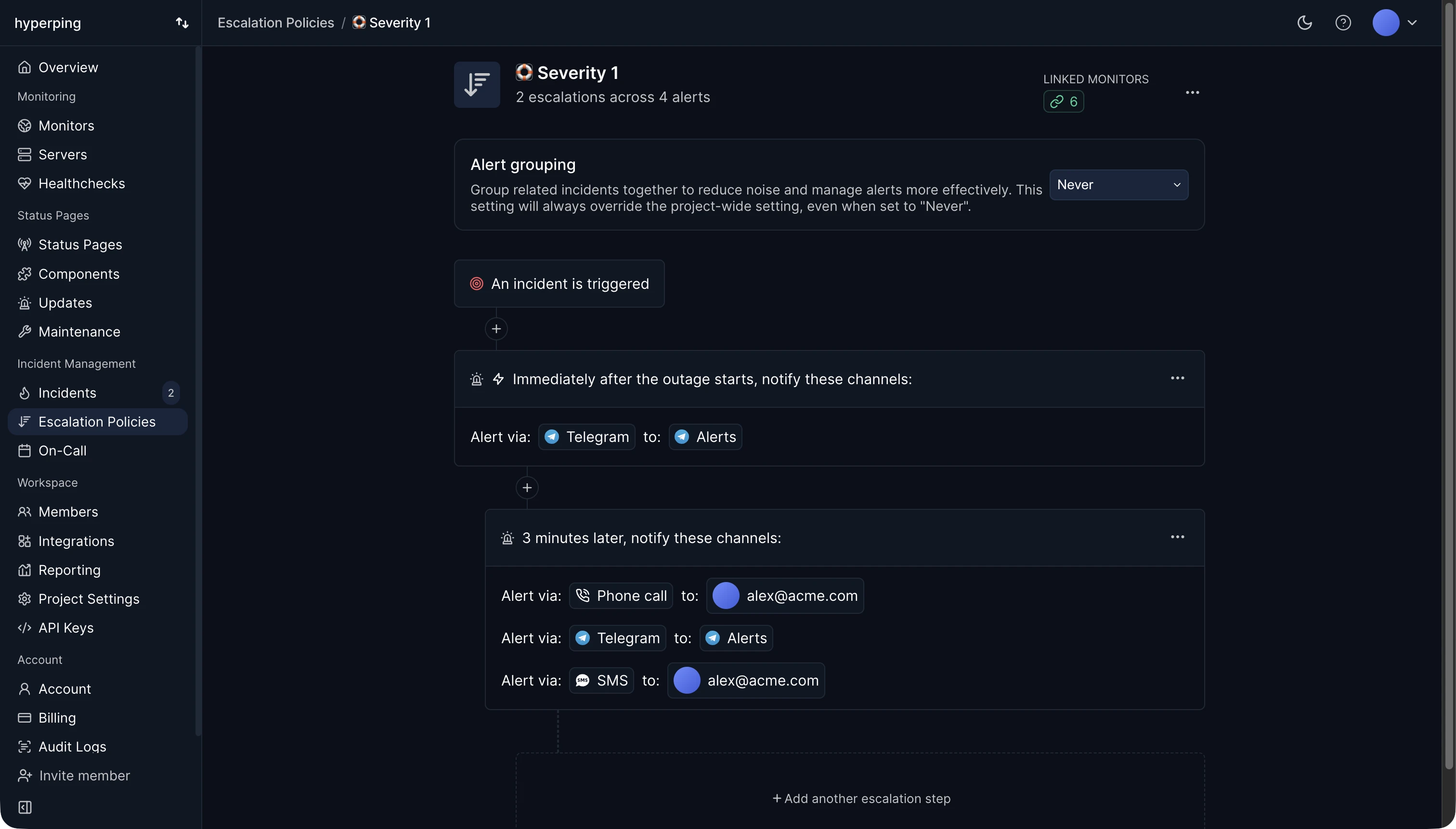
In Hyperping, an escalation policy is a list of steps, each with a delay and one or more channels: email, SMS, phone call, Slack, Microsoft Teams, or any connected integration. A delay of 0 fires as soon as the outage is confirmed, and each later delay counts from the previous step. For email, SMS, and phone calls, a step can target an on-call schedule instead of a person. The steps keep running until the outage resolves, and acknowledging stops the repeat alerts without cancelling the escalation, so a long outage still reaches a second responder.
An example policy
- Immediately: a message in the team's #incidents Slack channel. Anyone can acknowledge from there.
- After 5 minutes: an SMS to whoever is on call.
- After 10 more minutes: a phone call to the on-call engineer and an email to the team.
- After 15 more minutes: a phone call to the engineering lead.
When the monitor recovers, the steps that haven't fired yet are cancelled.
Designing escalation policies
- Use more than one policy. Revenue-critical services get the full chain with phone calls. A marketing site or a staging environment goes to chat only, and nobody's phone rings for the blog.
- Escalate across channels before people. A missed Slack message is more likely than an absent engineer, so try SMS and a call before paging a second person.
- Keep delays short at night. Five minutes before an SMS is reasonable, thirty is an outage nobody handled.
- End with a person who will answer. The last step should reach someone senior, not a shared inbox.
- Test the policy with a monitor pointing at a 404 page before you rely on it.
Escalation policy vs on-call schedule
The on-call schedule answers "who is responsible right now?". The escalation policy answers "how do we reach them, and who's next if we can't?". Policies reference schedules, so swapping a shift changes who gets paged without touching the policy.
How to create one in Hyperping
- Go to Escalation Policies and create a policy with a descriptive name, such as "Production critical".
- Set the first step's delay and channels, then add more steps with + Add another escalation step.
- For SMS and phone call steps, pick an on-call schedule as the recipient.
- Optionally set alert grouping on the policy, so several monitors failing together send one alert.
- Assign the policy to monitors from their Notifications tab. See escalation policies in the docs.
FAQ
How long should I wait before escalating?
Five minutes between the first notification and the next channel, and 10 to 15 minutes before paging a second person. Longer delays add directly to your MTTA.
What happens when someone acknowledges the alert?
In Hyperping, the outage is marked as owned and the repeat alerts stop. The remaining steps still run until the outage resolves, so managers hear about long outages.
Do I need an escalation policy with a small team?
Yes, a short one. Even two people benefit from "Slack first, then a phone call after 5 minutes", because it turns a missed message into a ringing phone.