





Hyperping vs. Freshping

Freshping is gone. Here's your migration path.

Freshworks discontinued Freshping on March 6, 2026, and customer data was permanently deleted in June 2026. Hyperping replaces it with reliable uptime monitoring, status pages, escalation policies, and cron monitoring — with a free plan to get started in minutes.

Free plan, 20 monitors. No credit card, no time limit.
Move from
Freshping
Move toHyperping
MonitoringOn-callStatus pages
Trusted by companies of all sizes and industries
Alma
"Before Hyperping, identifying the root cause of API degradation could take hours. Today, precise monitors and automated alerts give AlmaPay's engineers everything they need to react fast."
Engineering TeamAlma
Pitch
Silverfort
Quote
"With Hyperping monitoring our identity security platform 24/7, we have complete confidence in our uptime. The multi-region checks ensure our global customers always have access to critical security services."
Engineering TeamSilverfort
Beatport
EF
Higgsfield
République Française
Havas
Slite
Quote
"We picked Hyperping to bring a high quality incidents and status reporting dashboard to our users."
Pierre RenaudinSlite
Pierre Renaudin
Pew Research
Foxit
Husqvarna Group
Side-by-side comparison

See exactly what changes.

The essentials first, followed by the capabilities that separate Hyperping from Freshping.

Compare capabilitiesWhat your team gets
Hyperping
A complete replacement for Freshping
HTTP(S) monitoring
Ping monitoring
Email alerts
Public status pages
Multi-location checks
Free plan
What Hyperping adds
Still in service
Shut down March 2026
Browser checks with Playwright
Cron job monitoring
Escalation policies
On-call scheduling
Voice call alerts
Advanced status pages (SSO, custom domain)
Incident management
SSL certificate monitoring

Hyperping's reputation in our company is that it's more reactive than Datadog. We usually get notifications from Hyperping before Datadog.

Read the Alma case study
Fabrice Gregoire from Alma
Fabrice GregoireSite Reliability Engineer, Alma
Why teams choose Hyperping

More than an uptime checker.

One focused workflow for detecting issues, reaching the right people, and keeping customers informed.

Built into the product

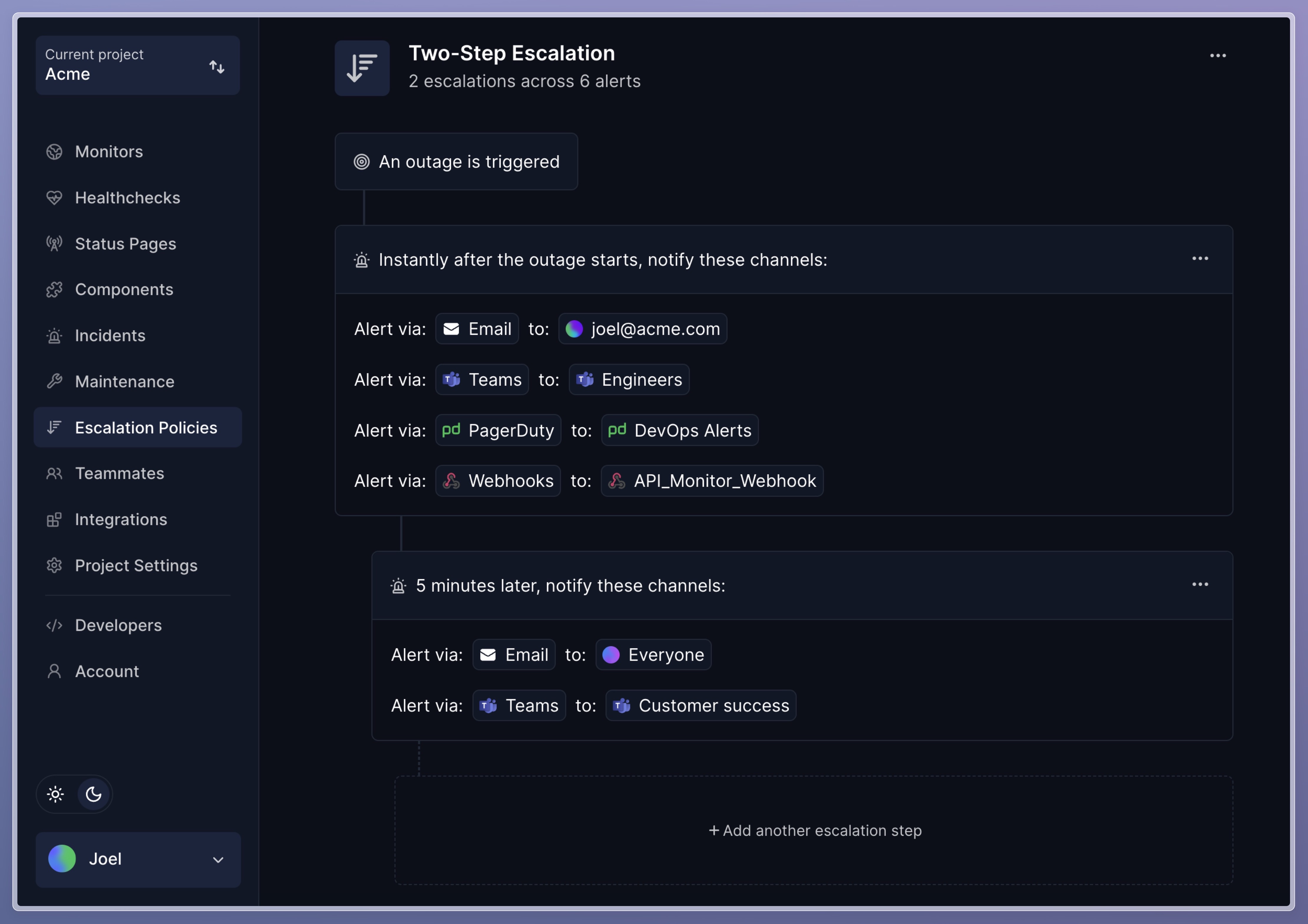
Escalate an outage until the right person answers.

Create timed notification steps, assign responders, and keep the incident workflow next to the monitors that triggered it.

Hyperping escalation policy with timed notification steps

What happened to Freshping?

Freshping shut down on March 6, 2026, and its remaining customer data was deleted.

Rebuilding your monitoring takes minutes, not days

Recreate URLs in bulk, connect alerts, and get a typical setup live within an hour, with no false positive alerts.

A status page your customers can rely on

Reconnect monitors to a branded status page that updates automatically.

A free plan to land on, room to grow

Start with 20 monitors and a status page, then add on-call when your team needs it.

Pricing

From a discontinued free tool to a sustainable platform

A straightforward view of what each plan gives your team.

01

The hidden cost of free tools

Freshping's generous free tier (50 monitors) is exactly why it disappeared: it never became a sustainable product, and its users are now rebuilding their monitoring from scratch.

When your uptime monitoring itself goes down for good, the cost is a lot higher than a subscription.

02

Hyperping's pricing

Start free with 20 monitors and a status page. The Essentials plan at $24/mo covers 50 monitors with 30-second intervals, escalation policies, SMS alerts, a branded status page, and 2 seats.

The Pro plan at $74/mo adds 100 monitors, browser checks, on-call scheduling, voice call alerts, private status pages, and 5 seats. Additional seats are billed separately.

03

Bottom line

Freshping is not coming back, and its data is gone. Rebuild on a platform whose core business is monitoring — not a side product waiting for the next portfolio cleanup.

Hyperping replaces Freshping + a status page tool + an alerting tool, in one product with a free tier.

FAQ

Frequently asked questions

The practical details teams usually want to know before making the switch.

A safer switch

Start migrating in minutes. Cut over when you are ready.

Move from Freshping without creating a blind spot. The guides below cover setup, parallel verification, and the final cutover.

Step 1

Inventory your Freshping setup

List checks, alert routes, status pages, and the historical reports you want to keep.

Use the monitoring quickstart
Step 2

Recreate monitoring and alerting

Add monitors, connect notification channels, and rebuild escalation or on-call rules.

Follow the quickstart
Step 3

Run both tools, then cut over

Compare alerts in parallel, verify customer communication, and only then retire the old setup.

Open the go-live checklist
Keep comparing

Hyperping vs. other tools

See the same feature-by-feature breakdown for the monitoring and incident tools on your shortlist.

Get started

Start monitoring in the next 5 minutes.

Stop letting customers discover your outages first. Set up monitoring, status pages, on-call, and alerts before your next coffee break.

Free plan, 20 monitors. No credit card, no time limit.